Top Features to Look for in a Customer Engagement Platform

This guide walks marketing and operations leaders through the specific features that drive retention and revenue and shows the KPIs, demo scorecard questions, and tradeoffs you should use to build a measurable shortlist. It explains how to evaluate the best customer engagement software for integration, omnichannel orchestration, AI personalization, experimentation, and compliance so you can pick a platform that scales without blowing up headcount. Choosing the Right Customer Engagement Platform for Scale starts with a focused checklist of capabilities, not vendor hype. 

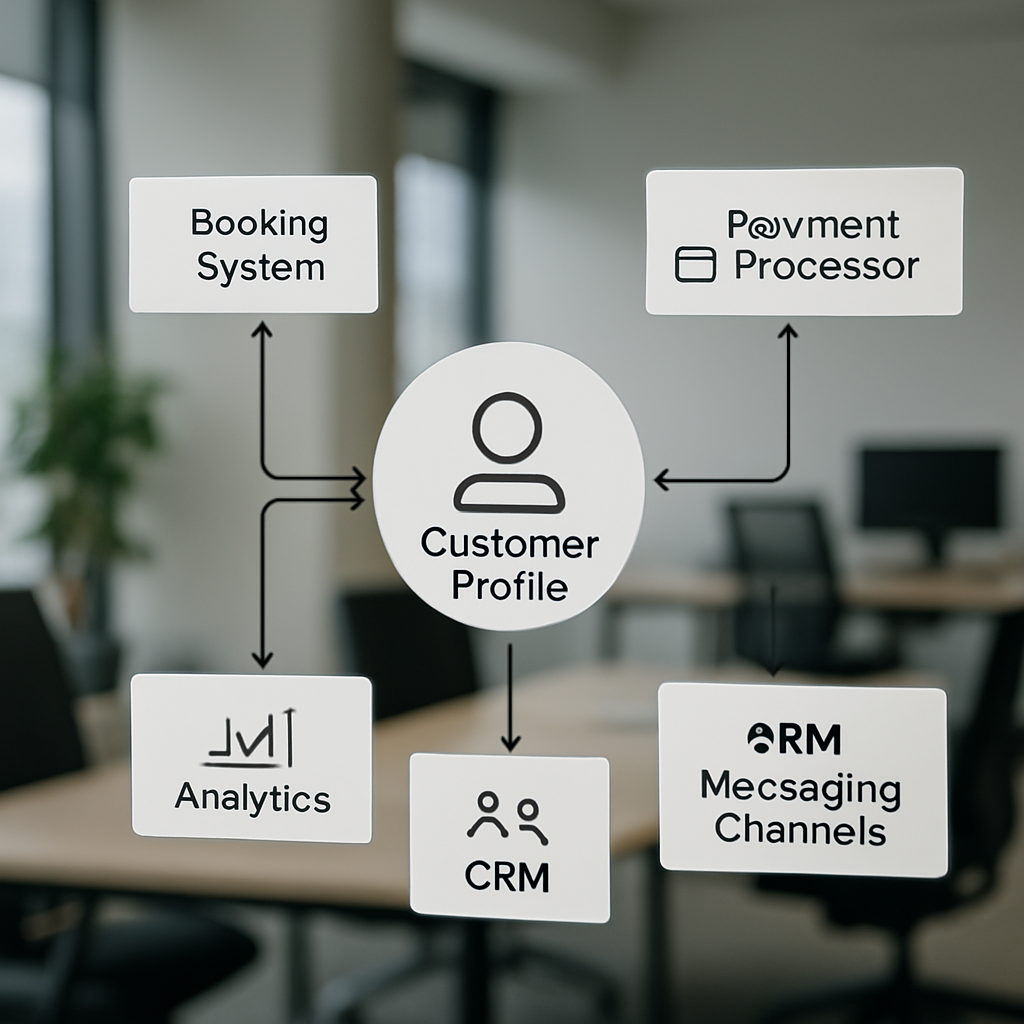
1 Unified Customer Profile and First-Party CDP

Bottom line: a reliable marketing program starts with one trustworthy customer record. Without deterministic identity stitching and low-latency event ingestion, even the best customer engagement software will send the wrong message to the wrong person at the worst time — and you will lose trust faster than you gain conversions.

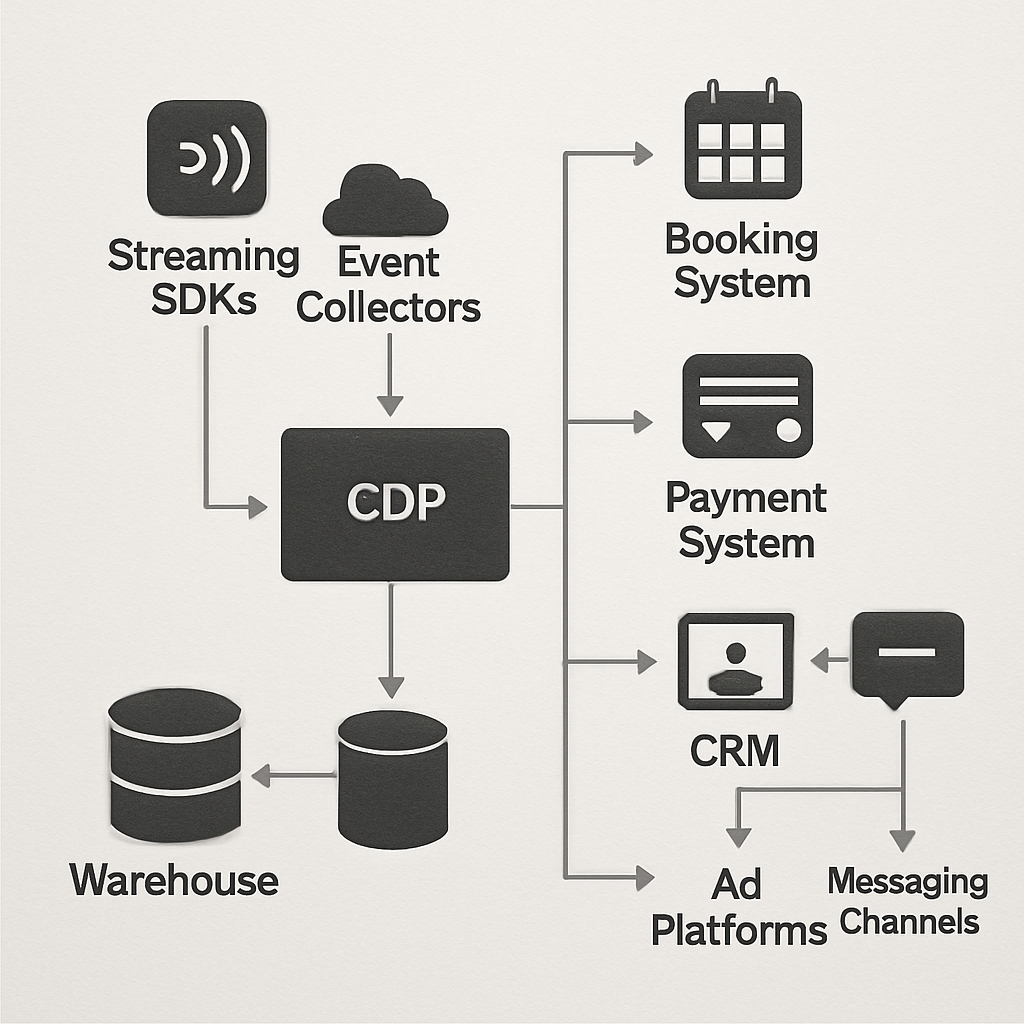
What to expect from a first-party CDP and unified profile: persistent profile attributes, event history, resolved identifiers (email, phone, membership id), and a queryable store that updates in near real time. This is not a reporting cache — it must power decisioning for orchestration, personalization, and analytics across POS, booking systems, mobile, and web.

KPIs to validate during procurement

  • Identity match rate: percentage of events that map to an existing profile across sources (goal: maximize for active cohorts).
  • Profile update latency: time from an event (booking, payment, app activity) to availability on the profile store (real-world target: seconds to a few minutes).
  • Duplicate profile reduction: measured before and after onboarding—tracks cleanup effectiveness.
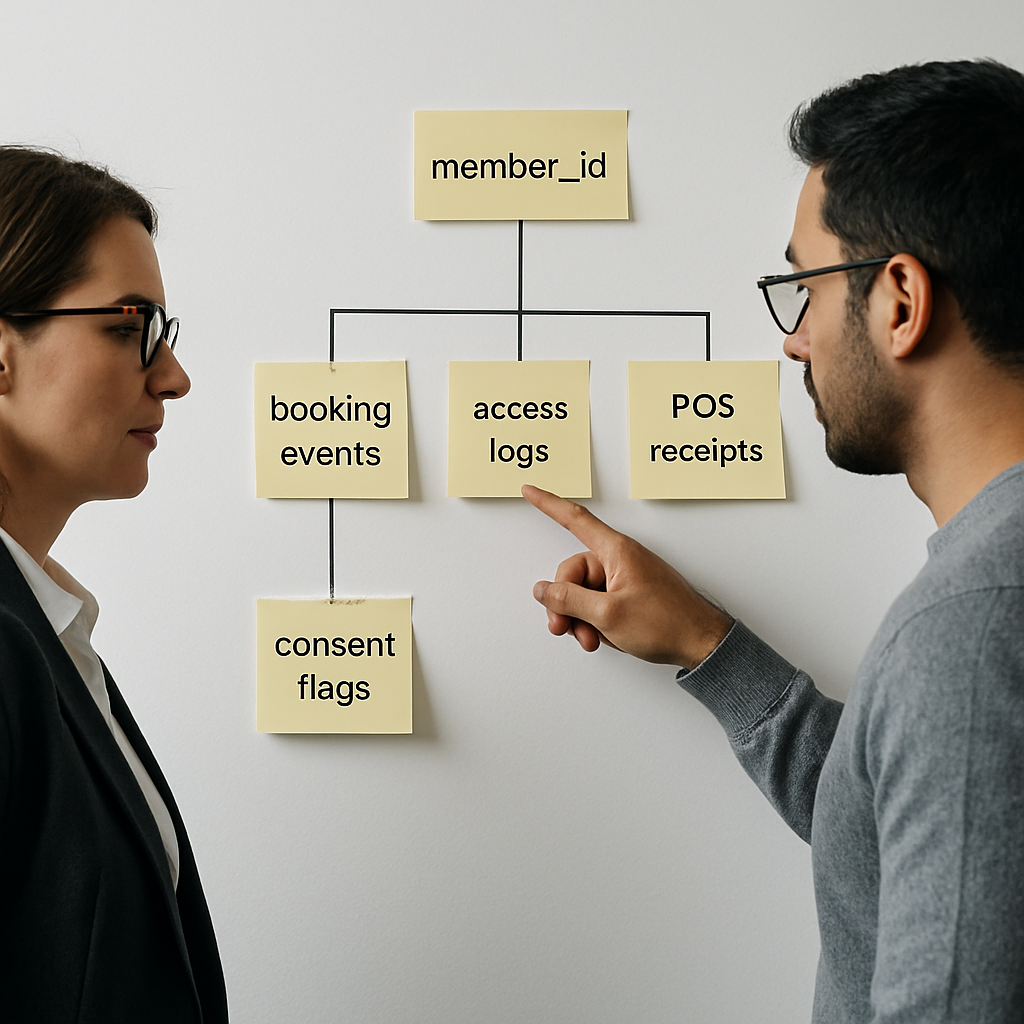
  • Profile completeness score: proportion of profiles with key attributes (phone, membership id, consent flags).
  • False merge rate: frequency of incorrect merges — small numbers matter more than high match rates.

Demo scorecard questions to use live: Ask vendors, How do you ingest events from our booking system and POS? What is your typical identity resolution match rate and how do you report false merges? Do you support both deterministic and probabilistic matching, and can we tune thresholds? Also test the API by pushing a booking event during the demo and watching the profile materialize.

Trade-off to evaluate: aggressive probabilistic matching raises match rates but increases risk of incorrect merges that break loyalty programs and billing workflows. In practice, mid-market B2C firms are better off prioritizing deterministically linked identifiers (membership id, phone, email) and using probabilistic joins only for enrichment or cold-start modeling.

Concrete example: A multi-location fitness chain normalized membership id from the POS, booking records from Mindbody, and mobile app events. After mapping canonical ids and enabling sub-minute ingestion, they cut duplicate profiles by 45% and started triggering missed-class reengagement within 30 minutes of a no-show — a clear, attributable lift in class recovery revenue.

Vendor signals that matter: look for platforms that pair event collectors like Segment or RudderStack with a profile store (mParticle, Treasure Data) or an integrated option that exposes profile APIs. Check prebuilt connectors for your systems and Gleantap features for examples tailored to membership businesses.

Run a short POC that pushes 1,000 real events from your booking and POS systems, then request a dedupe report and profile latency metric. Claims on spreadsheets rarely match live ingestion behavior.

Practical next step: map your canonical identifiers and pick three high-velocity events (first booking, payment failure, class no-show) to validate end-to-end latency and correct profile resolution.

2 Omnichannel Orchestration and Native Channel Support

Bottom-line observation: Omnichannel success is not about checking every channel box — it is about predictable routing, coordinated throttling, and deterministic fallback so a high-value message arrives once, on the channel that produces the best outcome for that customer.

Native vs integrated channels: Native channels (built-in SMS, email, push, web messaging) give you tighter control over latency, delivery retries, suppression lists, and carrier relationships. Platforms that rely entirely on external providers via connectors can work, but expect higher operational overhead: extra API hops, separate dashboards, and inconsistent suppression behavior across systems.

How to evaluate the best customer engagement software for omnichannel

  • Measure delivery SLAs: ask for p95 latency for transactional and campaign sends, not just average latency.
  • Fallback success rate: what percent of messages fall back to an alternate channel within your configured window?
  • Suppression consistency: does a single unsubscribe or DNC flag prevent sends across all channels instantly?
  • Concurrency and throttling: messages per second limits and rate-limit handling during peak events such as flash sales or payment failures.

Practical trade-off: Choosing a platform with many native channels increases reliability and reduces integration work, but it often raises cost and vendor lock-in. If your team lacks engineering bandwidth, prefer a vendor that offers the primary channels you need natively and clear export APIs so you can escape later if necessary.

Concrete example: A multi-location studio chain used a marketing platform for email and push while sending SMS through a separate provider. During peak renewal season they accidentally sent duplicate reminders because the two systems did not share suppression state. They resolved it by moving SMS into the orchestration layer and implementing a single suppression API; recovery cut complaint rates and reclaimed staff time previously spent reconciling lists.

Operational considerations: Carrier rules and regional regulations change often — your vendor should surface carrier error codes, support automatic retries or alternate routings, and expose reporting for deliverability troubleshooting. Also confirm how the platform handles transactional versus promotional classification, since misclassification harms deliverability and compliance.

POC checklist: during a demo, trigger a high-priority transactional event and watch end-to-end behavior — delivery latency, fallback activation, suppression enforcement, and any UI or API gaps. Ask the vendor to run the same test for an international phone number if you have cross-border customers.

Demo task: Simulate a missed-payment event and verify the platform will: 1) pause promotional sends to that profile, 2) attempt SMS then fallback to email after your configured delay, and 3) log the decision path in the activity feed.

Vendor signals to watch: look for platforms that document channel SLAs, publish carrier-level error handling, and provide unified suppression APIs. Examples for orchestration patterns and programmable messaging include Twilio blog for messaging primitives and orchestration examples, and vendor implementations that bundle channels natively such as those described on the Gleantap features page.

Next consideration: If you must integrate external providers, insist on contract-level SLAs for delivery visibility and a tested export path for suppression and message history. That prevents the most common failure mode: silent duplicates and fractured customer experiences that erode trust faster than any single campaign can earn it.

3 AI-driven Personalization and Recommendations

Clear point: AI personalization returns the most value when it reduces decision friction for marketers — not when it replaces their judgment. Practical systems deliver targeted product, content, or action recommendations that are observable, measurable, and auditable across channels.

Systems to expect include real-time scoring for propensity (likelihood to convert, churn, or attend), item-to-user recommenders (next class, product, or content), and content selection layers that choose subject lines or images per user. The technical requirement is fast, reliable inference tied to first-party signals so a recommendation can be used instantly by email, SMS, web, or in-app workflows.

Vendor validation — what actually matters in a demo

Ask for demonstration artifacts, not promises. Request a live scoring of a sample of your profiles during the demo, and check latency, coverage, and why certain items were suggested. Verify the vendor exposes the input features used for each score and how you can access those features for reporting or downstream ML.

  1. Step 1: Map the signals you already collect (bookings, no-shows, payments, app opens) and identify two high-leverage outputs to model (eg, churn risk and next-class recommendation).
  2. Step 2: Run a short pilot that uses model outputs only to prioritize messages for a small segment, not to automate billing or critical flows.
  3. Step 3: Instrument incrementality tests (holdout groups) so you measure true lift versus correlation.
  4. Step 4: Require explainability: each recommended action must show the top three factors that produced it so business teams can trust and tune behavior.
  5. Step 5: Define an operational SLA for inference — p95 latency and throughput limits — and test it under expected peak concurrency.

Trade-off to accept: out-of-the-box recommenders buy speed but not longevity. Template recommenders will get you early wins, but mature programs require either a vendor feature store or the ability to import your own model scores via API. If your team lacks data science bandwidth, prefer platforms that provide clear export hooks so you can graduate to custom models later without a data migration.

Real-world application: A regional wellness studio used an AI score to pick three classes to surface in its weekly push notification. For users flagged as high churn risk, the system prioritized low-capacity classes and an incentive offer; for active users it suggested a premium workshop. The studio phased the feature by running a 30-day holdout to confirm incremental rebookings before scaling the feed across all locations.

Important: model coverage beats marginal precision early. A modestly accurate model that scores 80% of your active profiles will usually produce more impact than a highly precise model that only covers 10%.

Operational metrics to require during procurement: model coverage (percent of active profiles scored), end-to-end inference SLA (p95 latency), feature transparency (top contributing features per prediction), and drift detection cadence (how often the vendor surfaces degraded performance). Also confirm export APIs so you can archive scores and run offline audits.

Pitfalls teams miss: vendors often conflate personalization with dynamic content insertion. Personalization should change the proposition, not just the name token in an email. Also test cold-start handling for new customers and low-activity users — a fallback rule set must be explicit and measurable, otherwise high-value profiles will be ignored.

If you want working examples and implementation guides, review vendor case notes on model explainability and scoring Braze resources and explore engineering-focused writeups on messaging primitives at the Twilio blog. For a hands-on feature map tailored to membership businesses see Gleantap features.

Next consideration: before you let a model control promotion allocation, define guardrails for spend and customer experience — set frequency caps per customer, require a human-review path for high-cost incentives, and monitor incremental ROI continuously. That containment is the difference between an experiment that scales and an automated program that blows budget and trust.

4 Journey Orchestration and Automation Builder

Hard truth: a visual journey builder is only useful if it enforces safe, stateful logic for long-running programs. Many vendors sell pretty canvases that collapse when you need month-long branches, backfill, or audit trails; that failure mode creates more manual firefighting than automation saves.

A production-grade automation builder must do four things reliably: maintain per-user state across pauses and re-entries, allow backfill of historical cohorts without duplicating sends, expose the decision path for every message, and let non-technical staff edit low-risk flows while keeping high-risk paths locked. If your team lacks an engineer for daily fixes, favor platforms that separate editable marketing steps from guarded system steps.

How the best customer engagement software should handle journeys

Expect event-triggered flows that can run for 12 months or more, with conditional branching based on real-time profile attributes and external signals (payment status, class attendance, membership tier). Practical constraint: long-running journeys need snapshotting and idempotency so edits do not re-run completed steps unintentionally. Ask for a demo of the edit-and-backfill controls during procurement.

  1. KPIs to validate: average time to deploy a new journey (hours, not days), percent of journeys using automated backfill correctly, send duplication rate after edits (target: near 0%), and retention delta attributable to automated journeys over a 90-day window.
  2. Operational probes to run in a demo: create a 6-month winback flow, enroll a test cohort, change a mid-flow message, and observe whether the edit triggers duplicate sends or logs a safe-edit event.
  3. Governance checks: ability to lock steps (billing, cancellations), role-based editing, and an activity feed that shows why a profile exited or branched within a journey.

Trade-off to accept: builders that offer deep control (conditional scripting, custom code actions) require better testing discipline and more engineering oversight. If your goal is speed and low headcount, pick a platform with robust templates and operational guardrails; if you need full control over edge cases, accept the overhead of a sandbox and release process.

Real-world use case: A regional fitness operator implemented a staged onboarding flow that begins at first booking, waits 3 days for attendance, then branches: attendees get upsell messages; no-shows enter a reengagement sequence with a single incentive. The team used safe-edit mode to tweak messaging after two weeks and relied on the platform’s backfill to apply the update only to profiles still mid-journey — preventing duplicate incentives and preserving margins.

Most teams misunderstand backfill: it is not a free way to retroactively send the same campaign to everyone. Backfill must be scoped by state, time window, and suppression rules. If a vendor treats backfill as a bulk-send button, that is a red flag.

  • Implementation tip: catalog your core lifecycle flows first (onboarding, engagement, payment failure, churn prevention) and instrument the exact event and profile attributes each flow requires.
  • Testing tip: run journeys in a staging workspace with the same data cadence and use holdouts so you can measure incrementality before scaling.
  • Integration tip: ensure the journey engine consumes events with sub-minute latency for time-sensitive paths like payment retries and missed-appointment nudges.

Design journeys for reparability: require idempotent actions, visible decision logs, and a rollback path so a failed automation can be fixed without re-traumatizing customers.

During demos, demand a live scenario: push a payment-failure event, confirm the journey pauses while billing is retried, then simulate a successful retry to see the flow continue. If the vendor cannot run this end-to-end in the demo, budget time for a POC.

If you want concrete templates for membership lifecycles, review vendor examples from Braze Canvas and Iterable workflows, test Salesforce Marketing Cloud Journey Builder for enterprise-grade governance, and compare how Gleantap features implement guarded templates for fitness and wellness programs. The final decision is about matching operational maturity: pick the level of control your team can maintain consistently.

5 Real-time Analytics, Attribution and Experimentation

Straight to the point: fast event streams are only useful when you can turn them into directional decisions and measurable dollars. Real-time ingestion without an experiment and attribution discipline turns dashboards into noise and wastes marketing budget.

Why this matters now: modern campaigns act on seconds — a missed payment alert or a last-minute class reminder only works if the data and decisioning are live. At the same time, channel proliferation makes naive last-touch metrics misleading. You need both low-latency signals and a framework that proves which actions actually move retention or revenue.

How the best customer engagement software supports experiments

Platforms that earn the label best customer engagement software combine three capabilities: sub-minute event availability, built-in split testing and holdouts, and cross-channel attribution that links exposures to outcomes. Do not accept a vendor that only exports logs for offline analysis; you need the experiment engine and attribution logic close to the orchestration layer so you can run rapid iterations and trust the results.

KPIWhat to measure and why
Experiment detection timeTime from deployment to a statistically actionable signal. Shorter windows enable faster pivots, but watch for false positives when volumes are low.
Incremental liftTrue improvement vs holdout, not relative CTR. Use holdouts to measure whether a campaign created net conversions or simply shifted timing.
Cross-channel contributionProportion of conversions attributable to each channel after controlling for exposure sequencing. Prefer algorithmic or mixed models over naive last-touch.
Attribution latency and completenessHow long after an event the platform will reconcile exposures to conversions and what percent of conversions it can link across devices and sessions.

Practical trade-off: real-time attribution and experimentation increase compute and storage costs and require stricter event hygiene. If you try to detect small lifts on low-volume segments in real time, you will either run underpowered tests or chase noise. Prioritize near-real-time signals for high-frequency actions and batch robust experiments for low-velocity outcomes.

Concrete example: a retail chain rerouted flash-sale spend mid-day after a real-time experiment showed email converted better for loyalty members while paid social worked for new prospects. They used a 24-hour holdout to verify incrementality, shifted budget automatically, and captured the outcome to their product analytics tool for post-mortem. That operational loop required both the experiment primitives in the engagement platform and integration with Amplitude for deeper funnel analysis.

Common mistake to avoid: vendors often present multi-touch models as fact. In practice, algorithmic attribution is sensitive to missing identifiers and cross-device gaps. Treat model outputs as directional and validate them with randomized holdouts before using them to reallocate significant budget.

Require a demo where the vendor runs a live A/B with a holdout and shows the end-to-end timeline: event ingestion, decisioning, delivery, and attribution reconciliation. If they cannot produce that in a POC, assume the platform will add weeks to your learning cycle.

Next consideration: instrument canonical conversion events up front, keep experiments simple and well-powered, and demand exportable raw results so your finance or analytics teams can audit claims. For implementation templates and integration notes see Gleantap features.

6 Behavioral Segmentation and Lifecycle Management

Hard fact: you will not increase retention reliably by spraying offers at demographic buckets. Behavioral segments that update from live events are the mechanism that turns first-party signals into timely interventions that can actually change customer behavior.

Operational value: treat segmentation as both a measurement lens and an activation primitive. Segments must be queryable, actionable across channels, and anchored to persistent lifecycle stages (for example new, active, at-risk, lapsed) so your campaigns can apply different business rules and experiments against each stage.

How to vet behavioral segmentation in the best customer engagement software

Key metrics to request during procurement: ask vendors to show live numbers for segment evaluation latency (time from event to segment membership change), segment coverage (percent of your active base eligible for dynamic segments), and signal-to-action lift (measured improvement in the target KPI after a segment-targeted flow). Also demand exportable cohort retention curves so you can compare lifecycle stage performance over time.

Practical trade-off: highly granular, dozens-of-micro-segments look sophisticated but create testing and operational problems. Small segments reduce statistical power, increase churn in audience composition, and multiply activation rules across channels. Start with a short list of high-impact behavioral definitions and treat further granularity as a later optimization once you can measure incremental lift.

  • Demo checks for every vendor: Can segments be defined on live event windows (for example, no app opens in 7 days AND last booking > 30 days)?
  • Activation scope: Are dynamic segments immediately available to all channels (SMS, email, push, web) or do some channels require exports?
  • Edit safety: If you change a segment definition, does the system support backfill controls and show which profiles will be added or removed before actions fire?

Concrete example: a regional fitness operator created an at-risk-7 segment that combined 7-day inactivity, a recent missed class, and a decline in app engagement. When a member entered that segment the platform immediately ran a prioritized sequence: an in-app nudge, an SMS reminder, then a coach outreach if no response. The team validated impact with a 30-day holdout and observed an increase in rebookings among the treated group.

Integration reality: some platforms compute segments on query-time (fast for ad-hoc analysis) while others evaluate membership continuously (fastest for triggers). Continuous evaluation is superior for time-sensitive flows but costs more in compute and may require event-hygiene discipline. If your use cases include missed-payment or last-minute class rescue, insist on sub-minute evaluation.

Implementation tips that matter: standardize event names (booking.created, payment.failed, class.attended), create a concise catalog of 6-8 lifecycle segments to start, and maintain a mapping document that ties each segment to the downstream journey and KPI to avoid orphaned audiences. Make sure segments are surfaced in the UI and via API so operations and analytics teams can both use them without re-creation.

Do not confuse behavior-derived segments with static lists. Dynamic segments must be auditable, triggerable, and testable. Require the vendor to run a live segment change during the demo and show which messages are scheduled as a result.

Vendor signals to prefer: live activation across channels, explicit lifecycle stage support, backfill controls, and clear costs for continuous segment evaluation. For data-layer and segment feeding, see Segment and for practical orchestration examples check Braze resources. For vertical-specific lifecycle templates se eGleantap features.

7 Integrations, APIs, and Data Portability

Key point: Integration capability is a gating factor — the platform either becomes the connective tissue for your business or it creates a second silo. Evaluate APIs and connectors as operational features, not optional extras, because integrations determine how quickly you can automate lifecycle moments and recover when things break.

What to insist on beyond connector counts

Practical requirement: The best customer engagement software for a B2C operator provides streaming ingestion (webhooks or CDC), SDKs for mobile/web, bidirectional APIs for profile and event updates, and reliable bulk export for archives and audits. Prebuilt connectors save time, but the platform must also let you run a full data sync and expose raw event logs so analytics and finance teams can validate outcomes.

  • Operational KPIs to measure: average time to onboard a new data source, webhook delivery success rate, API error and retry rates, and completeness of exported records (fields present / expected).
  • Interoperability checks: support for JSON schemas, CDC, SFTP/CSV exports, and the ability to accept third-party model scores via API.
  • Governance points: versioned schema support, field-level consent/suppression flags, and documented backup/restore procedures.

Trade-off to accept: Prebuilt, opinionated integrations speed launch but can lock you into a data model. If your business relies on non-standard identifiers (membership id, location codes), prefer platforms that publish schema contracts and let you transform data during ingestion. That reduces future migration friction.

Vendor demo checklist (what to run live)

  1. Full sync test: Ask the vendor to perform a one-time sync of membership, booking, and payment history and provide a completeness report you can audit.
  2. Webhook reliability run: Push 200 test events to a temporary endpoint and watch delivery, retries, and failure handling.
  3. Export and restore: Request a bulk export of a representative cohort, then import it into a staging workspace to confirm field mappings and restore behavior.
  4. APIs under load: Verify documented rate limits, and request a p95 response-time metric for profile read/write under expected concurrency.

Integration reality check: Lightweight automation tools like Zapier are useful for ad hoc flows, but they are fragile for high-volume lifecycle automation. Use Zapier for proofs-of-concept, not for core billing or churn-prevention paths where missed events cost revenue.

Practical use case: A regional wellness operator validated a vendor by wiring live events from Mindbody, Stripe, and their mobile app during a POC. The initial sync revealed mismatched membership identifiers; the vendor provided a mapping layer and webhook replay capability so missed triggers were backfilled without duplicating communications — saving a week of manual cleanup and preventing incorrect cancellation notices.

Require at least one scheduled full-data export and a tested restore during the POC. Portability is not just a checkbox — it is insurance against vendor failure and a negotiating lever during procurement.

Vendor signals to prefer: public API docs, SDKs, published rate limits, webhook dashboards, and explicit connector support for systems you use (for example Mindbody, Stripe, Shopify, and HubSpot). Tools like Segment or Zapier are useful in the stack, but make sure the engagement platform exposes the raw hooks you need.

Final consideration: prioritize platforms that let you validate a full end-to-end sync and provide exportable raw events — that portability is the single best protection against future migrations or compliance audits.

8 Privacy, Security, and Compliance Controls

Bottom line: Security and privacy are operational features, not optional wrappers. A platform that cannot prove who touched what data, when, and why will slow audits, block campaigns, and expose you to fines and reputational damage.

Practical controls to require from any vendor

  • Access governance: role based controls, single sign on (SAML/OIDC), and fine grained permissions so business users can run campaigns without elevated rights.
  • Immutable audit trails: searchable, tamper evident logs that show reads, writes, exports, and suppression changes tied to user id and API key.
  • Data lifecycle rules: configurable retention, automated archival, and reversible suppression so you can implement retention policies per region or product line.
  • Data residency and routing: ability to restrict storage or processing to specific regions to meet local rules and reduce cross border risk.
  • Encryption posture: strong encryption in flight and at rest, plus documented key management model and options for customer managed keys if required.
  • Right to be forgotten and export: automated workflows to extract or remove an individual record end to end, including third party connectors and backups.

Why this matters in practice: Controls matter because real incidents do not look like worst case movies. They are slow leaks, mis-routed exports, or forgotten test datasets that surface during an audit. Responding fast is what limits cost and customer harm, not promises about future roadmap.

Common procurement failures and how to avoid them

Failure mode: vendors provide high level compliance badges but hide the operational hooks. Do not accept a checkbox SOC 2 statement without the operational details you need to run your business.

  1. Ask for the playbook: request a documented process for a rights request including SLAs and sample delivered exports.
  2. Test exports: during a POC, run a full export for a representative cohort and verify deletion or anonymization on the vendor side.
  3. Simulate an incident: require the vendor to show their alerting and containment steps for a leaked API key or misconfigured connector.

Tradeoff you must accept: stricter controls increase implementation time and sometimes cost. For mid market B2C, pick the minimal set that secures customer trust and supports audits – then automate the rest. Over-engineering for enterprise scale before you need it is the quickest way to stall a rollout.

Concrete example: A regional healthcare provider discovered audit logs missing key export events during an annual review. They paused marketing sends, required the vendor to replay the export and provide cryptographic evidence of deletion for affected records, and negotiated a contractual remediation SLA. The vendor supplied a complete trace within 48 hours, which avoided regulatory escalation and allowed the provider to resume campaigns with a verified suppression list.

Require live evidence during the demo: do not accept screenshots. Ask to run a rights request and a targeted export for a test user so you can verify timing, completeness, and deletion behavior.

Key negotiable items to include in contracts: response SLAs for rights requests, scope of audit access, data return format, destructive delete confirmation, and options for customer managed keys. These are the terms that protect you after go live.

One practical judgment: The single most telling signal of vendor maturity is how they handle edge cases – expired backups, replayed webhooks, or connector errors. If a vendor cant demonstrate tested controls for these events in a POC, expect months of firefighting later.

For concrete documentation and implementation checklists see Gleantap features and high level compliance guidance from Gartner.

Frequently Asked Questions

Straight answer up front: the questions teams ask during procurement separate plausible vendors from the ones that will add months of work and confusion. Focus your queries on measurable outputs (latency, match rates, incremental lift) and on vendor behavior under failure — not glossy feature lists.

How should I use KPIs to compare vendors during demos? Ask for raw, auditable metrics and a short live test. Demand samples for profile update latency, identity match rate, webhook delivery success, and the vendor’s recent example of incremental conversion lift for a similar client. Do not accept spreadsheet averages without the underlying logs or a POC you can run yourself.

Minimum channel set for a mid-market B2C business is pragmatic, not aspirational: require native email and SMS plus either push or web messaging. The key is that the platform must orchestrate routing and suppressions across those channels in one decisioning layer so you do not get duplicate sends or inconsistent suppression behavior.

Can we bring our own ML models? Yes in most mature stacks, but verify the integration pattern. Good vendors accept scored outputs via API or a feature-store import, support server-side scoring hooks, and provide latency SLAs for model-driven decisioning. If you expect sub-minute decisions, confirm p95 inference latency and throughput limits before committing.

Is real-time ingestion always necessary? Not always — it depends on the use case. Prioritize real-time for onboarding triggers, payment failure flows, and last-minute reengagements; accept batch for long-term lifecycle analytics and monthly retention analysis. The trade-off is cost: continuous, low-latency evaluation increases compute and monitoring overhead.

What practical first automation should a fitness or wellness operator implement? Build a compact onboarding path: confirmation at booking, a 72-hour prep tip, a 24-hour reminder, a 90-minute nudge, and a 48-hour post-visit feedback + incentive. Instrument a 30-day holdout to measure incremental rebookings and set a frequency cap to avoid over-messaging.

How do I evaluate data privacy posture in procurement? Request operational evidence: a recent SOC 2 report, a documented rights-request playbook with SLAs, and the ability to run a targeted export & delete during the POC. Screenshots are not sufficient — require live runs so you can time the full workflow end to end.

How long should a POC run and what should it prove? Target 2–6 weeks. The POC must cover a full-data sync, at least one live journey, webhook replay, suppression enforcement, and a small randomized holdout test to validate incremental lift. Use the POC to expose mapping issues and to confirm export/restore behavior — those are the things that block production launches.

Concrete Example: A family entertainment center ran a 3-week POC to validate international SMS routing and fallback. During the test they discovered the vendor’s fallback rule defaulted to a promotional email for certain regions. The team switched to a transactional email fallback, re-ran the test, and avoided a potential spike in spam complaints when they rolled out a summer campaign.

Common procurement pitfall most teams miss: Vendors will quote median numbers that mask tail behavior. Insist on p95 metrics and a replayable event log. If a vendor hesitates to provide logs or to run a live failure scenario in a demo, treat that as a material red flag.

Negotiation levers to include in contracts: export & restore guarantees, rights-request SLAs, documented retention policies, and an exit data pack delivered within a fixed window. These items are cheaper while negotiating than during an emergency.

Practical next steps you can run this week:

  • Run a micro-POC: push 500 real events from your booking and POS systems and verify profile materialization and dedupe.
  • Test a live journey: trigger a payment-failure flow and confirm suppression, fallback routing, and the activity audit trail.
  • Validate ML integration: import a small set of scored profiles or callout a model endpoint and measure p95 latency.
  • Execute a rights request: during the POC, request export and deletion for a test user and time the full process.
  • Require raw logs: insist the vendor hands over the event stream for a sample period so your analytics team can run independent checks.

Final judgment: vendors that survive these practical probes and deliver clean, replayable logs plus exportable data are rare. Prioritize those operational guarantees over shiny UX features — they are what keep programs stable as you scale.

How Gym CRMs Enable Hyper-Personalized Member Journeys

If your club still treats members as a single mailing list, you are leaving revenue and retention on the table. This practical guide shows how gym CRM personalization and modern Gym CRM platforms turn attendance, booking, transaction, and wearable signals into real-time member intelligence and automated journeys that increase visits, reduce churn, and lift lifetime value. We trace The Evolution of Gym CRM: From Contact Management to Member Intelligence, then give the exact data model, integration patterns, journey templates, KPIs, and a 90-day roadmap to deliver measurable quick wins.

The Evolution of Gym CRM From Contact Management to Member Intelligence

Direct assertion: Gym CRMs have moved beyond address books and blast email tools into systems that build real-time, actionable member intelligence for automated decisioning and orchestration.

What changed: The shift labeled The Evolution of Gym CRM: From Contact Management to Member Intelligence is not a product buzzword. It is the addition of three capabilities to the old CRM stack – persistent unified profiles, event-level behavioral data, and a rules-or-ML decision layer that triggers channels in real time. When those three layers are present you can stop guessing who to message and start scoring who to act on.

Practical trade-off: Unifying every possible data source – POS, access control, MINDBODY or Zen Planner bookings, Myzone wearables, ClassPass referrals, web behavior – is ideal but costly. Most clubs get 70 to 90 percent of the value by prioritizing attendance logs, membership status, and transaction history first. Add wearables and marketplace data later when you can reliably match identities and handle consent.

Concrete example: A mid-size wellness club replaced weekly manual email blasts with two automated journeys – a 7-day trial conversion flow and an attendance recovery flow that triggered after two missed weeks. The club integrated booking data and access logs, used propensity thresholds to route high-value members to a phone follow-up, and reported measurable uplift in conversion and retention after the 90-day pilot; see a real implementation example in the Gleantap case studies.

A useful judgment: People assume personalization equals more messages. In practice, successful personalization reduces message volume while increasing relevance – better targeting means fewer wasted sends and less member fatigue. The real work is in decisioning – deciding who gets a low-cost SMS nudge versus a high-touch call – not in writing one more email template.

Implementation note: Identity resolution and consent are the two engineering choke points. If you cannot reliably match a phone number to a membership ID, your SMS efforts will fragment. Likewise, aggressive personalization without documented consent creates compliance and trust risk. Start with deterministic matches (email + membership ID) and explicit opt-in signals before deploying cross-device personalization.

Focus first on signals that predict behavior – last visit, booking cadence, payment issues – and instrument them well. They unlock the highest ROI on personalization work.

Key takeaway – Treat your CRM as a member intelligence engine: unify a few high-value signals, add a scoring layer to prioritize actions, and orchestrate fewer, smarter touches across SMS, email, and calls.

Data Foundations: The exact sources and schema needed for personalization

Direct point: Reliable gym CRM personalization starts with a small set of clean signals and a single canonical profile per member. Without that, your decisioning layer will route the wrong offers to the wrong people and produce noise, not lift.

Priority data sources and why they matter

  • Membership master record (source of truth): membershipid, status, tier, joindate — drives eligibility and long-term LTV calculations.
  • Access control / door swipes: timestamped visits — the highest-signal behavioral indicator for attendance and churn prediction.
  • Class bookings and attendance (MINDBODY / Zen Planner / ClassPass): bookedclassid, booking_status, instructor — informs preference and conversion triggers.
  • POS / transaction data: orderid, sku/category, paymentstatus — required for upsell propensity and LTV.
  • Engagement channels: email opens/clicks, SMS replies, push interactions — necessary to measure message effectiveness and suppress fatigued members.
  • Third-party telemetry (Myzone, wearable integrations): workout intensity, duration — useful for personalized programming and high-value upsells, but lower priority than attendance.
  • Web and landing behavior: page views, trial form completions — helps refine lead source and conversion touchpoints.

Integration trade-off: Real-time attendance and booking events are worth the engineering effort; batch-ingest historical transactions is acceptable as a second step. Prioritize low-latency flows that materially change member state (trial ending, no-show, payment failure).

Minimal member profile schema (developer-ready)

FieldTypeDescriptionRefresh cadence
member_idstringPrimary canonical identifier (internal).Never changes
emailsarray[string]All verified emails with source tag (POS, lead form).Event-driven
phonesarray[string]Phone numbers with verification and consent flag.Event-driven
statusenum(active, lapsed, trial, cancelled)Current membership lifecycle state.Real-time
lastvisitattimestampMost recent access control or class attendance timestamp.Real-time
weeklyvisitavgfloatRolling 4-week average visits per week.Hourly
favoriteclasstypestringTop class category by bookings in last 90 days.Daily
lifetime_valuedecimalCumulative revenue minus refunds; used for prioritization.Daily
consent_flagsobjectChannels opted into (email/sms/push) and GDPR/CCPA status.Event-driven

Identity resolution note: Use deterministic joins first — memberid + email + phone + accesscard_id. Only add probabilistic merges after you document error rates and member consent. Mis-matches are expensive: an incorrect merge can trigger a high-touch retention offer to a low-value lead.

Concrete example: A boutique studio integrated accesscontrol logs, MINDBODY bookings, and POS receipts. They created a weeklyvisitavg metric and a favoriteclass_type token. Using those fields, they sent an SMS with a 3-class pack offer targeted at members whose visits dropped by 40 percent and who had a high spend history; the offer was routed to email only if the member lacked SMS consent.

Practical limitation and judgment: Collector mentality fails here. Capturing every possible field without stable identifiers or consent creates a maintenance burden and privacy risk. Focus on a compact schema you can keep accurate: membership state, last visit, booking behavior, transactions, and consent. Add niche signals like wearables when identity and consent are rock solid.

Start with clean event contracts for visit, booking, and transaction — these three unlock most personalization use cases without a full data lake build.

Tools and quick paths: For rapid progress use direct webhooks from MINDBODY or Zen Planner to your CRM, layer in POS via daily exports or API, and use middleware like integrations or Segment for identity stitching if you lack engineering bandwidth.

Segmentation and Predictive Modeling for Member Journeys

Core point: segmentation without predictive scores is just labeling. To create member journeys that change behavior, you need segments that are both actionable and time-sensitive — and models that translate behavior into a probability you can operationalize.

From segments to decisions

Start by mapping each segment to a decision an operator can execute. A segment called high-churn-risk is only useful if it maps to one of three actions: automated retention messaging, a human outreach queue, or a suppressed marketing state. That mapping forces you to set thresholds based on capacity, not optimism.

  1. Churn risk score – probability a member cancels in the next 30/60/90 days; route top X percent to member success calls.
  2. Upgrade propensity – likelihood to buy a higher tier or personal training; use for targeted offers with limited inventory.
  3. Reactivation likelihood – chance a lapsed member will return with a small incentive; control spend by predicted ROI.
  4. Class conversion score – how likely a trial-booker converts to recurring class attendee; allocate follow-up coaching resources accordingly.

Practical trade-off: higher model granularity improves precision but reduces the number of members per bucket, which hurts statistical power and increases operational complexity. In practice, clubs are better off with three operational tiers per model (low/medium/high) rather than ten fine-grained buckets.

Modeling approach that works in the real world: begin with interpretable methods (logistic regression, decision trees) using features you already have: recent visit trend, payment status, booking cadence, campaign engagement, and spend categories. Push complex ensembles later — they help when you have large, clean datasets and an SRE process for retraining and monitoring.

Evaluation and guardrails: aim for models with useful separation (AUC > 0.65 is a pragmatic target for small clubs) and test calibration so predicted probabilities align with real outcomes. Equally important: align thresholds to match how many people staff can call or how many offers you can fund.

Concrete use case: a regional club assigned a churn score weekly and routed the top 6 percent to a concierge team for a phone outreach offering a free PT session. The club only sent automated SMS nudges to the next 20 percent. This two-tier routing preserved staff time and let automation handle lower-touch cases while focusing human effort where it mattered. Results: measurable improvement in retention where human follow-up was applied; see a similar implementation in the Gleantap case studies.

Design segments around the action you will take and the capacity to execute it; misaligned thresholds create backlog, not results.

Common misconception: teams often expect predictive models to eliminate manual prioritization. They do not. Models should reduce guesswork, not replace operational limits. Set conservative thresholds until you validate throughput and uplift.

Orchestrating Automated Member Journeys with Triggers and Actions

Direct point: Effective orchestration is decisioning, not just sequencing—your gym CRM must translate real-time signals into prioritized actions that respect member preferences, staff capacity, and message cadence.

Orchestration primitives every Gym CRM needs

  • Trigger: an event or state change (trialend, failedpayment, visit_gap>14d) that starts a flow.
  • Condition: branching logic using profile fields or scores (e.g., churn_score > 0.6 and LTV > 300).
  • Action: a deliverable—send SMS, queue a call, create a task in a CRM, or fire a webhook to POS.
  • Delay / Wait: scheduled pauses with cancellation checks (wait 3 days unless visited=true).
  • Escalation: human handoff rules that open tasks only when automation fails to re-engage.
  • Suppression & Merge: global suppression lists, per-member rate limits, and conflict resolution so flows don’t overlap.

Trade-off to accept: Real-time triggers increase relevance but amplify false positives if identity matching is imperfect or consent flags lag. If your access logs or phone verification are unreliable, prefer hourly batching for high-value triggers and real-time only for low-risk notifications like SMS class reminders.

Practical routing and priority rules

Priority judgment: Route members using a combination of propensity and resource cost. Use churn_score for human-touch routing, but cap weekly human outreaches per staff member. Automation should handle the long tail; reserve hands-on for the top 5-10 percent by predicted LTV impact.

Trigger (example)Primary ActionChannelSLA / Backoff
trialend -7d and trialengagement < 2Send limited-time upgrade offer; if upgrade_propensity > 0.5 create a call taskSMS -> Email -> PhoneSMS immediate; email next day; call within 48 hours if no response
Payment failure (first attempt)Retry invoice; notify member; open billing task if unpaidEmail + SMS; internal taskRetry payment at 24h, escalate at 72h
Visits drop >50% over 2 weeks and LTV > 200Tiered reactivation: automated class suggestions -> offer PT session -> concierge callPush / SMS -> Email -> Phone2 automated sends over 5 days, then human queue

Real-world flow example: A regional studio used trialend triggers plus a simple upgradepropensity score. Members with high propensity received an SMS with a limited offer and a one-click booking link; mid propensity got an email sequence; the top 4 percent were flagged for a concierge call. This routing reduced wasted calls and increased trial-to-paid conversions where the concierge intervened.

Operational consideration: Build idempotency into actions. If a webhook retries or a member flips state, ensure the CRM detects duplicates and avoids double-sending. Also, enforce per-member throttles (for example, no more than three outbound marketing sends per week) to prevent fatigue and complaints.

Design rules around operational capacity: tie thresholds to how many calls staff can actually make and how many offers you can honor.

Next consideration: Before scaling, implement holdout cohorts and track both short-term conversions and longer-term retention. Orchestration that boosts immediate conversion but harms retention through over-messaging is a false win; measure both outcomes concurrently.

Omnichannel Personalization at Scale and Message Personalization Techniques

Core assertion: Omnichannel personalization only delivers when channel choice, message intent, and data freshness align with a member’s immediate state — not when you simply spray the same creative across more endpoints. Gym CRM personalization and modern Gym CRM platforms enable that alignment by making a single decision engine aware of channel constraints and consent.

Channel roles and practical constraints

  • SMS — action driver, short window: use for time-sensitive nudges (class starts, trial-ending prompts); keep messages under two lines and include a single CTA.
  • Email — depth and receipts: use for billing, longer explanations, program content, and confirmations where tracking and receipts matter.
  • Push / in-app — experiential nudges: micro-personalization tied to app state; avoid for billing or sensitive topics.
  • Calls / human outreach — conversion saver: reserved for high-LTV or high-risk cases where automation failed or the member is in the top support tier.
  • Webhook / integrations — system actions: use to create bookings, apply credits, or open staff tasks; these are not consumer channels but part of the omnichannel loop.

Practical trade-off: High-frequency real-time personalization raises two operational costs: content management complexity and testing overhead. Implementing per-member creative variations across three channels multiplies QA work. The smarter trade is to personalize the decision (who, when, which channel) while keeping creative variants limited and reusable.

Message personalization techniques that scale: Use three composable layers — 1) decision tokens (for routing: churnscore, preferredchannel), 2) shallow personalization tokens (name, favoriteclass, lastvisit), and 3) contextual recommendations (next-available class using a simple rules engine or collaborative filter). Prefer server-side rendering for emails and SMS to avoid exposing logic in the client; push minimal tokens to the app for quick renders.

Concrete example: A mid-size studio leveraged their Gym CRM to send a single, personalized SMS 45 minutes before an evening HIIT slot to members tagged with favoriteclass=HIIT and preferredtime=evening. The message included a one-tap waitlist link rendered server-side and fell back to an email if the SMS was undeliverable. The studio routed members with churn_score > 0.7 into a concierge call queue instead of sending promotional offers, preserving staff time while increasing attendance for that segment. See how capabilities map to product features in Gleantap features.

Testing advice that avoids false positives: Start with sequential A/B runs on single elements (subject line, CTA, send-time) before combining into multivariate tests. Use a persistent holdout cohort for retention outcomes — short-term conversion lifts can be misleading if long-term churn increases because of over-messaging.

Operational rule of thumb: Limit active personalization dimensions per message to two (for example, favoriteclass + lastvisit_gap) to keep template counts manageable and reduce error modes like missing tokens or incorrect merges. This reduces engineering churn and keeps fallbacks predictable.

Personalization scaled well is a routing problem first and a creative problem second — focus on who gets what and why, then on what the message says.

Start with deterministic signals (last visit, membership tier, consent flags) to power channel routing and personalized tokens. Add recommendations and collaborative filtering only after identity resolution and consent are reliable.

Measuring Impact and Calculating ROI for Personalization

If you cannot tie personalization to incremental revenue or retained members, you cannot scale it. Measurement is the governance that separates experiments from investments; treat personalization budgets like any other revenue-generating program.

What to measure and why it matters

Track a small set of outcome metrics and their upstream signals. Primary outcomes: retention rate, trial-to-paid conversion, net new revenue attributable to campaigns, and average visits per member. Upstream signals to validate execution: open/click rates by channel, offer redemption, booking lifts, and payment recovery success. Measure both immediate action (conversion, booking) and downstream behavior (returns over 90–180 days) so you do not confuse short-term lifts with long-term value.

Practical trade-off: short attribution windows make campaigns look better but hide negative long-term effects like message fatigue. If a promotion increases immediate bookings but lowers repeat visits months later, the apparent win is a loss. Use layered attribution: short windows for conversion, longer windows for retention.

Basic experiment design and quick formulas

Always run randomized holdouts. Split targetable members into test and control before any filtering or prioritization. Use a persistent control cohort for retention analysis and rotating test cohorts for creative/offer iterations. To estimate incremental revenue: Incremental Revenue = (ConversionRatetest – ConversionRatecontrol) × N_test × Average LTV per member. Net ROI = (Incremental Revenue – Campaign Cost) / Campaign Cost.

Sample-size note: for many club-level tests, you do not need a data scientist to get a directional result. If you expect a modest absolute uplift, pick larger cohorts or accept longer test windows. Use an online calculator or a simple rule of thumb: the smaller the expected uplift, the more members you need.

Concrete example: A 2,000-member club ran an attendance-recovery SMS flow targeted to 250 members who had missed scheduled visits. Average member LTV was estimated at $720. The test group produced 12 additional retained members over 90 days versus control. Incremental revenue = 12 × $720 = $8,640. Campaign execution cost (SMS, creative, ops) = $1,200. Net ROI = (8,640 – 1,200) / 1,200 = 6.2x. The club kept the persistent holdout to validate no downstream churn increase in the following 180 days.

A caution: measurement noise and selection bias are common. If your automation preferentially targets already-engaged members, you will overstate lift. Always randomize within the eligible population and document exclusion logic so auditors can reproduce results.

Measure both short-term conversion and long-term retention. If a personalized flow lifts bookings but harms repeat visits, kill or rework it.

Operationalize reporting: weekly campaign dashboards for immediate performance, monthly cohort retention reports, and quarterly LTV trend reviews. Make retention cohorts the single source of truth for ROI conversations with finance and leadership.

Key metric to watch: incremental retained members attributable to personalization, mapped to LTV and reported as dollar uplift per dollar spent. This metric forces you to account for both cost and the duration of the benefit.

Implementation Roadmap and Quick Wins for the First 90 Days

Immediate point: In the first 90 days you want operational momentum, not a perfect data lake. Deliver two reliable automated journeys that change behavior, lock down consent and identity, and create repeatable measurement so leaders can fund the next phase.

Days 0–30: Clean the inputs and ship one high-impact automation

Priorities: Complete a targeted audit of live inputs (membership master, access logs, booking feed, POS), verify member_id joins across systems, and confirm channel consent for SMS/email. Stop any duplicate or ambiguous identifiers before you build logic on top of them.

  • Audit tasks: record owners for each data feed, note latency, and list missing consent flags
  • Stability actions: add verification for phone/email and a simple dedupe rule (member_id + email)
  • Ship a quick win: a one-touch trial_end SMS that offers a single clearly time-limited upgrade CTA

Practical trade-off: real-time attendance is ideal but often expensive; for launch, prefer event-driven webhooks for booking and visit where available, and use hourly batches for POS if APIs are rate-limited.

Days 31–60: Pilot two journeys and instrument measurement

Build focus: pick one acquisition-conversion flow (trial to paid) and one retention-focused flow (attendance recovery or failed payment). Keep each flow to a maximum of three decision branches: high-touch, mid-touch, automated fallback.

  1. Implement routing rules that combine a simple propensity token (low/medium/high) with an LTV threshold
  2. Add a 10% persistent holdout segment for retention measurement
  3. Log every action and outcome to a campaign events feed for later attribution

Judgment: early models should be pragmatic and interpretable. A small logistic model or even a rules-based score beats an unstable complex model that requires constant tuning.

Days 61–90: Scale the winners and formalize governance

Scale plan: expand the winning flows to all locations, add channel fallbacks, and create staff queues for escalations. Formalize an SLA for human follow-up and enforce per-member message caps to prevent fatigue.

  • Operationalize: handoff playbooks for staff when a member is escalated to phone outreach
  • Measurement: commit to weekly cohort reporting (test vs holdout) and a 90–180 day retention review before rolling out new creative at scale
  • Hardening: add idempotency checks and backoff logic so retries do not double-send offers

Constraint to watch: integrations that work in a pilot often break under scale because of inconsistent event schemas across studios. Budget two engineering sprints for stabilizing feeds after rollout.

Concrete example: A four-location chain used this cadence: they verified identity joins and consent in week one, launched a trial_end SMS plus a failed-payment alert by week four, then piloted an attendance-recovery flow in week six. By week twelve they had a reproducible funnel that reduced trial dropoff with less front-desk overhead and a clearer view of incremental revenue per campaign.

Quick wins beat perfect data. Deliver measurable journeys, then invest in deeper signals once you can match identity and measure lift.

90-day checklist: audit data owners; verify memberid joins; capture explicit consent; ship trialend SMS; pilot attendance-recovery; set a persistent holdout; define staff SLAs for escalations. Use integrations for fast wiring where possible.

Frequently Asked Questions

Straight answers: Below are the operational responses membership and marketing teams actually need when building gym CRM personalization — pragmatic, implementation-focused, and tied to measurable actions.

What is the difference between a gym CRM and a customer data platform for personalization?

Short answer: A traditional Gym CRM manages contacts, memberships, and campaign execution; a CDP (or a CRM with CDP capabilities) unifies event-level behavior, resolves identity across sources, and serves those unified profiles in real time to decisioning and ML layers. The practical trade-off is cost and operational complexity: pure CRMs are cheaper to stand up but limit you to batch campaigns; platforms with CDP features require more integration work but enable real-time triggers and propensity scoring. If your goal is hyper-personalized journeys tied to attendance and LTV, prioritize a solution that combines both functions — see features for an example of this blend.

Which data sources should we integrate first for personalization?

Priority guidance: Start with the minimal signals that change member state: the membership master record, access/door events, and class bookings from systems like MINDBODY or Zen Planner. These inputs drive the most reliable behavioral triggers. Add POS transactions next so offers and upsells are context-aware, then layer in wearables and marketplace feeds once identity matching and consent are stable. A pragmatic constraint: integrate only what you can QA — incomplete joins create noisy decisions.

How should a club measure whether personalization is actually working?

Measurement practice: Use randomized holdouts as the baseline, track both short-term and downstream metrics (trial-to-paid, visits per week, and retention over 90–180 days), and compute incremental value versus control. A simple profitability check: multiply incremental retained members by your conservative LTV and net against campaign cost to get ROI. Practical limitation: short attribution windows can mislead — always maintain a persistent control slice for retention outcomes.

How do you balance personalization with member privacy and consent?

Operational rules: Capture explicit consent with timestamped evidence, store channel opt-ins in the canonical profile, and avoid merging sensitive identifiers without clear consent. Trade-off: deeper personalization often requires more data and governance; accept slower rollout if your legal or ops team demands stricter controls. Keep an audit log of data sources and consent so you can answer member inquiries or regulator requests.

What are realistic short-term personalization wins for clubs with limited engineering resources?

Low-friction wins: Implement a brief onboarding series, trial-end SMS reminders, automated rebook nudges after no-shows, and failed-payment alerts using webhooks or middleware like Zapier or integrations. These moves require minimal schema work but create measurable behavior changes. Trade-off: they are tactical improvements — reserve complex scoring and recommendations for after identity and consent are stable.

Can predictive models be built without a dedicated data science team?

Yes, with caveats: Many platforms provide out-of-the-box propensity models and visual model builders. Start with interpretable approaches (rule-based scoring or simple logistic models) so operators can reason about thresholds. The practical judgment: only graduate to opaque ensembles after you have steady, clean data and resources for monitoring model drift; otherwise you risk noisy routing and wasted operational effort.

How much lift should clubs expect from hyper-personalized journeys?

Realistic expectation: Lifts tend to be modest but valuable — often in the low single-digit percentage points on conversion or retention — yet those changes compound into meaningful LTV improvements for subscription businesses. A common mistake is expecting large immediate jumps; personalization is a steady, test-driven investment that pays off when you tie decisions to staff capacity and measurement.

Concrete example: A 1500-member studio used membership state, door swipes, and booking data to trigger a 5-day lapsed-member SMS offering a tailored class pack. They routed the highest-value members to a short call queue while the rest received automated messaging. The result: clear lift in rebookings for the routed cohort and a repeatable flow they scaled to other segments.

Actionable FAQ checklist: 1) Confirm canonical member ID and consent timestamps; 2) Wire door swipe and booking events first; 3) Launch one SMS trial-end flow with a 10% persistent holdout for measurement.

  • Next step 1: Map data owners and record where member_id originates and who owns consent flags.
  • Next step 2: Implement a single low-latency trigger (e.g., trial_end -7d) and a simple 2-branch flow (automated offer vs. human follow-up).
  • Next step 3: Create a persistent control cohort (10%) and start weekly reporting on retention and conversion lift.

AI Appointment Scheduling: How Voice Assistants Fill Your Calendar 24/7

AI appointment scheduling is no longer a novelty—an AI voice assistant for appointment scheduling can take calls and chats, propose available slots, and confirm bookings 24/7 so your team only handles exceptions. This practical guide walks through the end-to-end technical flow, integration patterns with common booking systems and CRMs, a realistic pilot timeline, measurable KPIs, and a dedicated section on How an AI Front Desk Handles Calls, Chats, and Bookings 24/7.

How AI Voice Scheduling Works End to End

Direct technical path: audio input from the caller becomes structured booking data through a predictable pipeline: speech-to-text, intent and entity extraction, dialog manager and slot filling, business rules and availability checks, temporary hold/reserve with the booking system, confirmation and follow-up via SMS or email, and finally CRM/CDP updates for attribution.

Core stages and where integration matters

Speech-to-text and NLU: use a robust STT (for example, Google Speech-to-Text or Twilio voice with ASR) chained to an NLU engine such as Dialogflow CX or Rasa. Practical rule: tune intent models around the smallest viable vocabulary for bookings (service, date, time, client identity) before expanding to edge intents like cancellations or refunds.

Dialog manager and slot filling: the dialog system must implement deterministic slot rules. Ask for the minimum required fields, then confirm a single compact summary to avoid repeated turns. Over-engineered open dialogs increase transfers to humans — shorter, guided prompts work better in live call volume.

Availability check: call the booking API (Mindbody, Vagaro, Calendly, or Google Calendar) and return 2 slots, not 10.

Temporary hold: create a short-lived reservation (30–120 seconds) while you confirm details; reconcile unconfirmed holds with a background job.

Final commit & notifications: on confirm, push the booking to the system and send an SMS or email confirmation and a reminder sequence from your CDP.

Trade-off to watch: longer hold windows reduce race conditions but increase the share of blocked but unconfirmed slots; short windows improve availability but force an extra round-trip to the user. Choose based on peak load and average time-to-confirm for your customer base.

Concrete example: A boutique fitness studio routes phone calls to an AI voice assistant integrated with Mindbody. The assistant identifies the caller via phone number in Gleantap, checks class capacity, places a 60-second hold on an open spot, prompts the caller for confirmation, and on approval pushes the booking to Mindbody and sends an SMS confirmation and an automated 24-hour reminder.

Limitation & judgment: NLU accuracy is necessary but not sufficient. Real reliability comes from tight integration with booking APIs, conservative dialog flows, and robust conflict resolution (optimistic locking + background reconciliation). Many projects fail because vendors focus on intent accuracy but omit durable reservation logic.

Omnichannel continuity: preserve the same session context across voice, chat, and SMS so the assistant can resume a booking started on voice in web chat. See the section How an AI Front Desk Handles Calls, Chats, and Bookings 24/7 for operational handoff patterns and escalation rules; session IDs and the Gleantap profile lookup are the practical glue.

Key operational tip: implement temporary holds + a reconciliation worker that expires stale holds after a deterministic window. This single pattern prevents nearly all double-bookings without heavy locking on the source booking system.

Next consideration: design error-handling paths explicitly – when the system cannot parse or the booking API is down, fall back to short voicemail capture, immediate human callback request, or a secure web confirmation link. These make the automation robust in production.

How an AI Front Desk Handles Calls, Chats, and Bookings 24/7

Core assertion: an effective AI front desk is a session broker and rules engine, not a standalone voice bot. It needs to maintain conversation context across phone, web chat, and SMS, enforce business constraints, and escalate cleanly when confidence or policy requires human review.

Operational flow and handoff rules

Start each interaction by resolving identity where possible (phone number, SMS token, or web session). Use that identifier to pull a customer profile from your CDP so the assistant can apply membership status, outstanding balances, or staff preferences without asking unnecessary questions. Then apply a deterministic sequence: capture intent and required slots, run availability and business-rule checks, place a short hold, confirm the booking, and push a final commit to the booking system.

Pass structured context to humans: include the filled slots, holdid, bookingapitraceid, call transcript link, and an NLU confidence score so an agent can pick up immediately.

Escalation thresholds: set confidence bands that map to behaviors (auto-book, confirm with user, or route to live staff). Avoid auto-booking on low confidence for regulated or high-value appointments.

Queue and callback handling: when outside staffed hours, capture intent and preferred callback windows, record a callback SLA, and surface the request in a prioritized queue rather than leaving it to voicemail.

Trade-off to plan for: richer context reduces friction but increases compliance risk. Practical compromise: store only a pointer to the secure customer record and pass minimal PII in the handoff payload. Let agents request the full record through an audited portal rather than embedding everything in the call transfer.

Business-rule complexity: many failures happen because resource constraints are under-modeled. Multi-resource bookings (room + staff + equipment) and minimum prep windows must be checked before a hold converts to a commit. Implement a lightweight rules engine that can express these constraints and fall back to human review when rules conflict.

Concrete example: A dental practice routes after-hours calls to an AI front desk. The assistant identifies the caller, collects minimal intake (reason for visit, preferred days), places a temporary hold on an available hygienist slot, sends a secure verification link for insurance details, and schedules the appointment. If the caller needs a specific dentist or the insurance verification fails, the system creates a prioritized callback ticket with the full context for the next business day.

Design the handoff so a human agent can act without asking the customer to repeat key facts; that saves time and preserves trust.

Operational tip: log holdid, committime, and reconciliation_status for every booking. Reconciliation jobs that clear stale holds within a deterministic window are the single most effective guard against phantom availability.

Next consideration: set your escalation and data-passing policies now—they determine whether 24/7 automation reduces workload or simply shifts friction to the morning shift. Plan those thresholds, test real calls, and iterate with agents involved from day one.

Integration Patterns with Booking Systems and CRM

Practical point: integration is the part that decides whether your AI appointment scheduling actually reduces work or just shifts complexity. The right pattern ties an AI voice assistant for appointment scheduling to booking engines and your CRM in a way that preserves availability accuracy, maintains customer identity, and keeps auditable state for handoffs.

Five integration patterns (pick one, or combine)

Direct API sync: the assistant calls the booking platform API (Mindbody, Vagaro, Calendly) to read and write reservations in real time. Best when the booking API is robust and supports idempotent create/update calls.

Orchestration layer (middleware): place a small service between the bot and systems that enforces business rules, translates field names, and handles retries. This is the most practical choice for legacy systems that have partial or flaky APIs.

Event-driven webhooks: subscribe to booking and CRM events so changes originating from POS, web, or staff apps update the assistant state quickly. Use this for high-concurrency operations and audit trails.

CDP-first approach: surface identity and preference data from your CDP (for example, Gleantap) to the assistant, but keep booking commits with the native scheduler. This keeps customer context centralized while preserving source-of-truth for bookings.

Calendar-proxy mode: if the platform lacks proper reservation semantics, maintain a short-lived proxy calendar that mediates requests and reconciles with the source system asynchronously.

Trade-off to plan for: middleware and proxy patterns add operational overhead but make complex rule sets manageable. Direct API sync is lower latency but brittle if the vendor changes endpoints or rate limits. For most B2C pilots, an orchestration layer wins on predictability.

Data flow and what to keep out of third-party systems

Data hygiene rule: send only the fields a booking engine needs. Do not mirror your entire CRM record into a booking platform. Instead, pass a minimally sufficient payload and store a reference key (crm_customer_id) so the assistant and agents can join records securely in your CDP.

Practical limitation: many booking APIs lack strong transactional semantics; you will see race conditions under peak load. Design the assistant to accept brief provisional reservations and expose a visible state (pending, confirmed, expired) in the CRM so staff and automated reconciliation jobs can resolve conflicts without calling customers.

Concrete example: A salon integrates a voice bot with Vagaro via an orchestration service. When a caller requests a 90-minute service, the bot queries Vagaro for matching slots, creates a provisional reservation token in the middleware for two minutes, collects a deposit link through a PCI-compliant gateway, and only then writes the confirmed appointment to Vagaro and updates the CRM. If payment times out, the middleware cancels the token and pushes an unconfirmed tag to the CRM for follow-up.

Operational judgement: avoid trying to make the assistant master every downstream system. Let the booking platform remain the single source of truth for schedule state, use your CDP for identity and campaigns, and put logic that spans systems into a thin, auditable orchestration layer. That reduces ambiguity during handoffs to humans and supports measurable reporting.

Integrations also shape how you implement How an AI Front Desk Handles Calls, Chats, and Bookings 24/7. If you centralize session and state in the orchestration layer, the same session can resume across phone, chat, and SMS while the CRM reflects the current workflow status for agents.

Key takeaway: favor an orchestration layer that enforces idempotency, surfaces reservation states to the CRM, and exposes a short reconciliation window. This pattern is the fastest path from pilot to reliable AI-driven calendar automation.

Next consideration: instrument end-to-end traces now (bot utterance -> reservation_id -> final commit). Without traceability you cannot reliably measure AI scheduling accuracy or run a clean rollback when things go wrong.

Industry Use Cases and Sample Conversational Scripts

Clear point: Real deployments succeed when you design scripts around the smallest set of required decisions for each industry flow. AI appointment scheduling systems win by eliminating needless prompts and handing off only when policy, payment, or complexity requires a human.

Practical trade-off: Short, guided prompts speed booking completion but raise the chance of missing nuance (staff preference, bundled services, or equipment needs). The right compromise is a minimal primary path plus a single optional branch for complex cases that escalates to an agent or a secure web form.

How to read the scripts below

Note: Voice prompts assume one-shot confirmations; chat variants assume the user can scroll or tap. For regulatory or payment-sensitive flows, collect only identifiers on the call and redirect to a secure channel for details. See the section How an AI Front Desk Handles Calls, Chats, and Bookings 24/7 for channel continuity and handoff rules.

Use case Voice script excerpt Chat script excerpt

Family entertainment – birthday party reservation Assistant: Hello, this is the party desk. I have availability this Saturday at 11 AM for a 2 hour party. Do you want to reserve it for 20 guests? Customer: Yes. Assistant: Great — I will hold that slot and send a link to complete payment and guest details. Reply yes to confirm. Bot: Saturday 11 AM available for a 2 hour party for 20 guests. Tap Confirm to reserve and receive the payment link. [Confirm] [Ask a question]

Salon – color service with stylist preference Assistant: Which service would you like — full color, highlights, or a blowout? Customer: Full color with Sam. Assistant: Sam is available Wednesday 2 PM or Thursday 11 AM. Which works? Customer: Wednesday 2 PM. Assistant: Confirmed. You’ll get a reminder and a prep guide by SMS. Bot: Which service? • Full color • Highlights • Blowout. (User taps Full color) Any stylist preference? • Sam • Any. (User taps Sam) Sam is free Wed 2 PM — Confirm?

Telehealth clinic – intake + consent Assistant: I can schedule the appointment and send a secure intake link. Do you want a same-week slot or an appointment next week? Customer: Same-week. Assistant: There is a 3 PM slot tomorrow. I will secure it and text a secure intake link; are you comfortable receiving that link now? Customer: Yes — thanks. Bot: I can book a same-week telehealth visit and send a secure intake form. Select: • Tomorrow 3 PM • Next week. (User selects Tomorrow 3 PM) Confirm to receive secure intake link via SMS.

Retail – curbside pickup appointment Assistant: Pickup windows are 15 minute slots. I have 12:15 PM open. Do you want me to reserve 12:15 PM and hold it for five minutes while you complete payment? Customer: Yes. Assistant: Reserved — you’ll receive a pick-up code in SMS. Bot: Choose a pickup window: 12:00, 12:15, 12:30. (User taps 12:15) We’ll hold the slot briefly while you finish payment. Tap to continue to secure checkout.

Concrete example: A family entertainment center uses an AI voice assistant for appointment scheduling that proposes two party windows, takes a short verbal approval, and sends a secure payment link over SMS. When the guest requires a custom menu or extra rooms, the assistant creates a high-priority callback ticket with the reservation token so staff can finalize details without asking basic questions again.

Judgment: Many teams over-index on conversational flexibility instead of operational reliability. In practice, a rigid, predictable script that maps cleanly to your booking API and your staff’s exception process reduces errors and human follow-up. Start rigid, then expand utterance coverage as you log real failures.

Operational tip: log a short reservation_token and NLU confidence with every booking action. That single piece of metadata is what makes cross-channel continuation, reconciliation, and fast human pickup practical.

Next consideration: pick two high-volume flows to script verbatim, run them against real callers in a soft launch, and instrument where the assistant asks for clarifying turns. Use those spots to decide whether to add a branch, require a secure link, or escalate to a human.

Resources: For NLU patterns and slot strategies see Dialogflow documentation. To connect these scripts to a central customer layer, consider a CDP like Gleantap for identity and message orchestration.

Implementation Checklist and Pilot Timeline

Direct assertion: Treat the pilot as an engineering and ops gate, not a marketing demo. Success depends less on the voice model and more on airtight integration contracts, clear escalation gates, and a short, measurable feedback loop.

Prelaunch gates (what must be true before calls go live)

Identity and mapping: Verify caller ID or session token maps reliably to a customer record in your CDP (for example, use Gleantap to centralize identity) so the assistant can apply membership or blackout rules without extra questions.

Reservation semantics agreed: Have a documented hold/commit protocol with the booking system (who issues hold_id, how long holds live, and how to cancel stale holds). This prevents the most common double-booking failures.

Handoff payload defined: Define the exact structured payload passed to agents on escalation (filled slots, hold_id, NLU confidence, transcript URL). Agents must be able to act on that payload without re-asking core questions.

Minimum viable flows selected: Pick two high-volume workflows to automate fully and freeze the scripts for the pilot. All other cases route to a human queue with a clear SLA.

Pilot phases and milestone checklist

Phase 1 – Discovery & mapping: Confirm systems to integrate (booking platform, CRM/CDP, payment gateway), record peak hours and failure modes, and capture existing manual front-desk scripts.

Phase 2 – Integration and deterministic flows: Implement the orchestration layer that mediates between the AI assistant and the schedule source. Build provisional reservation logic and the reconciliation worker. Integrate notifications (SMS/email) and logging/traces to capture reservation_token -> commit paths.

Phase 3 – Internal test & agent dry-run: Run scripted calls and handoffs. Verify that escalations contain the minimal, actionable payload and that agents can complete tasks from the handoff without asking the customer to repeat facts.

Phase 4 – Soft launch: Open the pilot to a limited segment (by location, channel, or time window). Instrument key signals and keep humans on a low-latency standby for rapid rollback.

Phase 5 – Measurement and iterate: Use real interactions to expand NLU coverage, tighten hold windows, and tune escalation thresholds. Convert flows to production once error rates and reconciliation volume hit your acceptance criteria.

Acceptance criteria and operational stoplights

Green (go): AI handles a stable share of the pilot flows end-to-end with low reconciliation rate and agents report no repeat-capture complaints. Yellow (tune): High NLU success but elevated stale holds or API timeouts. Red (halt): Customer-facing errors causing misbookings or material data/consent issues.

Trade-off to plan for: Prioritizing broad conversational coverage early increases false positives and escalations. The practical path is conservative automation of core flows and progressive expansion based on live failure patterns.

Concrete example: An optometry clinic pilots after-hours phone booking for contact-lens fittings across two locations. The team integrates the assistant with their scheduling API, sets a short provisional hold token, routes any insurance-verification intent to next-business-day callbacks, and measures the share of successful end-to-end bookings versus callbacks to decide whether to widen the rollout.

Practical limitation: Expect the first iteration to trade conversational richness for operational reliability. Fixing reconciliation and handoff friction yields far more immediate value than adding more utterance variations.

Operational gate: require a visible reconciliation metric before scaling. If your reconciliation worker is reversing more than a small fraction of provisional holds, stop scaling and fix the hold/commit protocol.

How an AI Front Desk Handles Calls, Chats, and Bookings 24/7: Use the pilot to validate your session continuity model. Confirm that a booking started on voice can be resumed in SMS or web chat, and that the agent handoff exposes the same reservation_token and context so morning staff can finish work without customer repetition.

Next consideration: Decide your rollback and customer-notification plan before traffic hits the bot. A clear rollback procedure and a fast human triage path are what prevents pilot noise from turning into customer complaints.

Measuring Success and KPIs with Benchmarks

Measure what blocks work, not just what sounds good. For AI appointment scheduling, the right KPIs expose three operational facts: whether the assistant is closing real bookings, whether it reduces manual effort, and whether bookings are accurate and usable by staff after handoff. Instrument those end-to-end traces first; everything else is noise.

Core metrics to instrument

Primary success metrics: Track the percent of scheduling flows completed end-to-end by the AI voice assistant for appointment scheduling, the booking conversion rate from inbound contact to confirmed appointment, and the incidence of reconciliation events where a provisional reservation did not convert. These three tell you if the system is both productive and reliable.

AI-handled share: percent of requests fully handled by the virtual assistant scheduling flow (including confirmation and notifications).

End-to-end commit rate: of provisional holds created, how many become confirmed bookings within your hold window.

Average staff time saved: measured as minutes per booking removed from live-agent workload (use time-and-motion or system logs).

Call/chat abandonment: channel-specific abandonment after entering the booking path (indicates friction in the conversation flow).

Post-booking quality: percent of bookings requiring manual correction or duplicate fixes within 72 hours.

Practical trade-off: optimizing for a high AI-handled share often increases provisional holds and hence reconciliation work. If you push the assistant to auto-confirm uncertain intents, you reduce immediate handoffs but raise manual cleanup. Set conservative confidence thresholds for auto-commit on high-value or regulated appointments and permit lower thresholds for low-cost, high-volume bookings.

Benchmarks and a worked ROI example

Concrete example: A neighborhood wellness studio runs 1,200 appointment requests per month. They pilot an AI calendar assistant that handles evening calls. After instrumenting traces they observe: 18 percent of requests captured off-hours, a 70 percent conversion of provisional holds to confirmed bookings, and an average saved front-desk time of 6 minutes per confirmed AI-handled booking. They use these measured values to compute impact rather than relying on vendor claims.

Worked ROI (simple): if the studio’s average revenue per appointment is $45 and the AI captures 216 additional off-hour requests (18 percent * 1,200) with a 70 percent commit rate, that yields 151 incremental bookings = $6,800 gross. Subtract incremental monthly automation cost and staffing delta to calculate payback. Always show assumptions like hold window, confirmation rate, and average revenue in your board-level slides.

Attribution and experiment design: do not attribute every conversion to the bot without an experiment. Run a time-based A/B where half of comparable after-hours calls route to human agents and half to the assistant. Match on day-of-week and promotion exposure. Use reservation_token traces to join bot-originated commits with CRM revenue and exclude double-counted flows.

How an AI Front Desk Handles Calls, Chats, and Bookings 24/7 matters to measurement. Session continuity lets you credit a booking that started on voice but completed in SMS; absent that continuity you will undercount AI impact and overcount manual work. Instrument session IDs, handoff payloads, and the timestamped lifecycle of hold -> commit -> reminder -> arrival so reporting reflects operational reality.

Key metric to watch: the reconciliation rate (provisional holds that expire or require manual resolution). If this exceeds a small, agreed threshold during pilot, stop expanding and fix hold semantics or latency—reconciliation is the fastest indicator of hidden operational cost.

Final judgment: prioritize direct, auditable signals over vague engagement metrics. A tidy dashboard showing AI-handled share, commit rate, staff time saved, and reconciliation exposes whether automation is reducing work or merely shifting it. Feed that data into weekly pilots, not just quarterly reports, and iterate fast.

Handling Edge Cases, Compliance, and Security

Start with the hard constraints. Regulatory obligations and predictable failure modes determine whether an AI appointment scheduling rollout reduces risk or multiplies it. Design choices that ignore edge cases or legal requirements are the fastest route to a paused pilot and angry staff.

Compliance essentials: For healthcare appointments you need a signed BAA, encrypted transport and storage, and clear limits on what the assistant records and retains. For card payments use a PCI-compliant processor and avoid capturing card data in transcripts or logs. Use vendor features that support end-to-end encryption (SIP/TLS for voice, HTTPS/TLS for APIs) and keep the minimal pointer to identity in downstream systems rather than mirroring full PII.

Privacy vs model improvement – the trade-off. Recording calls and saving transcripts helps debugging and improves NLU, but it raises legal and operational costs. Practical rule: only collect recordings with explicit consent, purge or redact sensitive fields before using data for training, and prefer synthetic or de-identified samples for model tuning.

Operational edge cases to hard-code now. Plan for partial or ambiguous utterances, booking API timeouts, payment failures, and simultaneous seat requests. Implement a short-lived provisional reservation token with an expiry and an automated reconciliation sweep that either commits, releases, or converts the request into a high-priority human ticket. Treat payment failures as a distinct state that triggers a secure payment link and a time-boxed follow-up rather than an immediate cancel.

How an AI Front Desk Handles Calls, Chats, and Bookings 24/7 matters here. Maintain session continuity across channels using session IDs and reservation_token pointers, but gate sensitive actions when a channel is insecure. If a booking requires PHI or payment data, escalate the flow to a secure web form or an agent-assisted path that enforces re-authentication or one-time tokens.

Concrete example: A community clinic routes voicemail and after-hours calls to the assistant. The bot collects only date/time preferences and issues a provisional_token while sending a secure intake link via SMS. The clinic has a BAA with its cloud speech provider, stores only the token and an audit pointer in the CDP (Gleantap), and retains recordings for 30 days with automated redaction of any explicit health details before QA use.

Meaningful judgment: Teams commonly underestimate the cost of unresolved provisional bookings. A high volume of expired tokens is not a badge of progress; it is hidden operational debt. Fix reconciliation and payment-handling flows before expanding conversational coverage.

Quick, actionable controls to implement now

Minimum data in transit: pass only what the booking API needs and a crmcustomerid pointer; keep PII inside the CDP.

Provisional token policy: set an expiry, record token_owner, and run a reconciliation job every N minutes to resolve or escalate.

Consent & recording: inform callers at start, store consent flags, and separate QA data stores from production logs.

Must-have control: if your workflow touches PHI, require a BAA with every vendor that handles audio, transcripts, or storage. Without it you cannot legally use automated voice scheduling for protected health data.

Next consideration: instrument traceability for every booking lifecycle (session -> provisional_token -> commit/expire -> reminder -> arrival). Those traces are the only way to quantify hidden costs from edge cases and to decide whether to widen your How an AI Front Desk Handles Calls, Chats, and Bookings 24/7 rollout.

Gleantap Integration Example and Implementation Notes

Direct integration pattern: Use Gleantap as the authoritative customer layer, a dedicated orchestration service for booking logic, and a conversational NLU like Dialogflow CX to parse voice and chat. Gleantap stores identity and messaging channels; Dialogflow handles intent/slot extraction; the orchestration layer enforces business rules, issues provisional reservations to the booking API (Mindbody, Zen Planner, or similar), and records lifecycle traces for audit and metrics.

Key implementation steps (high level)

Step 1 — identify and enrich: On incoming calls the orchestration service queries Gleantap by phone or session token to fetch membership status and blackout rules so the assistant asks fewer questions. Step 2 — capture intent: Dialogflow CX returns structured slots (service, duration, preferred time). Step 3 — provisional reservation: the orchestrator requests a short-lived hold via the booking API and returns a reservation_token. Step 4 — commit or release: after confirmation (and payment if required) the orchestrator converts the hold into a confirmed booking and instructs Gleantap to send confirmations and reminders.

Practical trade-off: Longer hold durations lower simultaneous-race failures but increase the chance of blocked availability that never commits. If your business is high-volume and short-duration (classes, curbside pickups) prefer short holds + rapid confirmation links; for high-value, low-frequency services (private training, clinical visits) allow longer holds and require a human or payment confirmation to commit.

Real-world instance: A massage studio routes after-hours phone traffic to Dialogflow CX linked to Gleantap. The bot recognizes the caller, extracts service and preferred day, asks a single confirmation prompt, then calls the studio’s scheduling API to create a 90-second hold. When the caller confirms, the orchestration layer commits the slot, triggers Gleantap to send an SMS confirmation and a 24-hour reminder, and writes the reservation_token and audit trace back to the CDP for reporting.

Operational notes that matter: Implement idempotency keys and per-request trace IDs so retries and webhook redeliveries do not create duplicate appointments. Log minimal PII in handoff payloads; pass crmcustomerid instead of full profiles for agent transfers and use an audited portal to fetch full records. Expect the booking API to be the weakest link—build predictable timeouts and a fallback that converts the call into a prioritized callback ticket rather than a silent failure.

How an AI Front Desk Handles Calls, Chats, and Bookings 24/7: Preserve session continuity by tying Dialogflow sessions to the Gleantap profile and the reservation_token so a booking started on voice can be resumed in chat or SMS without repeating details. That continuity is the operational difference between automation that reduces work and automation that creates morning cleanup jobs.

Design the orchestration layer to be the single place for business rules, hold/commit semantics, and reconciliation. That centralization buys predictable behavior and measurable traces.

Implementation must-haves: enforce idempotency, implement a deterministic hold expiry and reconciliation worker, store only pointer IDs in third-party systems, and require a BAA for any flow touching PHI. Without these you will surface hidden operational costs quickly.

Frequently Asked Questions

Direct answer up front: most vendor and implementation questions have pragmatic trade-offs — pick the option that reduces morning cleanup and keeps reconciliation tractable, not the one that promises conversational perfection. AI appointment scheduling and an AI voice assistant for appointment scheduling are tools; their value shows up in integration discipline, escalation rules, and traceability.

Operational and vendor questions

Q: Will the assistant break my existing booking system or CRM? No—if you treat the booking platform as the source of truth and place a thin orchestration layer between the assistant and downstream systems. That orchestration layer should handle idempotency keys, temporary holds (reservation_token), and clear rollback rules so retries and webhook redeliveries do not create duplicates.

Q: How do I choose between cloud ASR/NLU and an on-prem alternative for protected data? Choose cloud services for speed and accuracy unless regulation forces otherwise. When PHI or local data rules apply, prefer vendors that sign a BAA and offer private-cloud or dedicated-instance options. The trade-off: on-prem adds compliance comfort but increases latency, cost, and maintenance burden.

Q: Who owns call transcripts and training data? Contractually define ownership up front. Keep production logs separate from training datasets, require redaction of PII before use, and include a clause that data used to improve shared models is de-identified. This prevents unexpected exposure and preserves auditability.

Q: What should be included in an SLA for availability and accuracy? Insist on trace-level SLAs: uptime for call ingestion, median API response times for availability checks, and maximum allowable reconciliation rate. Avoid vague accuracy guarantees; demand reproducible metrics tied to your pilot flows.

Implementation and change-management questions

Q: How do you prevent AI automation from creating more morning work? Stagger rollout by funneling complex or low-confidence cases to humans and instrument a reconciliation dashboard that shows expired reservation_tokens. If expired holds or manual corrections rise above your threshold, pause expansion and fix the orchestration rules first.

Q: Can the assistant handle deposits or payments? Yes—integrate a PCI-compliant gateway and use off-call payment links when possible. Payment on the call is feasible but increases compliance scope and UX complexity; the usual pattern is a provisional hold + secure payment link + commit on webhook confirmation.

Three vendor checks before you buy: Confirm BAA/PCI capabilities if needed; verify real examples of hold -> commit reconciliation; require trace-level logging to join reservations to payments and reminders.

Concrete example: A neighborhood spa configured a voice assistant to capture after-hours bookings. Calls are routed to Dialogflow, the orchestrator creates a 90-second reservationtoken in the booking API, and the assistant texts a secure Stripe link. When payment webhook confirms, the orchestrator writes the confirmed appointment to the booking system and the spa sees the reservation appear in their daily schedule with the same reservationtoken for audit.

Practice note and judgment: Teams often chase broader conversational coverage before the reconciliation and handoff framework is stable. That leads to high escalation volume and lost trust. Invest early in deterministic flows, traceability, and the human handoff payload rather than natural-language breadth.

Key action: Run a two-week test that routes only one or two flows to the assistant, instrument reservation_token lifecycle, and require a sub-5 percent reconciliation rate before adding more complex cases or languages. This single gate prevents most operational debt.

See the section How an AI Front Desk Handles Calls, Chats, and Bookings 24/7 for concrete handoff payloads and session-continuity patterns that make measurement and agent pickup reliable across channels.

Next steps you can implement this week: (1) Define your acceptable reconciliation threshold and add it to the vendor contract; (2) require reservation_token tracing in proofs of concept; (3) set up a pilot dashboard that shows token state, commit events, and manual corrections in real time. Those actions convert vendor demos into operational checks.

Using CRM Automation to Identify At-Risk Customers

If your retention playbook defaults to blanket discounts, you erode margins and still miss the customers who are quietly slipping away. This guide shows how CRM customer retention automation can detect at-risk customers using concrete signals, a transparent scoring recipe, and targeted multi-channel playbooks that favor value nudges and service recovery over constant promotions. See the section Customer Retention Automation: Keeping Customers Without Constant Promotions for practical tactics, a 30-60-90 rollout, and a measurement plan you can run with a control group.

1. Business case and KPIs for identifying at-risk customers

Immediate point: identifying who is slipping now preserves margin far more effectively than chasing replacements later. CRM customer retention work is high-leverage because small relative gains compound across existing revenue streams; use the retention lift to protect gross margins rather than fund permanent discounts.

Key constraint: you cannot measure everything at once. Pick a small set of KPIs that map directly to revenue or cost and run a controlled pilot. Too many metrics spread attention and hide the causal signal you need to prove ROI.

Priority KPIs and why they matter

Below are the practical KPIs retention teams should track from day one. Each one answers a narrow operational question—who to contact, whether the contact worked, and whether the dollar impact justifies the intervention.

KPIBusiness impactMeasurement cadence
Monthly churn rateDirectly affects recurring revenue and acquisition payback; primary signal for long-term healthWeekly trend + monthly cohort
30/60/90-day reactivation rateShows short-term success of re-engagement playbooks and lift from specific automationsDaily for campaigns; rolling 30/60/90 cohort update
Customer lifetime value (CLV)Guides how much you can spend to recover a customer without eroding marginMonthly recalculation; use cohort-level LTV for pilots
Cost to retain (per reactivated customer)Immediate ROI check: campaign cost vs incremental revenuePer campaign; roll up monthly
Net revenue retention (NRR)Captures expansion/contraction effect after interventionsQuarterly, with monthly monitoring for anomalies

Pilot targets that are realistic: aim for a 10–20 percent relative reduction in the pilot segment’s monthly churn or a 15–25 percent increase in 30-day reactivation versus control. Those ranges typically produce measurable revenue lift inside 60 to 90 days without aggressive discounts.

Trade-off to accept: optimizing for near-term reactivation often favors tactile channels like SMS and low-friction offers, which can inflate short-term reactivation but depress CLV if overused. Track both reactivation and downstream revenue to spot this early.

Concrete example: a boutique fitness studio with an 8 percent monthly churn baseline runs a 60-day pilot targeting members whose last class was 14+ days ago. The pilot aims for a 20 percent relative churn reduction in the test group versus a randomized holdout; if achieved, that translates to an immediate increase in monthly recurring revenue and lowers new acquisition needed to replace lost members.

Measurement practicality: ensure minimum sample sizes before running tests—segments under a few hundred customers will produce noisy outcomes. Run pilots with clear control groups and plan for a 60–90 day observation window to capture behavior cycles.

Focus KPIs on revenue linkage and actionability: churn, short-term reactivation, CLV, cost to retain, and NRR. Prove lift with randomized holdouts before scaling.

2. Signals and events that indicate a customer is at risk

Clear reality: no single metric reliably flags a slipping customer. The practical approach is to combine behavioral, transactional, engagement, sentiment, and product-usage events into a compact set of signals you can operationalize in your CRM customer retention systems.

  • Behavioral: declining visit frequency or long gap since last interaction (events: classattended, visitlogged, app_opened).
  • Transactional: failed payments, paused subscriptions, or refund requests (events: paymentfailed, subscriptionpaused, refund_initiated).
  • Engagement: falling open/click rates and stopped replies (events/traits: emailopen, smsclicked, lastmessageresponse_at).
  • Sentiment & support: negative NPS or increasing support severity (events: npssubmitted, supportticketcreated, supportescalated).
  • Product usage: reduced feature use, abandoned carts, or fewer bookings per typical cycle (events: productview, addtocart, bookingcancelled).

Design considerations and lookbacks

Each signal needs a lookback window and a noise-control rule. Short windows (7–30 days) surface fast-changing issues like payment failures but are noisy. Long windows (90+ days) capture slow decay and seasonality but delay action. For most B2C pilots, start with three-month baselines for behavioral norms, then add a 30-day window for immediate triggers like payment failures or no-shows.

Practical trade-off: aggressive thresholds find more at-risk customers but increase false positives and outreach volume. Prioritize signals where the cost to contact is low (SMS, light-touch email) and reserve human follow-up for high-value segments.

Pseudo-SQL examples: detect two common signals using event tables and profile traits. `– Last activity > 21 days
SELECT profileid FROM profiles WHERE profiles.lastactivityat < currentdate – interval 21 days;

— Any recent payment failure
SELECT DISTINCT profileid FROM events WHERE eventname = paymentfailed AND occurredat > current_date – interval 30 days;`

SignalGleantap event / traitTrigger condition (example)
Recency decayprofiles.lastactivityat / event.app_openedno appopened or classattended in 21–45 days
Payment frictionevent.paymentfailed / profiles.paymentfailure_countpaymentfailed >= 1 in last 30 days or paymentfailure_count > 0
Engagement dropemailopen / smsclicked / profiles.lastmessageresponse_atemail open rate down 50% vs prior 30-day window

Concrete example: a retail brand notices a segment of repeat buyers with a drop in view-to-cart rate and zero purchases for 60 days. The CRM flags these profiles when product_view frequency falls 60 percent versus their prior 90-day baseline and triggers a browse-abandonment workflow that emphasizes replenishment and personalized recommendations rather than blanket discounts.

What teams miss in practice: many teams track only obvious signals like last purchase date and then drown in contact lists. In reality, the highest-lift signals combine categories: a recent payment failure plus declining open rates is much more actionable than either alone. Build simple composite rules first and treat predictive models as the second step.

Minimum data requirement: keep at least three months of consistent event and transaction history for baseline behavior; extend to six months when seasonality or infrequent purchases matter. Ensure identity resolution so events map to the right profile before you automate outreach.

Map each signal to a low-cost response type and a follow-up SLA. Cheap, fast touches for noisy signals; human intervention reserved for high-value or multi-signal flags.

3. Constructing an at-risk score that teams can operationalize

Direct instruction: build an at-risk score that operations can read, act on, and tune without calling data science every time. Prioritize a transparent, weighted rule-based score first, then graduate to a predictive model once you have reliable labels and volume.

A compact, interpretable scoring recipe

Score structure: create five component buckets with simple numeric points and sum them to a 0–100 scale: Recency (0-30), Frequency change (0-25), Payment friction (0-25), Engagement decay (0-15), Support/sentiment flags (0-5). Each component maps to one or two CRM events such as last_activity_at, purchases_90d, payment_failed, email_open_rate, and support_ticket_severity.

  1. Step 1 — Define component rules: pick thresholds that match your business cadence. Example: for Recency, 0 points if last interaction within 14 days, 15 points if 15-30 days, 30 points if >30 days.
  2. Step 2 — Weight by cost to contact: give higher weight to signals that justify a human touch or immediate channel spend; lower weight to noisy, cheap-to-contact signals.
  3. Step 3 — Bucket for action: translate the numeric total into Low, Medium, High risk bands with explicit next actions for each band and contact quotas per week.
  4. Step 4 — Operationalize fields: store score and component breakdown as profile traits in your CRM so playbooks can reference atriskscore and atriskcomponents directly.
  5. Step 5 — Make it tunable: expose three knobs to operators: recency sensitivity, payment weight, and engagement decay multiplier.

Calibration and trade-offs: interpretability costs a bit of accuracy but pays back in speed. Rule-based scores let retention managers understand why someone was contacted and adjust weights to control volume. Predictive models often perform better but require 5k+ labeled profiles, ongoing monitoring for drift, and a plan for human review when the model surface surprises.

Validation steps that matter: backtest the score against historical cohorts, measure precision at each risk band, and set an acceptable false positive ceiling for low-touch channels. For pilots, use at least several hundred profiles per test cell for behavioral signals and thousands for model training when possible.

Concrete example: a wellness studio assigns 30 points when lastbookingat > 30 days, 20 points when booking rate drops 50% vs prior 90 days, and 25 points for a payment failure within 15 days. A customer scoring 75 triggers a 3-step reactivation sequence with SMS first, email follow-up, and a concierge call for VIPs. The studio measures 30-day reactivation versus a randomized holdout to validate lift.

Key consideration: do not treat the score as a verdict. Use it to prioritize outreach and surface root causes. Poor customer experience compounds revenue loss; businesses lose large sums from avoidable friction — see newvoicemedia research.

Common misjudgment: teams often tune thresholds to maximize short-term reactivation without checking downstream revenue impact. Tie each risk band to a cost-to-contact cap and monitor CLV after reactivation so the score does not become an excuse for margin eating campaigns.

4. Automation playbooks to surface and engage at-risk customers

Practical point: playbooks translate an at-risk signal into a repeatable sequence that minimizes manual triage and targets the right channel at the right time. Your goal is to move customers back toward habitual usage with incremental value nudges first, then escalate to friction removal and human help only when needed.

Six playbooks to implement now

  • Soft nudge (low friction): Trigger: recency breach (e.g., last activity window triggered). Sequence: SMS → lightweight email 48 hours later. Message intent: remind and reduce hesitation (class or product highlight). Typical uplift: vendor benchmarks report single to low double-digit reactivations for careful, targeted nudges.
  • Product value highlight: Trigger: usage decline plus moderate score. Sequence: email with personalized usage summary → push for app users. Message intent: show achieved benefits or unused features to remind of value.
  • Education drip (medium): Trigger: multi-signal engagement decay. Sequence: 3-email mini-series over 10 days. Message intent: remove confusion (how-to, tips, short tutorials) rather than sell.
  • Friction removal (high intent): Trigger: payment failure or repeated booking cancellation. Sequence: immediate SMS with retry link → email with one-click reschedule → human follow-up if unresolved. Message intent: solve the obstacle preventing continued use.
  • Social proof / community nudge: Trigger: low activity combined with positive NPS or friends-in-network. Sequence: push or email with member stories and invite to a small event. Message intent: restore belonging and routine.
  • Reactivation offer (last resort): Trigger: high risk + no response to prior flows. Sequence: time-limited incentive (use sparingly) + concierge call for VIPs. Message intent: behavioral nudge with controlled cost; reserve for segments where CLV justifies the expense.

Sequencing rules and throttles: Prefer immediacy for urgent signals (payment issues or known booking windows) and a gentler cadence for behavioral decline. Use 12–48 hours between an SMS and follow-up email for fast issues, and 48–96 hours before routing to a human. Always enforce channel frequency caps per profile and honor do-not-contact flags.

Trade-off to manage: aggressive automation catches more at-risk customers but increases contact volume and complaint risk. The practical compromise is tiered escalation: low-touch for broad segments, human outreach only for high-value or multi-signal profiles. Plan SLA and staffing before you scale so automation does not create an operational backlog.

Concrete example: boutique fitness studio workflow

Concrete example: A studio flags members with an at-risk score >= 70 after missing two classes in 21 days and a recent drop in app opens. The automation sends an SMS within 12 hours offering a simple booking link, an email 48 hours later with a short habit-building tip, and if still inactive after 7 days, schedules a concierge call for top-tier members. Success metric: 30-day rebooking rate versus a randomized holdout.

Important: attach a small control group to any new playbook so you can measure true incremental lift. Link the test back to revenue metrics and avoid scaling flows that only increase short-term activity without improving long-term value.

5. Customer Retention Automation: Keeping Customers Without Constant Promotions

Direct point: persistent discounting trains customers to wait for offers and destroys margins. CRM customer retention that works without continuous promotions focuses on increasing perceived product value, removing friction, and nudging habitual behavior through timely, personalized signals.

Practical tactics to replace blanket discounts

  • Usage nudges: Send targeted reminders and micro-habits that align with a customers expected cadence – for example habit streak summaries, short challenges, or class waitlist notifications. KPI to watch: change in active days per month for the contacted cohort.
  • Problem resolution flows: Automate immediate payment retry options, one-click rescheduling, and a clear path to human help when needed. Metric to watch: resolution rate within 48 hours and subsequent retention after resolution.
  • Personalized value content: Replace generic promotional copy with tailored content that highlights what a customer has not used or achieved – progress summaries, product replenishment reminders, or feature tips. Measure open to action conversion rather than opens alone.
  • Recognition and perks that are not discounts: Use tiered early access, complimentary add-ons, or community invitations that reinforce status rather than reducing price. Track engagement with exclusive events and membership tier movement.
  • Community and social hooks: Activate small local events, referral meetups, or member showcases that restore routine through belonging. Monitor attendance lift and peer-driven rebookings as retention signals.

Trade-off to plan for: These approaches require better data and slightly more engineering than firing discounts. Personalization and friction removal need accurate identity resolution and event hygiene. If those foundations are weak, targeted offers may still be cheaper in the short run, but they cost margin and erode long term CLV.

Implementation consideration: Start by instrumenting low-friction nudges and payment-retry links in your CRM software, then add personalized content once you have consistent event mapping for most active customers. Reserve loyalty perks and human outreach for higher lifetime value segments to control costs.

Concrete example: A regional family entertainment center replaced a running discount program by sending automated birthday reminders with group bundle suggestions and an easy online booking link. The sequence included a single SMS reminder 7 days before the birthday and an email with party planning tips; staff follow-up was triggered only for packages over a threshold. The center reported fewer discount redemptions and higher average spend per visit for reopened accounts.

Judgment: Do not treat personalization as optional. In practice, teams that try to avoid discounts but keep sending generic messages fail faster than those that invest in modest profile enrichment. A small set of accurate traits tied to event signals unlocks most non-discount interventions.

Next consideration: instrument measurement from day one – cost per retained customer, resolution-to-retention lag, and cohort CLV after reactivation will show whether non-discount tactics actually preserve margin.

6. Measuring impact and proving lift

Hard requirement: treat measurement as part of the automation, not an afterthought. If you cannot show incremental reactivation and incremental revenue from an at-risk workflow, you are guessing whether the program preserves margin or simply shifts spend.

Design the experiment before you build the playbook

Core elements: pick a randomized holdout or a staggered rollout, define a single primary KPI, and lock the test window before you touch messaging. Don’t swap test cells mid-run. Random assignment avoids selection bias; staged rollouts are useful when operations cannot support simultaneous live traffic.

  • Primary KPI: choose one of reactivation rate, incremental revenue per profile, or reduction in churn rate over the target period.
  • Test length: run long enough to capture the customer’s normal behavior cycle—for low-frequency purchasers use a 90-day observation window; for weekly cadence businesses a 30–45 day window can be defensible.
  • Segmentation: restrict the experiment to a homogeneous segment (same LTV band and behavior pattern) to reduce noise.

Attribution and ROI — simple math you must do

Practical calculation: measure the difference between test and control outcomes and translate that into dollars. Use conservative assumptions for retained revenue and attrition after reactivation to avoid overstating impact.

Example calculation: A retail subscription pilot: 2,000 customers in test, 2,000 in control. After 60 days, 180 test customers reactivated (9.0 percent) vs 110 control customers (5.5 percent). Incremental reactivations = 70. If average first-month revenue per reactivated customer is $45, incremental revenue = 70 * $45 = $3,150. Campaign cost (creative + sends + staff) = $700. Net incremental revenue = $2,450. Payback period is immediate; ROI = 3.5x. Run sensitivity checks: if only 60 of the incremental reactivations were retained into month 2, adjust LTV assumptions before scaling.

Trade-off to accept: the tighter your control logic and the smaller your test cohort, the longer you need to run to reach statistical clarity. If sample sizes are limited, focus on revenue per contact rather than percent-lift and run multiple sequential pilots rather than one noisy large test.

Dashboards and analyses that prove causality

Build a small set of visuals that answer precise questions: did the flow increase rebooking, did it change spend, and did it reduce cancellation events? Use three charts: a reactivation funnel (contacts → clicks → rebookings), rolling cohort retention (30/60/90 day comparisons between test and control), and a revenue waterfall that isolates incremental dollars attributable to the flow.

Operational warning: attach monitoring for negative signals—complaint rate, unsubscribe rate, and short-term CLV decline. A flow that raises rebookings but also raises complaints or reduces month-3 retention is damaging; stop and re-evaluate before scaling.

Concrete example: A boutique fitness studio ran a 90-day randomized test of a friction-removal flow for members with a recent payment failure. The test increased 30-day reactivation by 6 percentage points versus control and recovered twice the average lost monthly revenue for each resolved account. Because the studio had pre-mapped SLAs, human follow-up capacity matched expected volume and complaint rates stayed flat.

Judgment: randomized holdouts are the gold standard. If operational constraints force a non-random rollout, accept a larger margin of uncertainty and run supporting analyses (pre/post trends, synthetic controls). Measure both short-term lift and downstream CLV to ensure you are not trading short-term gains for long-term margin loss.

Next consideration: before you scale, confirm your sample sizes and run a quick sensitivity analysis on LTV assumptions. Measurement that overstates lift will cost far more than delaying a rollout for robust validation.

7. Implementation plan and 30-60-90 day checklist

Direct action: treat the first 90 days as a delivery sprint with three concrete milestones: instrument reliable signals, prove a single automated pilot with a control, then scale the flows that show positive ROI. Keep the scope narrow so the team can ship and measure without burning bandwidth on broad personalization or multiple hypotheses at once.

Phase goals and quick constraints

30-day goal: validate event hygiene and deploy a transparent at-risk score that the operations team can read. 60-day goal: run a randomized pilot for one segment and measure incremental reactivation. 90-day goal: scale the winning playbook to adjacent cohorts with KPI gates. Constraint: staffing and data quality usually limit simultaneous pilots—choose one vertical or LTV band.

  1. Days 0–30: Foundation and signals (Owner: Product/Analytics) — Audit event consistency, finalize identity stitching rules, and map the minimum traits to profiles (lastactivityat, paymentfailurecount, messageresponseat). Acceptance: 90% of active customers have complete profiles for those traits; event latency < 6 hours.
  2. Days 15–30: Score and playbook design (Owner: CRM/Growth) — Build the weighted rule-based at-risk score and one low-touch playbook (soft nudge + value reminder). Acceptance: score stored as atriskscore on profiles; playbook ready in automation tool with test messages approved.
  3. Days 30–60: Pilot build and controls (Owner: CRM / Analytics / Ops) — Randomize a test vs holdout, enable throttles and unsubscribe handling, run the pilot on a single homogeneous segment. Acceptance: pilot live with control flagged, monitoring dashboards in place, and support SLA mapped for expected volume.
  4. Days 45–75: Observe and iterate (Owner: Analytics / CRM) — Monitor primary KPI daily, check complaint/unsubscribe rates, and tweak thresholds if contact volume exceeds capacity. Acceptance: preliminary lift estimate and signal quality report submitted at day 60.
  5. Days 60–90: Scale decision and operationalize (Owner: Head of Retention / Ops) — Approve scale based on ROI gates, add human escalation for VIPs, and extend the playbook to another segment if it passes. Acceptance: scale runbook, staffing adjustments, and fiscal gate (minimum ROI) defined.

Operational items to add directly to your project board: legal opt-in verification, integration tasks for POS/booking/payment, sample message approvals with brand/compliance, configuration of throttles and DNC handling, and an SLA for concierge follow-up when human outreach is triggered.

Practical trade-off: moving faster increases the chance you scale a noisy signal; moving slower reduces business risk but delays savings. In practice prioritize low-cost channels and conservative cadence for broad cohorts, and reserve human outreach or incentives for higher-value segments where the cost-to-contact is justified.

Concrete example: a neighborhood dental chain used this plan to reduce no-shows. By day 30 they had lastappointmentat and appointmentremindersent synced; by day 60 they ran a randomized SMS reminder plus one-click reschedule pilot for patients overdue 45+ days; by day 90 the clinic scaled the flow to all clinics after confirming the control group showed a 4 percentage point incremental rebooking lift and manageable staff follow-up load.

Run every pilot with a holdout and a fiscal gate. Tie the go/no-go decision to net incremental revenue per reactivated customer, not just rebooking percentage.

Key implementation constraint: if identity resolution or event latency is poor, automation will misfire and create bad experiences. Fix mapping and delay automation until the profile hit-rate meets your acceptance criteria; temporary manual triage is preferable to noisy mass outreach.

8. Example scenario using Gleantap for a boutique fitness studio

Quick claim: a compact Gleantap automation can identify slipping members, fix the most common frictions, and return them to habit without resorting to permanent discounts. This blueprint is intentionally prescriptive so a studio manager can map tasks to staff and calendar slots immediately.

Profile, signals, and the at-risk trigger

Customer profile example: a recurring member with a 6–8 visit monthly cadence, paid membership, and mobile app installed. Relevant Gleantap events to stream: events.bookingmade, events.bookingattended, events.bookingcancelled, events.paymentretry, events.smsresponse. Useful profile traits to create: traits.lastbookingat, traits.avgweeklyvisits, traits.membershiptier, and traits.atriskscore.

Trigger logic (operational): mark a profile as at-risk when the member misses three scheduled classes within a 28-day window and their one-month engagement metric falls below their personal baseline. Store the reason code (for example missedbookings + engagementdrop) so playbooks can tailor the message intent.

Automation workflow — concrete playbook

Playbook summary: once traits.atriskscore exceeds the threshold, run an automated sequence that prioritizes value and friction removal before any incentive. Channels are sequenced to escalate only if earlier steps fail.

  • Step 1 (immediate): send an SMS with a one-tap rebook link and a short benefit reminder within 8 hours of the trigger.
  • Step 2 (follow-up): send a personalized email 36 hours later with a 2-minute habit tip and suggested classes that fit prior behavior.
  • Step 3 (app users): push a reminder five days after trigger showing a tailor-made 7-day plan; include social proof from similar members.
  • Step 4 (escalation for high-value members): schedule a concierge call after ten days if still inactive; include a human note that confirms payment status and availability.

Why this ordering: immediate SMS addresses friction and choice inertia; email supplies richer context; push reaches engaged app users; human outreach is expensive and reserved for members with higher lifetime value. This tiered approach preserves margin while maximizing operational efficiency.

Pilot assumptions (conservative): run the pilot on a cohort of roughly twelve hundred members for a 42-day window. Use a randomized holdout to measure incremental rebookings versus control. Budget for campaign sends and two hours per day of concierge capacity during the pilot.

Expected outcomes and ROI thinking: in a conservative scenario expect a noticeable uplift in short-term rebookings and recovered revenue that exceeds campaign cost if reactivation is measured over the 42-day horizon. Translate results into incremental monthly revenue per recovered member and require a minimum payback multiple before approving any incentive-heavy scale-up.

Technical notes for Gleantap implementation: push the listed events to Gleantap in near real-time (max latency a few hours), create traits.atriskscore with component breakdowns, and use the platform Journey templates such as the Rebook Sequence and Payment Recovery flows. Wire traits.concierge_flag to route high-value profiles into the operations queue and enable throttles/DNC handling in the workflow settings. See Gleantap product for template names and sample journeys.

Practical limitation: false positives will occur if your booking data or identity stitching is incomplete. If you cannot hit a high profile coverage rate, reduce the pilot scope to members with consistent event history and one clear payment method on file. Staffing mismatch is the most common operational failure — automations must respect human capacity or they create poor experiences.

Judgment: start rule-based and short-cycle the test. Use the pilot to label outcomes and then train a predictive model only when you have reliable labels and volume.

Frequently Asked Questions

Practical point: an FAQ in your retention playbook is not a help doc — it is an operational guardrail. Use it to stop costly mistakes (over-contacting, misrouted incentives, or automation that overwhelms operations) before they happen.

Short answers CRM teams can act on

How much history do I need to detect at-risk customers? Aim for at least a few months that capture a full behavioral cycle for your product. If purchases or visits are seasonal or infrequent, expand that window until the baseline reflects normal peaks and troughs; otherwise your triggers will mistake seasonality for churn.

Won’t more outreach annoy customers and increase churn? It will if you treat everyone the same. Throttle by risk tier, respect do-not-contact flags, and make each touch clearly useful (payment retry link, reschedule option, or a personalized usage note). Cheap channels and high false-positive rates are the usual culprits when outreach backfires.

When to use simple scores versus predictive models? Start with transparent rules so operators can understand and tune behavior quickly. Move to predictive models only after you have stable labels from pilots and the capacity to monitor model drift — otherwise you trade speed and clarity for unexplainable decisions.

How do we prove a retention automation actually creates incremental value? Use a randomized holdout or a staggered rollout and measure a single primary KPI tied to revenue or behavior cycle. Keep the test homogeneous and run it for at least one full customer behavior cycle so you capture downstream effects, not just immediate clicks.

Which channels work best for urgent reactivation in consumer businesses? Use immediate channels for time-sensitive frictions (SMS and push), and richer channels (email) for value messaging. Reserve phone or concierge outreach for multi-signal, high-value customers so human time is targeted where it moves the needle.

Who needs to be in the room for a retention pilot? At minimum: CRM/growth to run playbooks, analytics/product to define signals and measure lift, engineering for event plumbing and identity, and frontline operations for human follow-up and capacity planning.

Operational limitation to watch for: automated detection without operational capacity to act creates worse experiences than no automation. If your human follow-up or refund/reschedule processes lag, throttle the automation or narrow the pilot to avoid creating broken promises.

Practical example: A regional wellness studio instrumented a payment-retry flow that first sent a retry link via SMS, then an email with a short plan suggestion, and only escalated to a staff call for members with a history of high lifetime spend. The studio limited human callbacks to profiles flagged by multiple signals so staff time focused where it mattered and the team avoided a flood of low-value callbacks.

Key caution: never deploy a full ramp of automated outreach without a small control group and a staffed escalation path. Measurement and operations must be wired before you expand; otherwise you trade short-term activity for long-term damage.

If you can only do three things right now: (1) instrument reliable events into your CRM, (2) build a simple, transparent at-risk score, and (3) run a small randomized pilot with a clear SLA for human follow-up.

Next actions you can implement this week: map two highest-confidence signals to CRM traits, create one low-friction playbook for those signals (SMS then email), and reserve a randomized 10–15 percent holdout to measure incremental reactivation.

SMS Marketing Automation for Fitness Studios: Boosting Class Attendance

If your studio is fighting no-shows and empty classes, gym SMS marketing is the fastest lever to reach members where they respond immediately. This practical how-to guide explains how fitness marketing automation drives trials, check-ins, and retention by mapping specific automated flows, including trial nurture, booking confirmations and reminders, waitlist fills, and no-show recovery, with timing, sample copy, integrations, and KPIs. You will get ready-to-use message templates, a 90-day implementation plan, and the measurement framework to tie SMS activity to show rates and revenue using platforms like Mindbody, Zen Planner, Glofox, Vagaro, Twilio, and Gleantap.

Why gym SMS marketing outperforms other channels for driving attendance

Direct, immediate action beats slow persuasion. For class-based businesses you do not need a long sales funnel; you need people to show up this week. Gym SMS marketing converts intent into attendance because messages land in the highest-attention inbox most people check first.

Why the channel matters for time-sensitive bookings

Attention and timing. Industry-cited benchmarks put SMS open rates near 98 percent and most messages read within minutes, while email open rates commonly sit in the 20s. That immediacy matters for last-minute fills, waitlist pushes, and class-day reminders where a one-hour window can determine occupancy and instructor pay.

  • Simplicity of action: a single reply or one-click booking link closes the loop faster than an email or push that requires multiple taps.
  • Predictable deliverability: carrier routing and sender reputation make message arrival more reliable than app push notifications that depend on installed apps and device settings.
  • Behavioral nudges: quick reminders paired with social proof or limited inventory push members to act now instead of postponing.

Trade-off to acknowledge. SMS costs per send and strict consent rules mean you cannot treat it like an unlimited blast channel. Overuse erodes trust quickly. The practical rule I use: prioritize transactional and highly relevant messages first, then a capped promotional cadence tested against opt-out rates.

Concrete example: A boutique studio using Mindbody, Twilio, and an engagement layer such as Gleantap sends a booking confirmation at signup, a 24 hour reminder, and a one-hour pre-class alert with a one-tap cancel or confirm link. That sequence recovers late decisions and fills last-minute spots through waitlist triggers, turning trial signups into first-class check-ins and improving class utilization on peak slots.

What most teams get wrong. They treat SMS like email and send generic blasts. In practice the highest ROI comes from behavior-triggered messages tied to booking state and attendance history. Segmented, automated flows outperform one-off promotions because they reduce friction and respect members time.

Key takeaway: Use SMS for time-sensitive prompts and simple CTAs. Reserve email for longer content and push for app-heavy engagement. Integrate booking data from platforms like Mindbody or Zen Planner so messages are precisely timed and measurable. See Gleantap integrations and delivery best practices atTwilio.

Next consideration. After you accept the channel advantages, focus on mapping messages to business outcomes so gym SMS marketing feeds directly into How Fitness Marketing Automation Drives Trials, Check-Ins, and Retention using measurable flows and control cohorts.

Technical foundation: integrations, message routing, and deliverability

Core point: Your automations will fail not because copy is bad but because events and routing are unreliable. Gym SMS marketing depends on clean booking events, accurate opt-in status, and predictable message delivery — get those three right and the rest scales.

Integration checklist — the minimum data you must sync

  • Member identity: full name, primary phone in E.164 format, timezone, email, and a stored opt-in timestamp.
  • Booking events: bookingid, classid, starttime (ISO8601), locationid, instructorid, and bookingsource.
  • Attendance signals: check-in timestamp, no-show flag, cancel timestamp, and waitlist join/leave events.
  • Payment & status: membershipstatus, trialstartdate, trialexpiry, and paymentmethodlast4 for segmentation.
  • Preferences & tags: preferred class types, favored instructors, typical lead time for bookings, and geo radius.
  • Suppression records: global opt-outs, temporary DND windows, and bounced numbers with retry policy.

Practical detail: Prefer webhooks or event streaming from Mindbody, Zen Planner, Glofox, or Vagaro over nightly CSV exports. Near-real-time events keep reminders and waitlist pushes accurate; polling introduces race conditions that reduce show rates.

Routing and number strategy — trade-offs that matter

Number choice matters. Short codes deliver high throughput and strong deliverability for promotional campaigns but require carrier registration and weeks of setup. 10DLC on local long codes is the current middle ground — faster to set up, better for 1:1 messaging, and cheaper than short codes. Toll-free numbers can be good for higher volume two-way traffic but need proper A2P registration to avoid filtering.

  • Throughput vs time-to-launch: short code = high throughput, long onboarding; 10DLC = moderate throughput, faster registration.
  • Cost vs flexibility: local long codes are cheap and look local; short codes cost more but reduce risk of carrier-level throttling for mass sends.
  • Two-way handling: choose a provider that supports sticky sender assignment and easy webhook delivery receipts so member replies map back to staff workflows.

Deliverability controls: Configure a Messaging Service (or equivalent) with a sender pool, enable delivery receipts, throttle sends per carrier, and log per-message error codes. Monitor carrier responses for codes that indicate filtering or spam scoring and remove probable trigger phrases from promotional texts.

Concrete example: A studio routes Mindbody webhook events into Gleantap, maps booking.starttime and member.optin to trigger a 24-hour reminder, and sends through a Twilio Messaging Service configured with local numbers. Delivery receipts feed back to Gleantap to mark delivered; undelivered and bounce counts suppress the number from future promos and surface it for staff follow-up.

Key limitation: choosing the wrong number type or skipping A2P registration will suppress deliverability and inflate opt-outs — faster rollout without proper registration is often a false economy.

Next step checklist: create API/webhook credentials in your booking system; verify and register your sender(s) with the SMS provider; map the fields above into Gleantap; run a staged test cohort; and review delivery reports for 7 days. See Gleantap integrations and Twilio SMS best practices.

Next consideration: After the technical plumbing is in place, use the reliable events and delivery metrics to iterate flows that tie directly into How Fitness Marketing Automation Drives Trials, Check-Ins, and Retention — start small, measure delivery and show-rate impact, then expand number pools and segmentation once routing is stable.

Core automation flows that increase trial signups and class check-ins

Start with booking state, not creativity. The automations that consistently move people from trial to actual check-in are small, state-driven sequences tied to booking, waitlist, and attendance events rather than occasional promotional blasts.

Five operational flows to implement now

Flow 1 — Trial welcome + conversion nurture. Trigger: trial signup. Timing/cadence: immediate confirmation (minutes), Day 3 reminder, Day 7 value nudge, Day 12 urgency + offer. Sample SMS (<=160 chars): Thanks for joining, [FirstName] — book your free trial class now: [one-tap link]. Optional MMS fallback: short instructor clip. Target: new trialers who have not checked in. Expected KPI: higher first-class show rate and improved trial-to-paid conversion (small lifts compound).

Flow 2 — Booking confirmation + 24h & 1h reminders. Trigger: booking.created. Timing: immediate confirmation, 24 hours before, 1 hour before. Sample SMS: Confirmed: [Class] @ [Time]. Tap to add to calendar or cancel: [link]. Optional CTA: reply YES to confirm. Target: all booked attendees. Expected KPI: lower cancel/no-show rate for that class window.

Flow 3 — Waitlist fill and last-minute push. Trigger: spot opens (cancel or no-show earlier than class start). Timing: send within 0–10 minutes of availability. Sample SMS: Spot open for [Class] at [Time]. Claim it now: [one-tap link] — seats go fast. Target: local members who favor this class type and typically book within X hours. Expected KPI: increased same-day fill rate and better peak utilization.

Flow 4 — No-show recovery + rebooking incentive. Trigger: missed check-in flagged inside 1–3 hours after class start. Timing: immediate follow-up, then 3-day incentive reminder. Sample SMS: Sorry we missed you today, [FirstName] — take a free drop-in on us: code THANKS1. Book: [link]. Target: booked but no-show members. Expected KPI: recovered bookings and feedback that improves scheduling.

Flow 5 — Lapsed member reactivation. Trigger: missed X classes within Y weeks or membership idle > Z days. Timing: sequence over 2–4 weeks using personalization. Sample SMS: We miss you, [FirstName] — your favorite instructor [Instructor] is teaching [Class] on Thursday. Want a guest pass? Reply YES. Target: infrequent attenders and paused members. Expected KPI: lower churn risk and regained monthly visits.

FlowTrigger / TimingPrimary KPI to track
Trial nurtureSignup → immediate, Day 3, Day 7, Day 12First-class show rate; trial-to-paid conversion
Confirm + remindersBooking.created → immediate, 24h, 1hBooking-to-attendance show rate
Waitlist fillSpot opens → send within 0–10 minutesSame-day fill rate; peak occupancy

Practical trade-off: aggressive timing wins fills but increases support volume. Build quick reply routing to staff (or bot) and set clear DND windows so automations improve attendance without creating support backlog.

Concrete example: A community studio using Vagaro, Twilio, and Gleantap implemented the waitlist flow sending a one-tap booking link within 5 minutes of a cancellation. Within 30 days they converted a noticeable share of same-day openings into fills and reduced the number of partially staffed classes. The change was operational — not creative: faster triggers, tight segmenting, and reliable links.

A practitioner’s judgment: teams often over-personalize message length and under-invest in timing and data fidelity. Short, stateful messages tied to a clear CTA beat long, heartfelt texts. Also, automations only work if booking events and opt-in flags are canonical and near real-time; anything slower than event webhooks produces race conditions that reduce show rates.

Next consideration: instrument each flow with a control cohort and track the business metrics that matter. That is how How Fitness Marketing Automation Drives Trials, Check-Ins, and Retention in a way you can measure and iterate — not by guesswork but by cohort-level lifts tied to specific automations. Focus on one flow at a time until delivery and attribution are rock solid, then scale.

How fitness marketing automation drives trials, check-ins, and retention

Direct sequences create predictable behavior, not miracles. When automation is tied to precise booking and attendance events it converts single interactions into repeat patterns: a timely nudge turns a signup into a first visit, a quick rebooking push turns a one-off into a habit, and tailored reactivation messages slow churn. This is the practical mechanism behind How Fitness Marketing Automation Drives Trials, Check-Ins, and Retention.

Core mechanisms that move members through the funnel

  • Micro-conversions: small, measurable steps (signup → confirm → show → rebook) that you can optimize independently.
  • Scarcity and immediacy: last-minute availability or limited guest passes produce fast responses when delivered inside the booking window.
  • Personalized habit nudges: suggestions based on past behavior (preferred instructor, class time) increase repeat attendance more than generic promos.

Practical trade-off: aggressive automation increases conversions but also increases inbound replies and exceptions. You must route replies to a staff queue or bot, and invest in a small support workflow. Skipping that creates frustrated members and hidden manual work that erodes the lift you expected.

What to measure differently. Don’t fixate on message-level engagement. Track outcome velocity and member value: first-class activation rate (percent of trialers who attend a class within 7 days), median booking lead time, rebooking rate within 14 days, and active-month revenue per member. These tie automations to cash, not vanity metrics.

Key insight: The single biggest win is reducing time between signup and first attendance. Shorten that interval and retention follows.

Measurement step: run a 4-week A/B test where 50% of new trial signups receive an automated three-message welcome + one-tap booking flow. Compare first-class activation rate and 30-day rebooking between cohorts. Use booking events from your system and send messages through an A2P-compliant provider. See Gleantap integrations and delivery guidance at Twilio SMS best practices.

Concrete example: A mid-size fitness center integrated Zen Planner with an engagement layer and deployed a two-day trial push: immediate welcome with one-tap booking, a 48-hour reminder, and a same-day instructor intro SMS. Over a realistic test window the center saw trial activation jump in the test cohort and a higher 30-day rebooking rate. The operational changes were simple: faster event triggers and targeted offers, not deeper discounts.

Judgment you can act on. Teams waste time perfecting clever copy when the real bottleneck is timing and data fidelity. Prioritize near-real-time events, one-click CTAs, and clean opt-in records before iterating on personalization. Automation only scales when routing, suppression, and reply handling are solved.

Segmentation, personalization, and AI-driven triggers

Segmentation is the multiplier on your automations. Generic blasts will tick people off and cost you opt-outs; the right segments turn each SMS into a relevant nudge that actually changes behavior. For fitness businesses that means slicing by recent behavior, intent signals, and operational constraints (capacity, instructor schedules) so messages hit when someone can act.

Segments that move attendance

Build segments that reflect decision moments, not demographic boxes. Practical, high-leverage segments include: 1) members who signed up for a trial and have no booking within 72 hours, 2) local members with short booking lead times who have joined a waitlist in the past month, and 3) regulars who skipped two consecutive weeks. These cut straight to the behaviors you can change with a short SMS sequence.

  1. High-immediacy segment: trialers or local members who historically book within 0–48 hours — use for last-minute fills and one-tap booking links.
  2. At-risk regulars: members with declining visit frequency in the last 30–60 days — target with personalized reactivation offers tied to favorite classes or instructors.
  3. Support-needed segment: numbers with recent delivery failures or frequent DND replies — suppress promos and route to manual outreach to clean data.

Trade-off to plan for: the more granular your segments, the fewer people are in each one and the greater the risk of noisy A/B tests. Start with 3–5 business-driven segments, validate lift, then split further where ROI justifies the operational cost.

Personalization that actually improves show rates

Use personalization sparingly and instrumentally. The highest impact signals are last booked class, next booked instructor, and time since last visit. Inject those three pieces into a short SMS and you change the message from abstract to actionable. Avoid long dynamic templates that require many joined tables — stale or missing fields break automation and hurt deliverability.

Practical example: send a one-line reminder: [FirstName], spot saved for [Class] with [Instructor] at [Time]. Tap to confirm or cancel: [link]. This uses only three live fields and a single CTA — low failure surface, high conversion.

When to lean on AI-driven triggers

AI is effective for prioritization, not magic copy. Use predictive scores to rank who gets a scarce incentive (guest pass, discounted drop-in) or to surface the members most likely to attend a same-day open spot. Feed the model with clean booking and attendance events and use the score as an input to a rule-based flow (for example: score > 0.7 and booked within 48 hours). That hybrid approach preserves explainability and operational control.

Limitation to accept: predictive models produce false positives and drift. Monitor precision over time and keep a rollback path: if the model’s suggested outreach shows weak lift after two weeks, revert to rule-based segmentation while you retrain.

Concrete use case: a studio uses Gleantap to flag trialers with a 60+ percent conversion probability. Those above the threshold receive a personal instructor intro SMS and a one-click booking link; lower-score trialers get a standard trial nurture. Within a month the team sees a higher first-class activation in the predicted cohort because outreach prioritized the members most likely to act.

Judgment: prioritize freshness of input data over model complexity. The single biggest mistake is using stale attendance or opt-in data — predictive segments are only as valuable as the events feeding them and how they integrate into the flows that drive How Fitness Marketing Automation Drives Trials, Check-Ins, and Retention.

Practical checklist: map three segments to one automation each, limit dynamic fields to the 3 highest-impact signals (name, class, instructor), use predictive scores only to rank outreach priority, and log model performance weekly.

Measurement framework and A B testing to optimize attendance

Hard rule: measure SMS impact by changes in bookings and check-ins, not by opens or clicks alone. If a message increases link clicks but does not move the needle on class show rate or trial conversion, it is noise. Build measurement around booking and attendance events as your ground truth.

Which metrics to prioritize (and why they matter)

Start with three metric tiers. Operational metrics (delivery, bounces, opt-outs) protect deliverability and list health. Engagement proxies (clicks, replies) show message relevance but are intermediate. Business outcomes (booking-to-show rate, first-class activation for trialers, rebooking within 14 days) are the only ones that justify spend and staff time. Finally, attach a revenue lens: incremental revenue per recovered booking or incremental lifetime value from moved trialers.

Practical A B testing workflow

  1. Define the hypothesis: be specific. Example: instructor-signed reminders increase show rate for trialers booking within 72 hours.
  2. Pick one primary outcome: choose a single business metric (e.g., booking-to-attendance) and leave everything else as secondary.
  3. Randomize at the member level: avoid splitting by booking events to prevent cross-contamination; assign each member to A, B, or holdout once.
  4. Decide holdout size and risk: keep a small permanent holdout (5–15 percent) for long-run attribution and to control for seasonality.
  5. Estimate required sample size: small uplifts need large samples. As a rule of thumb, expect needing thousands per arm to detect 1–2 percentage point lifts; for 3–5 point detectable effects, a few hundred per arm may be enough. Use a two-proportion calculator if exact planning is required.
  6. Run, monitor, and guardrail: set automatic stops for negative business impact (e.g., opt-out spike or large support burden).
  7. Analyze with booking events: compute cohort-level show rates over a defined exposure window (typically class date through 3 days post-class) and report confidence intervals.

Tool-level tip: pull bookings.created, attendance.checked_in, and messages.sent events into a single view. Keep the exposure window fixed (for example, 0–7 days after message) so tests are comparable across calendar weeks and class types.

Example SQL snippet: calculate show rate by cohort with a simple join. SELECT cohort, COUNT(DISTINCT CASE WHEN a.checkedin IS NOT NULL THEN bookings.memberid END)::float / COUNT(DISTINCT bookings.memberid) AS showrate FROM bookings LEFT JOIN attendance a ON bookings.id = a.bookingid WHERE bookings.createdat BETWEEN 2026-01-01 AND 2026-01-31 GROUP BY cohort; Adapt field names to your integration.

Concrete example: A 1,200-member trial cohort was randomized to receive either a generic studio reminder or a short instructor-signed SMS (10% permanent holdout). After 6 weeks, the instructor-sent group posted a 3.2 percentage point higher show rate with a statistically significant p-value. The lift also increased inbound replies to staff, creating a small but manageable support load—a trade-off the studio accepted because recovered bookings covered the incremental cost.

Judgment call: prioritize experiments that are cheap to implement and directly tied to cash outcomes: timing tweaks, sender identity, and one-tap booking links beat complex personalization experiments early on. Run fewer, cleaner tests and instrument them well rather than many noisy micro-tests that never reach significance.

Design tests around attendance outcomes, randomize members (not bookings), and keep a small permanent holdout for reliable attribution.

Weekly reporting checklist: pull these into a dashboard each week — delivered vs sent, bounce rate, opt-outs, clicks on one-tap booking links, booking-to-show rate by cohort, first-class activation for trialers, incremental revenue from rebookings. Use event names like bookings.created, messages.delivered, and attendance.checked_in.

Next consideration: after a successful A/B test, bake winners into live automations and re-run tests periodically. Models and member behavior drift; what lifts attendance this month may stop working after a schedule change or a new instructor. That is how How Fitness Marketing Automation Drives Trials, Check-Ins, and Retention in a repeatable, accountable way—not by guesswork but by iterative experiments tied to real bookings.

Compliance, consent, and message design that protects deliverability

Hard constraint: legal consent and carrier trust are not optional—if your opt-ins, suppression handling, or sender reputation break, your entire gym SMS marketing program can be throttled or shut down. Build compliance into flows, not as an afterthought.

Explicit opt-in copy (example you can adapt): By entering my mobile number I agree to receive recurring automated text messages from [Studio Name] about class bookings, schedule changes, and promotional offers. Message frequency varies. Msg & data rates may apply. Reply STOP to opt out; reply HELP for help.

Practical control: keep marketing consent separate from service-necessary confirmations. Use one checkbox for transactional messages required to deliver booked classes and a second, unchecked-by-default checkbox for promotional or marketing messages. That simple separation prevents legal and deliverability problems down the line.

Operational safeguards that preserve deliverability

  • Record everything: store opt-in timestamp, source (web, in-person, phone), and exact copy shown at signup in E.164 phone format for at least the period your counsel recommends.
  • Respect DND and local time: default to a quiet window (for example 21:00–08:00 local) for promos; allow exceptions for urgent transactional alerts like class cancellations.
  • Suppress aggressively: auto-suppress bounced numbers, STOP replies, and repeated HELP responders from promotional flows; route two-way replies to staff queues for human follow-up.

Message design constraints that matter in practice: short, stateful texts with a single CTA perform best and reduce carrier filtering risk. Avoid heavy use of URL shorteners and unnecessary keywords that trigger spam filters. Keep promotional links domain-consistent with your studio site and use tracking parameters server-side rather than visible short links when possible.

Trade-off to accept: stricter consenting and DND rules shrink the immediate audience for promotional pushes but protect long-term deliverability. Studios that relax consent to grow lists see short-term reach gains and long-term deliverability losses — I recommend conservative consent design and a small, high-quality list over a large, complaint-prone one.

Concrete example: A boutique fitness studio sent promotional texts to everyone who had agreed to general terms. A handful of complaints triggered carrier filtering for their long code. They paused promos, rebuilt consent with a clear marketing checkbox, and lost two weeks of promotional reach. The fix required re-verifying numbers and re-registering with their SMS provider—costly and avoidable.

If you want consistent show-rate gains from gym SMS marketing, you must treat consent and suppression as the foundation of every automation; deliverability is the plumbing that delivers the business result.

Compliance checklist: capture explicit marketing consent separate from transactional consent; log opt-in source and timestamp; include STOP and HELP in every promotional message; honor local time windows; suppress bounces and STOPs; maintain a reply routing process; consult legal counsel for TCPA/CTIA specifics.

Next consideration: map these consent and delivery controls onto each automation flow so that How Fitness Marketing Automation Drives Trials, Check-Ins, and Retention runs on a healthy list—no shortcuts. If you need one immediate action: add a distinct marketing opt-in at signup and wire STOP replies to automatic suppression before you scale promotional sends.

Implementation roadmap and 90 day playbook for a studio

Hard assumption: a small, disciplined rollout beats a sprawling program. Pick one booking event (trial signup or booked class) and make its automations flawless before expanding to other flows. That focus reduces wasted sends, prevents support chaos, and surfaces integration errors fast.

Day 0–14: Plumbing, confirmations, and one measurable quick win

Execution tasks: enable webhook delivery from your booking system (Mindbody, Zen Planner, Glofox, or Vagaro) into your engagement layer, verify a Twilio or 10DLC sender, and push a single confirmation + 24-hour reminder flow live for one class type. Measure delivered vs sent and the class show-rate for that cohort.

Operational note: expect initial support volume from member replies. Route these to a staff queue or a light bot. Do not scale waits or promos until replies are routable—unhandled replies create churn and manual backfill work.

Day 15–30: Segments, trial nurture, and one A/B test

Execution tasks: add a trial-welcome nurture (immediate + Day 3 + Day 7) and create two simple segments (new trialers; booked attendees). Run a single A/B test on reminder timing or CTA wording for the trial cohort. Use booking events as the outcome and hold a small control group to measure lift.

Trade-off to manage: tighter segmentation increases relevance but raises the operational cost of templates and QA. Start with broad segments, prove lift, then narrow where ROI justifies the extra maintenance.

Day 31–60: Waitlist automation, no-show recovery, and staffing

Execution tasks: wire a sub-minute waitlist trigger for same-day fills, and deploy a no-show recovery message that includes a low-friction incentive. Assign owners: one content owner for copy and approvals, one reporting owner for weekly metrics, and one frontline staffer to handle two-way replies and exceptions.

Practical constraint: last-minute pushes increase bookings but also increase booking volatility and front-desk work. Budget at least 1 hour per day of staff time per location to manage swaps, cancellations, and member outreach during this phase.

Day 61–90: AI-prioritization, retention sequences, and measurement

Execution tasks: introduce a simple predictive ranking (use Gleantap predictive segments or equivalent) to prioritize incentives and reactivation nudges. Launch a 30-day lapsed-member sequence and tie all flows into a weekly dashboard that reports booking-to-show lift, recovered revenue, and opt-out trends.

Judgment call: do not trust model scores blindly. Use the score to order outreach, not to replace rule-based guards (opt-outs, DND, bounced numbers). Monitor precision weekly and be ready to rollback the model if precision drops.

Concrete example: A boutique studio connected Mindbody → Gleantap → Twilio, launched the confirmation + 24-hour reminder flow and then the waitlist trigger. In two months they improved first-class activations for new trials from 22% to ~32% for the targeted cohorts and filled more late cancellations on peak days. The lift required a daily 45-minute reply-handling slot and stricter suppression rules to preserve deliverability.

Staffing & cadence template: Owner: Marketing manager (copy + approvals); Reporter: Ops manager (weekly dashboard); Support: Front-desk (two-way replies); IT: one-time webhook setup and monitoring. Meeting cadence: weekly 30-minute standup for 90 days, monthly strategy review with owner and studio GM. Use Gleantap integrations to reduce manual wiring.

Practical limitation: accelerated rollouts uncover data edge cases—duplicate member records, incorrect timezones, and stale opt-in flags. Allocate the second week to cleaning and mapping data fields; treating data hygiene as optional is the single fastest route to automation failure.

Focus first on reliable events, one high-impact flow, and repeatable measurement. That disciplined path is how Fitness Marketing Automation Drives Trials, Check-Ins, and Retention in a way you can prove and scale.

Next step: pick the owner and schedule the first webhook test this week. Run the confirmation + 24-hour reminder flow for a single class line item, capture the first week’s delivery and show-rate metrics, and use that evidence to justify expanding the playbook across classes and locations.

Frequently Asked Questions

Short answer first. These are the operational answers you need when implementing gym SMS marketing — timing, integrations, legal risk, measurement, and what actually moves attendance. Each reply includes a pragmatic trade-off or constraint so you can act without idealizing the channel.

Common questions and actionable answers

  • How quickly should I message a new trial signup? Send a confirmation within minutes of signup to lock in intent, then a reminder the day before their first scheduled session. The trade-off: earlier messages capture attention but increase early support traffic, so route replies to staff or an autoresponder from day one.
  • What systems do I need to automate reminders and attribute results? You need three pieces: your booking system, an engagement layer that handles segmentation and flows, and an A2P-capable SMS provider. Connect them via webhooks so booking.created, booking.cancelled, and attendance.checked_in are canonical events. Practical platforms that integrate well include Mindbody, Zen Planner, Glofox, Vagaro, with an engagement engine like Gleantap and delivery through providers such as Twilio. Test end-to-end on a small cohort before scaling.
  • Are promotional texts legally risky? Yes when consent is missing. Keep marketing opt-in distinct from transactional consent, include clear STOP/HELP instructions, and keep records of opt-in text and timestamp. These protections preserve deliverability and reduce legal exposure; bring counsel in for anything outside routine confirmations and reminders.
  • Which metrics prove SMS is driving retention? Focus on outcome metrics: percent of trialers who attend a first class within your target window, booking-to-show conversion, rebooking rate within 14–30 days, and incremental revenue from recovered bookings. Use a small permanent holdout cohort to control for seasonality and attribute lift cleanly.
  • How often can I message members before they opt out? Start conservative: keep transactional flows (confirmations, reminders, cancellations) intact, limit promotional pushes to a single targeted outreach per week, and watch opt-out and complaint rates. If opt-outs rise, tighten relevance rather than throttle volume; relevance reduces churn more than frequency limits.
  • Will last-minute waitlist texts actually fill spots? Yes when messages are narrowly targeted and sent fast. The constraint is data freshness: if your booking events are delayed, your outreach will race with other members and staff. Prioritize near-real-time webhooks and one-click booking links to convert cancellations into fills reliably.

Concrete example: A three-location studio tied Mindbody webhooks to an engagement layer and a compliant SMS provider, then ran a holdout test for trial signups. The cohort receiving a short, timed confirmation + day-before reminder returned to book and attend their first class at a higher rate than the control. The studio recovered the automation cost inside weeks because recovered bookings and rebookings outweighed messaging spend.

Key trade-off to accept. The biggest practical mistake is scaling copy and cadence before the plumbing is reliable. Deliverability, canonical booking events, and reply routing must be solved first; otherwise automations create noise, support debt, and erode trust — and that kills the gains you expect from How Fitness Marketing Automation Drives Trials, Check-Ins, and Retention.

Immediate actions you can take today: 1) Verify marketing opt-in is a separate checkbox and log the timestamp; 2) enable webhooks from your booking system and map booking.created and attendance.checked_in to your engagement platform; 3) launch a single confirmation + one reminder flow to a small cohort and set a 5–10% permanent holdout for attribution.

If you do one thing: get real-time booking events and a suppression list in place before you write a single promotional message.

Next concrete steps: assign an owner to run the first webhook test this week, schedule a 30-minute QA session to confirm message delivery and reply routing, and prepare a 4-week A/B holdout to measure first-class activation. These actions convert technical work into predictable attendance lifts.

How to Build a Brand Identity for Your Small Business + Examples

Your business already has a personality. It shows up in how you price or how you respond to that bizarre customer email at 11 p.m. But most people never see that side. They see a logo and a website that feel like they were pulled from the same drawer as everyone else’s. That gap between who you are and what people get is where small business branding quietly breaks. 

That is exactly what we are going to fix here. We will show you how to build a strong brand identity that is alive and unmistakably yours. And yes, we will back it up with real examples that prove a small business can leave a mark that is bigger than its size.

Why Is Small Business Branding Important For Long-Term Growth: 5 Key Benefits

If you think consistent branding is just about looking good, these 5 benefits will change how you see it.

1. Improves Pricing Control Without Competing On Discounts

Your brand is the reason someone will pay $50 instead of $30. It is the little details people notice without thinking – the way your packaging feels, the tone in your messages, the small signature touches no one else does. 

When brand image is clear, you don’t have to constantly fight over price. You don’t flail around trying to match competitors or post endless discounts. People understand your core values in a competitive market before they even reach for their wallets.

2. Attracts Better-Fit Customers From The Start

Not every customer is a good customer. Some drain time. Some push back on boundaries. And most small businesses assume this is just part of the job. It is not. Branding quietly decides who feels welcome and who feels out of place. Words, visuals, positioning – they all tell people whether this business is for them or not. 

When that clear brand identity, the right people hang on every word, and the wrong ones move on. That means you will have fewer refunds and fewer projects that feel like a bad idea halfway through. Growth is smoother because your customer base actually supports your business.

3. Reduces Marketing Decision Fatigue

If you don’t have a strong brand positioning, it would be like going back to square one for every marketing decision. What should this post sound like? What should this ad look like? Should we try this platform or that one? The output ends up all over the place because of constant assumptions.

A strong brand personality gives you a built-in decision filter. You know your brand vision. You know what your business stands for. You know what is off-limits. With that brand consistency and clarity, everyday marketing becomes simpler

Writing posts, planning campaigns, making calls – it all moves fast. Your team makes choices that match your brand without having to run everything by you.

4. Makes Expansion Into New Offerings Easier

Business growth almost always means adding something new – a new service, a new product, a new audience, a new market. Without a strong brand, every expansion is risky because customers don’t know what to expect from you beyond what they already bought.

A great brand strategy creates a transferable reputation. When people trust your brand, they are more willing to give new things a shot because they already know the experience will be familiar

You can introduce new lines faster and enter adjacent markets with less resistance. This reduces the cost and time required to grow while increasing the success rate of new initiatives.

5. Shortens The Time It Takes To Win New Customers

When your brand is weak, customers take longer to decide. They read more. They compare more. They ask more. They hesitate more. Every sale takes more time and more effort. And that matters, because about 81% of consumers say brand trust is a deciding factor or a deal-breaker when they choose who to buy from.

A strong brand visibility does the opposite of all that confusion. People understand what you do and what it is like to work with you almost instantly. That speeds up trust. Sales conversations become simpler. Decisions happen faster. You close more deals with less friction, which directly accelerates long-term growth without increasing workload.

8 Small Business Branding Strategies That Make People Remember You

Being “good” at what you do is not enough if people forget you 5 minutes later. Here are 8 strong brand strategies that make small brands memorable.

1. Create A Unique Brand Voice & A Cohesive Visual Identity

Many small businesses think they “have” a brand voice because they chose a tone like friendly or professional. That is not a voice. A successful brand voice is the way you talk and write so consistently that people would recognize you even without your logo. 

Same with visual branding. About 55% of a brand’s first impression is based on visuals, so having just a logo is not enough if the rest of your brand looks like stock templates.

Do This

  • Write 5 example sentences that sound exactly like your business and 5 that never should. Use them as your voice filter.
  • Choose one headline font and one body font with one accent style and use them across all platforms and marketing materials.
  • Define your layout rules – spacing, alignment, button style. Save them in a shared file.
  • Rebuild your homepage, email templates, product descriptions, and social bios to match these rules exactly – line by line.

2. Integrate Multi-Sensory Branding Elements

Most branding stops at how things look and what you say. But people remember brands because they keep noticing the same things over and over. The more senses your brand consistently activates, the easier it is for people to recognize it. You have to decide what people notice when they deal with your business – not just what your logo looks like.

Do This

  • Choose one consistent audio element, like a voicemail script style or video intro sound, and standardize it.
  • Select one physical or tactile element – packaging style, paper type, material finish, additional branding assets – and use it everywhere.
  • Create one recurring layout pattern or design motif and apply it across your website and ads.
  • Train your team to use these same elements in every customer-facing interaction.

3. Personalize Communication Beyond Names

Using someone’s first name is the bare minimum. Real personalization is when your messages change based on what someone actually did – what they bought, what they clicked, what they ignored, how long they have been around, what they care about. 

A first-time buyer gets guidance. A repeat customer gets straight-to-the-point offers. A power user gets insider language. And people notice that immediately. It shows that your business is listening and adjusting, not just shouting the same thing at everyone. 

Do This

  • Send messages based on behavior triggers – first purchase, abandoned cart, repeat order, inactivity window.
  • Reference specific past actions – “You downloaded the guide on X” or “You bought Y last month”.
  • Change email and ad copy based on category interest instead of generic product grids.
  • Use different messaging frameworks for new and loyal customers with separate templates.

4. Create Signature Experiences For Customers

A signature experience is that one specific thing people associate with you. No, it is not a mission statement or a brand value. It is an actual thing you do on purpose – every single time someone deals with your business. That single moment is what turns a normal checkout or call into something people actually remember and talk about.

Do This

  • Build a fixed onboarding sequence with exact steps and timing – day 0, day 3, day 7.
  • Add a structured surprise at a specific milestone – third order, 30-day mark, first renewal.
  • Create a visible progress system – status tiers, streak emails, progress summaries.
  • Run a recurring branded ritual – a monthly insider drop, structured community update, scheduled private offer.

5. Use Storytelling In Every Customer Touchpoint

Most businesses only use the brand story once, usually on the About page. And then switch back to feature lists everywhere else. That creates a gap between how your business actually works and how it communicates. 

You have to turn every customer interaction into a short and useful narrative. Storytelling can boost conversion rates by 30% because it makes information easier to process and easier to trust.

Do This

  • Rewrite your homepage sections using problem → action → outcome structure instead of features and benefits.
  • Add one short story block to every major page that explains a real customer scenario or business decision.
  • Train your sales and support teams to explain processes using examples instead of explanations.
  • Build a story library with at least 15 real scenarios your team can use in marketing and sales.

6. Highlight Social Responsibility Initiatives

You can’t just say “we care about the environment” or “we support the community” and walk away. People remember brands that actually do something and show exactly what happened. Pick a clear and measurable way your business makes an impact, and make it visible.

Do This

  • Choose one primary initiative – local hiring, carbon reduction, donations, accessibility.
  • Publish quarterly updates with numbers – trees planted, hours volunteered, funds donated, accessibility upgrades completed.
  • Put a small but visible marker on your website and packaging that links to a detailed impact page.
  • Partner with one local organization and show that partnership in communications – checkout messages, email signatures, packaging inserts.

7. Build A Consistent Social Media Presence

Posting without a plan just overloads your feed. Switching your tone all over the place makes people unsure what you actually are. Instead, structure your content such that people can tell it is you even before your name shows up. This puts everything into place on social media without you having to explain it every time.

Do This

  • Define 3–4 content pillars and rotate them on a fixed weekly schedule.
  • Use a recurring post format. Same hook structure. Same caption length pattern. Same layout template.
  • Use standardized brand visual elements to increase your reach on YouTube and other socials by making both algorithms and viewers recognize your content instantly.
  • Post on fixed days and times so your target audience comes to expect your content.

8. Leverage User-Generated Content

Your best brand marketing is whatever your customers are already doing for you – but it only works if you actually collect it and show it off on purpose. Random reposts don’t create memory. Systematic collection and presentation do. User-generated content beats brand talk any day because it shows real outcomes with real emotional connection. 

Do This

  • Create a clear branded hashtag and explain exactly how customers can share content.
  • Feature one user story or example on a fixed schedule – weekly highlight, monthly case post.
  • Build a dedicated space on your website and social media platforms for customer feedback and content.
  • Reward participation with clear incentives – discount tiers, feature spots, loyalty points. Link them to participation volume. 

4 Common Small Business Branding Mistakes You Should Fix Early

These 4 common branding mistakes quietly hold small businesses back early, and fixing them now saves a lot of cleanup later.

1. Failing To Document Brand Guidelines & Train Your Team

Most small business owners think their brand lives in their head, and that everyone else will just “know  it.” The problem is they don’t. In fact, 56% of organizations say their internal processes break down simply because nothing is clearly documented. 

That is how your brand ends up sounding like 5 different companies at once. Social posts and emails start looking completely different. One person writes like a cheerleader, another like a textbook. And suddenly your brand is all over the place. 

How To Fix: Write down the rules. Not a 50-page PDF – just a clear guide covering voice, tone, colors, fonts, and basic visuals. Include examples as well. Give it to every team member and make sure anyone creating content uses it.

2. Relying Solely On Trends Instead Of Core Identity

Jumping on trends is tempting. TikTok dances, Instagram templates, viral copy formats – they are everywhere. But if you follow trends without tying them to your actual brand, people remember the trend, not you. Target customers might click, but they won’t connect the dots to your business.

How To Fix: Stick to your core corporate identity first. Define your voice and style. Then add trends on top only when they fit. If a trend looks forced or off-brand, skip it. You become a memorable brand not by being popular this week but by being recognizable every week. To keep everything aligned and track what is actually working, hire SEO and digital marketing experts to sync your branding with performance data and trace results back to real growth.

3. Neglecting Offline Touchpoints Like Packaging & Signage

Sure, online content is great, but offline moments stay in people’s minds longer. If your packaging is bland or your signage doesn’t match, every in-person interaction is wasted. Those small details can make someone remember you weeks later if they are done right.

How To Fix: Treat every offline touchpoint like a billboard for your brand. Standardize colors and brand messaging. Add small but repeatable brand elements—like a signature insert or label style. Offline branding should echo your online presence for an unforgettable experience.

4. Not Updating Branding When Products Or Services Evolve

Your business grows, but your own brand usually doesn’t. New products or services appear, but branding ideas stay in the old world. And that confuses customers. They can’t tell what is new or why they should stick around. 

How To Fix: Review your branding efforts whenever you launch something new. Update visuals and messaging to match new offerings. Let customers see the connection between your old and new products clearly. 

3 Small Business Branding Examples You Can Model Your Approach After

Some successful small businesses just get branding right in ways you can’t ignore. These 3 examples show exactly what they are doing, so you can use the same approach.

1. Beardbrand

Beardbrand is one of the cleanest examples of small business branding done with discipline. They didn’t start by selling beard oil. They started by defining a type of man they wanted to serve and then built everything around that identity. 

They controlled their brand identity by owning their education. Rather than relying on ads, they built a massive library of grooming content and lifestyle guidance that made customers trust them before ever buying a product. Their YouTube channel alone became a brand asset. 

They also maintained a strict visual system – muted tones, editorial-style photography, long-form copy. This made them recognizable even without their logo. Pricing, packaging, messaging, and even product naming were all matched to the same core identity.

This worked because Beardbrand never tried to appeal to everyone. They built a brand that focused on one specific mindset and then reinforced it everywhere – content, product design, customer support, and community. That clarity turned customers into repeat buyers and brand advocates without relying on discounts or trend-driven marketing.

2. IceCartel

IceCartel took the opposite route and built a brand rooted in visibility and digital dominance. Their branding strategy centers around being first, bold, and everywhere in their niche. They positioned themselves as the fastest way to get iced-out chains that look expensive without the wait or the gatekeeping.

Their content is structured around high-contrast visuals, fast cuts, price callouts, and transformation clips that show the jewelry in motion. They use aggressive on-screen branding and consistent messaging hooks so their content is recognizable even without audio.

Their branding system extends into influencer seeding – chains on rappers, TikTok creators, and street-style shoots. IceCartel also built trust at scale through volume-based proof. Thousands of customer photos, order fulfillment videos, packaging clips, and influencer partnerships – all fed back into their brand narrative of speed and accessibility. 

3. Re Cost Seg

Re Cost Seg builds branding through clarity and authority in a highly technical niche. Their site architecture is structured by state and service category, which positions them as a systematic and nationwide operator rather than a random consultancy. 

They use calculators and compliance-focused language to reduce perceived complexity and risk. Their branding relies on structured layouts and predictable page templates that show reliability. Instead of flashy visuals, they use trust signals like certifications and step-by-step explanations of cost segregation outcomes. 

Their brand is built around being the most straightforward and no-nonsense option in a confusing space – and that clarity is their differentiator. This makes them recognizable as a professional and compliance-driven firm and shortens sales cycles by answering objections before a prospect ever schedules a call.

Conclusion

Small business branding is not a design project you “finish.” It is a business decision you make every day. So, stop trying to look like a brand. Start acting like one. And don’t wait until your business is “bigger” to take this seriously. An effective brand strategy has to grow with you. You can’t just tack it on later.

That is exactly the mindset we brought into building Gleantap. It is a unified system where your customer data, messaging, and engagement are in one place so you can nurture brand recognition and customer loyalty. 

With Gleantap, you don’t have to assume which channel your customers prefer. You reach them in real time on the exact platforms they use, with automated journeys that move people from first awareness to repeat business without losing your voice in the process. 

You get unified customer profiles, behavior-driven automation, AI-powered two-way conversations, and tools that help you monitor reviews and retention – all under one roof.

Book a demo or try it for free and see how it feels in action.

Author Bio:

Burkhard Berger is the founder of Novum™. He helps innovative B2B companies implement modern SEO strategies to scale their organic traffic to 1,000,000+ visitors per month. Curious about what your true traffic potential is?

Benefits of Customer Service Automation for Modern Businesses

For B2C leaders facing rising contact volumes and thin support teams, the benefits of customer service automation are concrete: lower cost per contact, faster responses, and personalized engagement at scale. This post shows where customer service automation and Customer Support Automation deliver measurable gains, and which workflows to automate first. Read on for Customer Service Automation: What It Is, Use Cases, Tools & Real Business Impact, plus a practical pilot checklist and KPIs you can use in the next 30 to 60 days.

Customer Service Automation: What It Is and Core Components

Core assertion: Customer service automation is an orchestration layer that routes predictable work, automates repetitive actions, and surfaces the right customer context when a human needs to step in. It is not a single chatbot or ticketing tool — it is the combination of automation engines, knowledge, integrations, and escalation rules that change how work flows across channels and teams.

Core components and where they sit in the stack

  • Chatbots and virtual assistants: automated conversational front ends that handle common intents and collect context before escalation (examples: Dialogflow, Rasa, Ada).
  • Automated messaging workflows: timed and trigger-based campaigns for reminders, confirmations, and proactive outreach (examples: Twilio, Gleantap).
  • Ticketing and routing automation: rule-based assignment, SLA enforcement, and priority routing inside systems like Zendesk or Salesforce Service Cloud.
  • Knowledge base and self-service portals: searchable articles, decision trees, and guided flows that deflect contacts and ensure consistent answers.
  • IVR and voice bots: speech-driven flows for high-volume phone tasks; useful where voice remains a primary channel (Amazon Connect, Genesys).
  • Robotic process automation (RPA) for back-office tasks: automating repetitive backend steps such as refunds, account updates, or cross-system lookups (UiPath examples).
  • AI triage and classification: intent classification, sentiment detection, and recommended responses that reduce average handle time and improve escalation accuracy.

Practical trade-off: automation delivers the most value when it reduces manual routing and repetitive work, but it requires disciplined data hygiene and integration effort up front. Poorly integrated bots amplify frustration — misrouted intents, stale knowledge, and missing CRM context turn a small automation gain into a CX problem. Build integrations to membership, booking, and billing systems early; skip vanity automations that don’t access customer state.

Concrete example: A 2,000-member fitness club automated class reminders, waitlist alerts, and a billing-dispute triage flow tied to its membership system. Within two months the club reported a sharp drop in routine calls and emails, smoother handoffs for exceptions, and higher class attendance from timely reminders — the automation handled context capture so agents spent less time asking basic questions.

What people often misunderstand: many teams expect turnkey AI to fix accuracy issues. In practice, accuracy improves when you combine a compact set of intents, solid KB articles, and continuous monitoring. Start small, measure intent accuracy, and keep humans in the loop for ambiguous cases rather than over-training models on noisy transcripts.

Customer Service Automation: What It Is, Use Cases, Tools & Real Business Impact all depend on clean integrations, clear escalation rules, and incremental pilots that prove deflection and response-time gains.

Key setup checklist: integrate with your CRM/POS, map top 5 intents, create or audit 10 knowledge base articles, set escalation SLAs, and define success metrics (deflection rate, first response time, and reduction in handle time).

Diagram of customer service automation architecture showing customer touchpoints (SMS, chat, phone), an orchestration layer connecting chatbots and workflows, a shared knowledge base, <a href='https://gleantap.com/features'>CRM integration</a>, and escalation to human agents; photo realistic, professional, clean colors

Tangible Benefits for Modern B2C Businesses

Direct operational impact: Customer service automation reduces routine workload and shortens response cycles, turning previously reactive teams into proactive engines. For B2C operators that manage bookings, memberships, or orders, automation moves predictable tasks off agent queues so humans handle only exceptions that require judgement.

Where the savings and scale actually show up

Lower variable costs: Automating repeatable contacts — order status, appointment confirmations, basic billing checks — lowers cost per interaction because those interactions no longer need a full-service seat. Calculate savings from deflection by multiplying average handle time by hourly labor cost and the volume of deflected contacts; that simple model gives a defensible ROI for pilots.

  • Faster outcomes: Automated acknowledgements and triage cut initial wait from hours to seconds, improving customer sentiment and preventing escalation.
  • Personalization at scale: When automation reads CRM state and behavioral signals, messages are relevant rather than generic, which raises conversion and reduces churn.
  • Revenue lever: Timely automated nudges for renewals, add ons, or reactivations drive measurable lifts in retention and spend without adding headcount.
  • Consistency and compliance: Scripted responses tied to a single knowledge source reduce variance and the risk of incorrect regulatory language in sensitive verticals.

Practical tradeoff: There is a point of diminishing returns. High-variance, high-emotion issues still require human care; automating them wastes engineering effort and creates friction. Prioritize high-volume, low-complexity intents for initial automation and accept that some pathways must route to a human quickly.

Concrete example: A regional retail chain automated order tracking, returns initiation, and loyalty enrollment across SMS and web chat. Within eight weeks the chain measured a 30 percent drop in phone contacts and a 10 percent rise in same-store repeat purchases where the automation suggested related items at delivery confirmation. Agents spent more time resolving complex exceptions and less time on status lookups.

Measurement to focus on: Track contact deflection rate, time to meaningful answer (not just first response), resolution yield on automated flows, and incremental revenue per automated touch. Use these metrics to compare automation performance against staffed handling and iterate on the flows that underperform.

Key consideration: Customer Support Automation only delivers when automation has accurate customer state and clear escalation rules. Invest in integrations with booking, billing, and CRM systems up front, and define a human-in-the-loop policy for ambiguous or sensitive cases.

Customer Service Automation: What It Is, Use Cases, Tools & Real Business Impact belong together — automation without a use case or measurement plan is guesswork, and a measurement plan without integrated data is blind.

Next consideration: When you scope a pilot, pick one high-volume flow, instrument the right metrics, and connect to your CRM. If you want a vendor that combines customer data, messaging orchestration, and lifecycle campaigns for B2C operators, see Gleantap features for a concrete example of how these pieces fit together.

Use Cases by Vertical with Concrete Examples

Practical assertion: Automation works when it targets predictable, high-frequency touchpoints that currently eat agent time or block revenue. Below are realistic scenarios for five B2C verticals, each with the concrete flows to automate, measurable KPIs to watch, and a real operational tradeoff to plan for.

Fitness clubs and studios

Primary flows: automated class confirmations, dynamic waitlist handling, membership renewal nudges, and billing-dispute triage tied to the booking system. Why it matters: these flows are high-volume and time-sensitive; fixing them raises attendance and reduces inbound calls.

  • KPIs to track: deflection rate, booked-attendance lift, time-to-resolution for billing issues
  • Tradeoff to accept: investing in two-way SMS or WhatsApp increases immediacy but requires more guardrails around templates and opt-ins

Concrete example: A 12-location boutique chain automated waitlist offers and last-minute class push-notifications via SMS. Over ten weeks the chain reported an 18 percent increase in filled classes and cut staff reschedule work by nearly half, freeing managers to focus on retention programs.

Wellness studios and salons

Primary flows: appointment booking/rescheduling, pre-appointment intake and screening, and automated post-service product recommendations. These reduce no-shows and create tidy cross-sell moments immediately after a service.

  • KPIs to track: no-show rate, average additional spend per post-service message, booking conversion after reminder
  • Tradeoff to accept: high personalization improves conversions but depends on clean appointment and POS data; partial data produces awkward recommendations

Healthcare clinics (non-emergency)

Primary flows: appointment reminders with secure intake forms, automated post-visit follow-ups and medication reminders, and simple triage for admin questions. Automation here reduces missed appointments and improves adherence, but compliance is non-negotiable.

  • KPIs to track: appointment no-shows, completion rate of digital intake, secure message escalation percentage
  • Tradeoff to accept: you must use HIPAA-ready vendors and limit sensitive content in SMS; that increases vendor and contract overhead

Retail (ecommerce and omnichannel)

Primary flows: order-status notifications, returns initiation with automated label creation, chatbot-guided product discovery, and post-purchase NPS tied to loyalty triggers. Well-designed flows cut repeat contacts and keep customers confident during slow shipping windows.

  • KPIs to track: contact volume for order inquiries, return completion time, conversion uplift from product suggestions
  • Tradeoff to accept: automating returns leverages fulfillment APIs; weak integrations shift work downstream to warehouse teams

Family entertainment centers

Primary flows: group booking automation, automated party upsell and add-ons during checkout, digital waiver collection and express check-in. These reduce front-desk congestion and increase average spend per booking.

  • KPIs to track: booking conversion, upsell attach rate, check-in throughput (minutes per group)
  • Tradeoff to accept: faster check-ins can expose safety compliance gaps; automated waivers must be legally validated per jurisdiction

Key point: pick the vertical flow that ties directly to revenue or avoided cost. Automate the small set of intents that deliver measurable lifts and integrate them with the system that owns the truth (POS, booking, or membership platform).

Pilot recommendation: choose one flow per location type, run a 6–8 week test, instrument deflection and revenue metrics, and include a human fallback for 10–15 percent of ambiguous cases.

Photo realistic scene of a fitness studio front desk with staff using a tablet showing automated booking confirmations and an adjacent kiosk for digital waiver check-in; professional, practical mood

Judgment: Customer Service Automation: What It Is, Use Cases, Tools & Real Business Impact becomes actionable at the vertical level. Generic bots rarely move KPIs; the systems that win are those that pair channel-appropriate automation with tight integration to the operational system of record and deliberate escalation rules. Next consideration: pick the highest-impact flow in your stack and instrument it end-to-end before expanding.

Tools and Vendors: How to Choose and When to Use Them (including Gleantap)

Bottom line: pick tools by the work they must own, not by logo or hype. This section connects vendor selection to practical outcomes in Customer Service Automation: What It Is, Use Cases, Tools & Real Business Impact so you buy for measurable gains — lower contact cost, faster responses, and higher retention — rather than feature checklists.

Match vendor archetype to the problem you need solved

Orchestration-first platforms are built to unify profiles, triggers, and multi-channel journeys; they suit B2C operators focused on lifecycle-based retention and automated outreach. Gleantap is an example here — it bundles segmentation, messaging (SMS, email, WhatsApp), and lifecycle workflows so you can move from pilot to live without heavy engineering. See Gleantap features.

Conversational-first vendors (Intercom, Ada) are strongest when you need quick in-app chat, guided product support, or a polished bot experience. They help reduce simple contacts fast but often need an orchestration layer for lifecycle work.

Ticketing and case management suites (Zendesk, Freshdesk, Salesforce Service Cloud) win when you have complex routing, enterprise SLAs, or deep case histories. They are not lightweight messaging engines — expect configuration work to connect automated journeys.

Programmable channels and CCaaS (Twilio, Amazon Connect, Genesys) are tools for engineering-heavy teams that want full control over messaging, voice, and scale. Use them when you need custom flows or high-volume telephony, but budget for developer time.

Custom NLU frameworks (Rasa, Dialogflow) are only worth it when your intents are complex, multilingual, or require on-prem control. Most B2C pilots do better with a managed bot and a strong orchestration layer under it.

Decision checklist (ordered priorities)

  1. Integration first: Can it read and write the system of record (POS, membership, bookings)? Without that, automation is brittle.
  2. Channel coverage: Does it support the channels your customers actually use (SMS, WhatsApp, email, voice)?
  3. Compliance: Does the vendor meet regulatory needs (HIPAA, TCPA, GDPR) and offer a BAA if required?
  4. Operational ownership: Can non-engineers build and iterate on flows, or will every change need dev time?
  5. Pricing fit: Is pricing per-contact, per-seat, or consumption-based — and does that align with your expected volume?
  6. Analytics and attribution: Can you measure deflection, revenue lift, and time-to-resolution out of the box?
  7. Vertical experience: Has the vendor shipped solutions in your industry (e.g., fitness, clinics, retail)?
  8. Exit and lock-in: How hard is it to export flows, customer segments, and conversation history?

Practical tradeoff: Choosing a single vendor that promises everything is tempting but risky. Platforms that centralize profiles and journeys (like Gleantap) speed up pilots for retention and lifecycle automation, but if you later need advanced contact-center routing or highly specialized NLU, you may layer in a ticketing system or a custom bot. Plan integrations upfront to avoid rebuilding orchestration later.

Concrete example: A regional community health clinic selected Gleantap to run appointment reminders and secure intake links over SMS and WhatsApp while keeping patient records in their EHR. The clinic required a BAA and simple segmentation by appointment type; the pilot cut no-shows and reduced front-desk calls, while escalation paths sent complex clinical questions to nurses through the clinic’s ticketing system.

Judgment: For most B2C operators prioritizing retention and throughput, start with an orchestration-first tool that includes messaging and segmentation. Reserve heavy investment in custom NLU or CCaaS until after you prove deflection and business impact. Integration with the source-of-truth system is the single most important vendor capability.

Key takeaway: buy the platform that owns customer state and multi-channel delivery. If your vendor cannot reliably access membership/booking/billing data, the benefits of customer service automation will be limited — expensive automations that fail to personalize are worse than none.

Implementation Roadmap: From Pilot to Scale

Direct point: Treat a pilot as a bounded experiment that must prove both operational savings and safe customer experience before you expand. Successful pilots are small, measurable, and deliberately narrow — they validate integration, intent accuracy, escalation, and real impact on business KPIs.

MVP scope and governance

MVP rule: Automate one high-frequency, low-ambiguity flow and one adjacent exception path. This gives you both deflection data and quality checks for failures without exposing customers to broad automation mistakes.

  1. Week 0 — Preparation (7–10 days): Assemble stakeholders (ops, CX, engineering, legal), map the customer touchpoints involved, and agree on three success metrics and SLA thresholds.
  2. Weeks 1–3 — Build and connect: Implement the minimal integration to your source systems (booking, POS, billing), author canonical responses and decision rules, and set up escalation routing for uncertain cases.
  3. Weeks 4–8 — Live pilot with cohorts: Run automation for a controlled customer cohort, log every automated interaction, and capture both quantitative metrics and representative transcripts for human review.
  4. Weeks 9–12 — Analyze and iterate: Compare cohorts (automation vs control) on chosen KPIs, tune intent models and scripts, and fix integration gaps that produce false positives or stale data.
  5. Post-pilot — Scale plan: Define rollout phases by channel and intent complexity, estimate incremental infrastructure and support costs, and document governance (who can change flows, how frequently, and audit trails).

Practical trade-off: Speed to market costs technical debt. A quick pilot that skips robust data mapping will show short-term wins but create brittle automations that break when upstream schemas change. Budget a small engineering sprint for durable connectors rather than one-off exports.

Operational insight: You must instrument the pilot to measure not just volume deflected but quality of outcome — for example, resolution within X hours, follow-up escalation rate, and customer feedback on automated replies. These tell you whether saved agent minutes translate to preserved or improved CSAT.

Concrete example: A family entertainment center piloted automating party-booking confirmations, digital waiver collection, and an upsell message for add-on packages. The automation read booking status from the POS, sent a timed waiver link, and routed ambiguous waiver questions to staff. Over eight weeks the center reduced front-desk check-in time for parties and captured a measurable uptick in paid add-ons during the pilot cohort.

Common mistake: Teams over-index on intent coverage instead of interaction quality. Covering many intents badly creates customer friction; covering a few intents well produces clear ROI. Prioritize depth over breadth in the first rollout.

Key pilot metrics to collect: baseline contact volume for the flow, deflection percentage, escalation ratio (automations → human), time-to-resolution for automated cases, CSAT for automated interactions, and revenue lift tied to automated prompts. Use A/B cohorts to attribute changes.

Next operational step: If you want a platform that combines customer profiles, lifecycle messaging, and rapid pilot execution for B2C operators, review how Gleantap features map to your integration needs. Tie decisions back to the original success metrics before broad rollout.

Customer Service Automation: What It Is, Use Cases, Tools & Real Business Impact is only realized when pilots are scoped tightly, instrumented for outcome quality, and governed so failures route quickly to human operators.

Photo realistic image of a project team around a whiteboard mapping an automation pilot timeline with columns for integration hooks, scripted responses, monitoring metrics, and escalation owners; professional and analytical mood

Measuring ROI and Real Business Impact with a Worked Example

Practical premise: Finance and operations stakeholders will sign off only when automation maps to cash or predictable retention gains. Translate deflection and handle-time savings into dollars, and then show how faster, contextual outreach moves the revenue needle.

Worked example – a mid-sized fitness club

Scenario setup: A 4,500-member club runs a six-week pilot automating membership renewal reminders and a billing-dispute triage flow across SMS and chat. The pilot targets predictable, repeatable interactions that current agents handle with an average handle time of 8 minutes and a fully loaded labor cost of $25 per hour.

MetricBaseline / monthPilot / monthDeltaMonthly monetary impact
Inbound contacts for target flows900405-495 
Average handle time8 min0 min for deflected66 saved hours$1,650 labor savings
Incremental renewals attributed to timely outreachn/a30 additional renewals30$1,800 additional monthly revenue
Estimated monthly vendor + SMS spend$0$1,200-$1,200-$1,200
Net monthly benefit   $2,250

Annualized view: Multiply monthly net benefit to get an annual net of about $27,000. That converts to a near 2x payback on a modest vendor and messaging bill in month 6 of the pilot. These are conservative assumptions; improve the outcome by increasing intent accuracy and by embedding targeted upsell prompts into the renewal flow.

Important tradeoff: Quick operational wins are visible in weeks – reduced queue, faster acknowledgements, fewer repetitive questions. Revenue and retention signals take longer. If you claim revenue lift too early, you will mistake correlation for causation. Expect to run cohorts for 8 to 12 weeks before treating retention changes as attributable to automation.

Attribution in practice: Randomized holdouts are the least ambiguous method. Split expiring members into control and treatment cohorts, send automation to treatment only, and compare renewal rates after one renewal cycle. Use cohort-based lifetime value calculations to convert incremental renewals into projected revenue.

  1. Quick test design: Randomize 20 percent of eligible customers into a control group.
  2. Instrument outcomes: Capture renewals, churn, follow-up contacts, and downstream purchases tied to automated messages.
  3. Time window: Use at least one full billing cycle plus 4 weeks of lag for retention signals.
  4. Quality checks: Review conversational transcripts for misroutes and set a 10 to 20 percent human-review quota on automated replies during the pilot.

Common measurement mistakes: Teams often double-count benefits – adding labor savings and headcount reductions without recognizing that some saved capacity will be redeployed rather than cut. Also avoid using raw message open rates as a proxy for business impact. Measure outcomes people care about – renewals, resolved disputes, and time-to-resolution – not vanity interaction metrics.

How this ties to Customer Service Automation: What It Is, Use Cases, Tools & Real Business Impact: The worked example above shows why connecting automation to the system of record matters. Without membership and billing integration you cannot reliably identify expiring customers or resolve disputes automatically; that kills both deflection and conversion benefits. If you want a platform that bundles segmentation, multi-channel messaging, and lifecycle workflows to accelerate pilots, review Gleantap features as a practical starting point.

Bottom line takeaway: Demonstrable ROI requires two streams – short-term operational savings from deflection and longer-term revenue or retention lift from timely, personalized automations. Design pilots to prove both separately, then combine them for the full business case.

If you measure only volume deflected you will undercount risk. Measure outcome quality – resolution, escalation rate, and genuine revenue conversions – to capture the real business impact.

Risks, Limitations, and Compliance Considerations

Straight statement: Automation cuts repetitive work but introduces operational and regulatory risks that can nullify efficiency gains if you treat it as a set-and-forget solution.

Operational risk: Poorly scoped automations create failure modes that inflate, rather than reduce, agent effort. Common scenarios include misrouted escalations, stale knowledge leading to incorrect answers, and automation that hides rather than resolves edge-case work. The trade-off: faster bulk handling versus an increased share of harder-to-resolve exceptions.

Where projects actually break

  • Workflow gaps: Integrations that miss fields (e.g., membership tier, billing flags) create false-negatives and orphaned tickets.
  • Channel constraints: Messaging platforms impose template rules or opt-in requirements that delay campaigns or lead to delivery failures.
  • Model drift: NLU accuracy degrades unless you retrain on fresh transcripts and deliberate edge-case samples.

Regulatory exposure: SMS and automated calls trigger TCPA obligations in the US; European customers trigger GDPR controls. For healthcare scenarios you must use HIPAA-ready vendors and execute a BAA before exchanging protected health information. These are not legal niceties — missteps lead to fines and business disruption. See Gartner for context on automation growth and attendant compliance focus.

Practical mitigation: Design human-in-the-loop gates for any intent that carries financial, legal, or clinical consequences. Log every automated decision with an audit trail, enforce explicit opt-ins for SMS/WhatsApp, and use secure links or portals for sensitive data rather than raw channel messages.

Example in practice: A small clinic deployed appointment reminders over SMS but initially included appointment reasons in the message body. After reviewing security posture the team switched to a generic reminder with a secure intake link, signed a BAA with the vendor, and routed any clinical questions to nurses via the clinic ticketing system. That change preserved response speed while eliminating a direct HIPAA exposure vector.

Hard judgment: Many teams underinvest in governance and overestimate how quickly advanced NLU will reach production quality. Avoid expanding intent coverage until you have a repeatable review cadence, error-rate thresholds, and escalation SLAs. Otherwise, you scale friction, not value.

Minimum compliance checklist: BAA (if healthcare), documented opt-in records for messaging, templates pre-approved for WhatsApp/SMS, audit logs for automated actions, SLAs for escalation, and quarterly model review with a 10-20% transcript sampling plan.

Customer Service Automation: What It Is, Use Cases, Tools & Real Business Impact matters here — pick tools that can both execute automated journeys and provide the governance primitives (consent capture, auditability, secure links) needed to reduce legal and operational risk. For a practical starting point, review Gleantap features to confirm they meet your compliance checklist before pilot launch.

Photo realistic infographic showing a compliance and risk flow for customer service automation: consent capture, secure message link, audit logs, human escalation, and vendor BAA—professional and analytical mood

Decide governance before scaling: if you cannot prove safe escalation, auditable decisions, and consent controls for one pilot flow, do not double the scope.

Actionable Checklist and Next Steps for B2C Operators

Start small, measure fast. Prioritize one or two high-frequency, low-complexity flows you can instrument end-to-end and prove in 6–8 weeks — then expand. This section gives a prioritized, role-driven checklist and a decision rule set so you and your team can move from idea to pilot without overbuilding or overpromising.

Prioritized pilot checklist (owner, outcome, timeframe)

  1. Map the flow (Ops, 2–3 days): Identify the exact steps customers take today and the data fields required to resolve the interaction (booking ID, payment status, membership tier).
  2. Lock KPIs and control group (CX/Analytics, 1 day): Define one primary outcome (e.g., resolution in 24 hours or renewal rate lift) and a randomized holdout for attribution.
  3. Confirm data access (Engineering, 1 week): Ensure read/write access to the system of record; build a durable connector rather than relying on CSV exports.
  4. Author canonical responses (CX, 3–5 days): Draft short, tested messages and decision rules; include explicit human-escalation triggers.
  5. Implement the pilot (Vendor/Platform, 2–3 weeks): Configure journeys, templates, and escalation routing; set message cadence and consent capture.
  6. Run and sample-review (Ops, 6–8 weeks): Monitor automated interactions daily, sample transcripts weekly, and collect CSAT from participants.
  7. Analyze and decide (Leadership, 1 week): Compare treatment vs control on your chosen KPI, then either iterate or scale with documented guardrails.

Practical constraint: automation that cannot access current customer state is effectively just a broadcast tool. If your automation cannot verify booking or payment status at runtime, it will create noise, not value. Prioritize connectors to the single system that most affects the flow.

Vendor decision shorthand

  • Must-have: native or low-code connector to your POS/booking system, secure opt-in capture, and auditable escalation logs.
  • Should-have: multichannel delivery (SMS + WhatsApp + email) and simple segmentation so messages are context-aware rather than generic.
  • Nice-to-have: built-in lifecycle templates and vertical case studies that shorten configuration time; consultative onboarding is valuable for non-technical teams.

Trade-off to plan for: cheaper per-message pricing often comes with higher implementation effort. If a vendor charges less per SMS but lacks connectors, your engineering cost will erode savings. Contrast total cost to deploy, not just unit pricing.

Concrete example: A five-location pilates studio automated class waitlist offers and immediate payment-failure notifications tied to its booking system. The pilot ran for eight weeks with a randomized control; the automated waitlist filled more classes and reduced follow-up calls. Managers reclaimed time to run member outreach and the studio measured a net lift in attended classes for the treatment cohort.

What teams misunderstand in practice: many treat AI as a replacement for governance. In reality, you need a routine for human review, error thresholds, and rollback. Set an error-rate ceiling (for example, stop automations for an intent if misclassification exceeds X percent over two weeks) and require manual review before expanding coverage.

Actionable next step: pick one flow, secure access to the system of record, and run a 6–8 week randomized pilot with clear escalation rules. If you need a platform that combines segmentation, multi-channel messaging, and fast pilot setup for B2C operators, evaluate Gleantap features against your connector needs.

Final judgment: for most B2C operators the fastest path to measurable benefits of customer service automation and Customer Support Automation is to buy an orchestration-first product with the right connectors and treat advanced NLU as a second phase. Prove deflection, response quality, and business impact first; build complexity only when those outcomes are stable.

Customer Service Automation: What It Is, Use Cases, Tools & Real Business Impact is actionable only when pilots are tightly scoped, instrumented for outcomes, and governed with human-in-the-loop controls.

Frequently Asked Questions

Direct answer first: the core benefits of customer service automation — faster responses, lower variable costs, and scalable personalization — materialize only when you pair automated channels with accurate customer state and clear escalation rules. Customer Support Automation without those two elements is mostly noise; with them it reliably reduces routine workload and frees humans for higher-value work.

Which interactions should my team automate right away?

Priority rule: pick high-volume, predictable tasks where resolution logic is binary or follows a short decision tree. Examples include confirmations, status lookups, simple billing checks, and scheduled reminders. Automating these moves measurable minutes out of queues. Trade-off: avoid trying to automate emotionally charged or ambiguous cases early; those cost more to get right and create more rework than they save.

How do I prove the financial return of automation?

Measurement you can act on: establish baseline metrics for the flow (monthly contacts, average handle time, fully loaded labor rate), run a controlled pilot with a holdout cohort, and convert saved agent minutes into dollars. A practical formula: (deflected contacts × average handle time in hours × loaded hourly wage) − automation operating cost = net monthly benefit. Limitation: some saved capacity will be redeployed to proactive initiatives rather than headcount reduction, so present both cash and capacity value to stakeholders.

Will automation hurt the customer experience?

Short answer: it can, but it usually improves CX when designed around context and fast escalation. Automation that lacks access to membership, booking, or purchase state produces generic replies that frustrate customers. Practical judgment: invest one sprint in durable connectors to your system of record before expanding conversational scope — that single change eliminates most annoying, impersonal interactions.

How soon will we see results?

Timing pattern: operational signals (reduced queue length, faster acknowledgements) appear within 2–8 weeks; reliable revenue or retention signals require 8–12 weeks and a cohort-based comparison. Consideration: don’t claim long-term retention wins until you have a full billing or renewal cycle and randomized controls — early upticks can be misleading.

What must healthcare teams do differently?

Compliance constraints: require a vendor that will sign a BAA, encrypt data at rest and in transit, and avoid sending protected health information over plain SMS. Operational trade-off: choosing HIPAA-ready tools increases vendor and contractual complexity but is non-negotiable; design automations to surface secure intake links rather than embedding sensitive details in messages.

Build vs buy: where should we start?

Practical shortlist: start with an orchestration-focused vendor if your objective is retention and lifecycle automation; pick a conversational-first tool when in-app support and guided flows are the priority. Judgment call: most B2C operators get faster, safer wins from a managed orchestration product because it reduces integration and governance overhead. Evaluate vendors for data portability and export of flows so you avoid lock-in when you need custom routing or NLU later. For a B2C-oriented example, review how Gleantap features couple segmentation and messaging with lifecycle workflows.

Concrete example: A regional online retailer automated return-label generation and delivery-status updates via SMS tied to its order system. The automation removed repetitive status-check calls, reduced agent lookups, and left staff to handle exceptions such as damaged shipments. Because the flow validated order IDs at runtime, the retailer avoided many false-positive escalations that typically occur with template-only systems.

Quick rule of thumb: Automate an intent only if it either saves at least 50 agent hours per month or is tied to a measurable revenue lever (renewals, upsells, lower churn). If neither threshold is met, the effort rarely justifies the integration cost.

Common misconception: advanced NLU is not the first bottleneck — data access, consent capture, and escalation policies are. Teams that skip those governance elements end up with high error rates and poor customer outcomes even if their NLU model is technically accurate.

One concrete next set of actions you can run this week: identify one repeatable flow that touches your system of record; record baseline contacts and handle time; create a small, scriptable message and an escalation rule; run a two-week holdout pilot and collect transcripts for review. Tie this pilot back to the playbook in Customer Service Automation: What It Is, Use Cases, Tools & Real Business Impact to ensure you measure both operational and revenue outcomes.

How to Predict Customer Attrition Using Behavioral Data

Customer Attrition Starts Earlier Than You Think – Here’s How to Spot It. This guide shows how to predict customer attrition using behavioral data and turn early warning signals like falling visit frequency, missed bookings, and payment failures into production-ready scores and automated interventions. You will get concrete SQL snippets, modeling and evaluation templates, and intervention playbooks to run a 30-day proof of concept.

Customer Attrition Starts Earlier Than You Think — Here is How to Spot It

Signal, not event. You will typically see customers drift long before they cancel – a falling rhythm of visits, fewer app opens, more booking cancellations, or a slipped payment attempt. Those micro behavioral changes form the earliest, most actionable inputs when you want to predict customer attrition rather than wait for a termination event.

Practical trade-off. Chasing every tiny dip raises false positives and wastes marketing budget; using only coarse rules misses early exits. The pragmatic compromise is a hybrid signal: require a relative decline (for example, at least a 40 percent drop versus the prior period) plus one corroborating event (failed payment, support ticket, or push-open decay) before flagging high risk.

Concrete SQL: detect two-week consecutive decline in active sessions

Use a rolling count per week and compare the last two weeks to the prior two. This example (BigQuery-style) produces a boolean decline_2wk you can join into features or triggers:

WITH weekly AS (
SELECT
user_id,
DATETRUNC(eventdate, WEEK(MONDAY)) AS week_start,
COUNTIF(event_type = session) AS sessions
FROM project.dataset.events
WHERE eventdate >= DATESUB(CURRENT_DATE(), INTERVAL 90 DAY)
GROUP BY userid, weekstart
),
ranked AS (
SELECT userid, weekstart, sessions,
LAG(sessions,1) OVER(PARTITION BY userid ORDER BY weekstart) AS prev_week,
LAG(sessions,2) OVER(PARTITION BY userid ORDER BY weekstart) AS prev2_week
FROM weekly
)
SELECT userid, weekstart,
(sessions < prevweek AND prevweek < prev2week) AS decline2wk
FROM ranked;

Limitation to watch. Small-sample users produce noisy week-over-week signals. Apply a minimum activity floor – for instance, only evaluate decline patterns for users with at least three sessions in the prior 30 days – or smooth counts with an EWMA to reduce churn in the signal itself.

Concrete example: A boutique fitness club tracked a member who fell from three bookings weekly to one, app opens dropped by 70 percent, and a card auto-charge failed one week. The two-week decline rule fired, the member received a coach outreach and a targeted offer, and attendance returned the following month. That one case cost less than a single lost membership versus waiting for cancellation.

  • What to combine with a decline rule: failedpaymentscount, pushopenrate14d, bookingcancels_30d
  • Why relative measures beat absolutes: they detect decay even for high-frequency users who still have above-zero activity
  • Calibration tip: choose thresholds based on precision at top k so you treat only the highest-value, highest-confidence cases

Common misjudgment. Teams often assume recency alone is sufficient; in practice, recency is a blunt instrument and misses momentum. Momentum – the slope and persistence of decline – separates temporary lapses from structural attrition. Model or rule design should prioritize momentum features if your goal is early, reliable warning.

Key takeaway: spot attrition by combining relative declines in behavioral rhythm with corroborating signals (payments, support, engagement). Tune thresholds to marketing capacity using precision-at-k, not global accuracy.

Next step. Once you can reliably surface two-week decline patterns, fold that boolean into your feature store or CDP segmentation and map risk buckets to concrete interventions in your orchestration system. If you use Gleantap, sync the flagged segment directly to a journey for automated outreach and A/B testing; see Gleantap features for orchestration options.

Define Attrition for Your Business and Choose a Labeling Strategy

Start with the label, not the model. The single highest-leverage decision you will make when you set out to predict customer attrition is how you define the positive class. Customer Attrition Starts Earlier Than You Think — Here’s How to Spot It applies only if your label captures the earlier window you want to act on; otherwise your model will learn to predict cancellations, not prevent them.

There are four practical labeling patterns you will choose from: explicit cancellation events, contract nonrenewal, fixed inactivity window, and transaction absence. Each maps differently to revenue, operational cadence, and noise. Choose the label that matches how you measure revenue and how quickly you can execute treatments.

Decision matrix to pick a label

Business modelLabel candidateWhen to usePrimary trade-off
Monthly membership (fitness clubs)No visits for N days + no payment on renewalWhen you need alignment with billing and coach outreachGood signal-revenue alignment but requires payment data
Pay-per-visit (family entertainment)No visits for 60-90 daysWhen visits drive lifetime value and cancellations are rareEarlier detection but higher false positives for occasional customers
Class subscriptions (wellness studios)Missed consecutive renewals or N missed bookingsWhen class cadence and booking behavior predict churnCaptures momentum but needs booking logs
Retail loyaltyNo transactions in seasonal window (e.g., 6 months)For businesses with clear seasonalityBalances seasonality vs label freshness

Practical rule example: For a monthly membership, a robust operational label is: label = 1 if visitslast60days = 0 AND autopaymentfailedormissinginnext30_days = true. This pairs behavioral inactivity with revenue signal so treatments target customers you can realistically retain.

A critical limitation: shorter labeling windows (0-30 days) increase signal timeliness but inflate false positives and class imbalance. Longer windows produce clearer positive examples but delay interventions until risk is already realized. Match your labeling horizon to campaign cadence — daily scoring needs shorter labels; quarterly retention programs can use longer windows.

Avoid leakage. Never include events that occur after your label window as input features. Using post-label actions (refunds, late cancellations) in training will inflate offline performance and break production behavior. Build your feature assembler with a strict cutoff timestamp.

Key takeaway: Pick a label that ties to revenue and treatment capability. If you can act before billing, favor a behavior+payment hybrid; if you cannot, use contract milestones. Then validate labels with backtests showing whether interventions executed at that label would have changed outcomes.

Next consideration: map your chosen label to the feature lookback window and your temporal validation plan so that training data, scoring cadence, and campaign timing are aligned before you train any model. For orchestration, sync the labeled segment into your engagement tool such as Gleantap features so predictions trigger treatments without manual translation.

Collect and Instrument the Right Behavioral Signals

Start with the signals that actually move the needle. Customer Attrition Starts Earlier Than You Think — Here’s How to Spot It, but you cannot act on early warnings unless those micro-events are captured reliably, consistently, and with stable identifiers.

Which events matter most. Capture event types that reveal rhythm and friction: sessionstart, bookingcreated, bookingcancelled, purchase, paymentattempt, paymentfailed, emailopen, pushopen, supportticket_created, and loyalty or membership state changes. Record these at the source rather than trying to infer them later from aggregated reports.

Minimum event schema (practical and production-ready)

Instrument a compact, consistent payload every time. Include userid (hashed), eventtype, an ISO 8601 timestamp, sourcesystem, locationid where applicable, amount for monetary events, and a meta map for optional attributes like classid or paymentgateway. Below are two concrete JSON payloads you can copy into your ingestion layer.

Class booking example: {userid:hash:abc123,eventtype:bookingcreated,timestamp:2026-02-20T14:05:00Z,sourcesystem:bookingservice,locationid:studio7,meta:{classid:spin60,instructorid:i42,pricecents:2500}}

Failed payment example: {userid:hash:abc123,eventtype:paymentfailed,timestamp:2026-02-21T04:12:00Z,sourcesystem:payments,locationid:null,amountcents:4999,meta:{paymentmethod:card,failurecode:insufficientfunds,attemptid:pay_987}}

Operational trade-offs you will face. Raw event capture is ideal for feature engineering but increases storage, pipeline cost, and data-quality surface area. Aggregating everything into summary tables reduces cost and latency but destroys sequence information and subtle momentum signals. Pick a hybrid: stream raw events for a representative sample or VIP segment and write daily aggregates for the full base.

Integrity considerations that matter in practice. Enforce consistent userid resolution across systems, normalize timestamps to UTC at ingestion, deduplicate events by an eventid, and version your schema. Most production failures I have seen come from missing payment_webhook events and inconsistent location mapping — build automated checks to detect gaps early.

Consent and minimization. Avoid sending PII into analytics. Hash identifiers, strip unnecessary personal fields from the event payload, and record consent status with each event so you can honor GDPR/CCPA requests without breaking feature pipelines.

Concrete example: A regional family entertainment center added booking_cancelled and a lightweight WiFi checkin event tied to hashed device IDs. By joining those events to POS receipts they detected declining visit velocity two weeks earlier than before and reactivated high-value families with targeted weekend bundle offers, increasing short-term visits without broad discounts.

Practical judgment. Instrumentation is not an all-or-nothing exercise. Start with the handful of signals that historically correlate with loss in your vertical, validate predictive lift, then expand. Use Gleantap features or your CDP to centralize events and feed both real-time scoring and daily aggregates. For implementation patterns, see the BigQuery churn tutorial for sample ingestion and modeling pipelines.

Key takeaway: Prioritize correct, versioned payloads for a small set of high-value events, enforce id and timestamp hygiene, and balance raw capture with aggregated storage to control cost while retaining early-warning fidelity.

Feature Engineering and Early Warning Signals

High-impact rule: good features detect decay before a cancellation is filed. Customer Attrition Starts Earlier Than You Think — Here’s How to Spot It, and the only practical path from early warning to prevention is a focused set of features that capture momentum, friction, and value — not a long laundry list of raw events.

Feature families to prioritize: count-based rhythm, short-term velocity, engagement ratios, friction signals, monetary value, and interaction features that expose changing behavior relative to a user baseline. Build each family with a clear business question: is activity falling, is engagement eroding, or is a payment incident increasing risk?

Prioritized feature list (copyable names)

  • Recency / baseline: lastvisitdays
  • Counts (multi-window): visits7d, visits30d, visits_90d
  • Relative momentum: pctchange30dvsprev30d
  • Payment friction: failedpayments90d
  • Monetary signal: avgspend30d
  • Engagement rate: pushopenrate_30d
  • Velocity / gaps: mediandaysbetweenvisits90d
  • Decay weighted: ewmvisits60d (exponentially weighted)

Practical trade-off: heavier features like ewmvisits60d and interaction terms improve early detection but require either online feature serving or nightly recomputation, which increases engineering cost. Start with daily-aggregated counts and one momentum metric, then add decay weights once you have stable IDs and a feature store.

SQL example: visits_30d and percent change vs prior 30 days

Use a single query to produce both current-window and prior-window counts and a safe percent-change. This BigQuery-style snippet is production-friendly and intentionally avoids division-by-zero errors:

WITH visits AS ( SELECT userid, eventtimestamp FROM project.dataset.events WHERE eventtype = visit AND eventtimestamp >= TIMESTAMPSUB(CURRENTTIMESTAMP(), INTERVAL 180 DAY) ), agg AS ( SELECT userid, COUNTIF(eventtimestamp >= TIMESTAMPSUB(CURRENTTIMESTAMP(), INTERVAL 30 DAY)) AS visits30d, COUNTIF(eventtimestamp >= TIMESTAMPSUB(CURRENTTIMESTAMP(), INTERVAL 60 DAY) AND eventtimestamp < TIMESTAMPSUB(CURRENTTIMESTAMP(), INTERVAL 30 DAY)) AS visitsprev30d FROM visits GROUP BY userid ) SELECT userid, visits30d, visitsprev30d, CASE WHEN visitsprev30d = 0 THEN NULL ELSE SAFEDIVIDE(visits30d – visitsprev30d, visitsprev30d) END AS pctchange30dvs_prev30d FROM agg;

Limitation to manage: small-sample users will create extreme percent-change swings. Resolve this by applying a minimum-activity floor (for example, compute pctchange only when visitsprev30d >= 2) or use NULL and treat missing momentum as low-confidence in downstream scoring and campaign selection.

Concrete example: A wellness studio tracked pctchange30dvsprev30d for members on recurring class packages. When the metric dropped below -50 percent and pushopenrate_30d fell under 20 percent, they triggered a coach outreach plus a single-session credit. Over three months this targeted flow reactivated a measurable subset of at-risk customers without mass discounting.

Key judgment: feature quality beats algorithm novelty. A well-constructed set of momentum and friction features plugged into a logistic baseline usually outperforms a complex sequence model when data volume and labeling are limited. Reserve LSTMs or transformers for businesses with rich, ordered event streams and thousands of labeled churns.

Operational note: compute expensive decay and interaction features offline and materialize them to a feature table consumed by your scorer. If you need near-real-time reactions to failed payments, compute a small set of boolean triggers in the ingestion layer and combine them with daily feature snapshots in your orchestration tool such as Gleantap features. For batch modeling references see the BigQuery churn tutorial.

Build features that answer business questions: is the customer slipping, stuck, or being blocked? Map each feature to the treatment you will run when it fires.

Takeaway: focus first on simple rolling counts, a single momentum ratio, and a payment/engagement friction flag. Add decay weights and interactions only after you validate that those gains produce higher precision at the top of your target list.

Modeling Approaches and Evaluation Metrics That Matter

Immediate point: pick models and metrics that map directly to the actions you will take. If your goal is to predict customer attrition and convert the top decile into targeted outreach, optimize for ranking and calibration at the top of the list, not global accuracy.

Which algorithms to start with and why

Start simple and iterate. A well-regularized LogisticRegression gives explainability, fast iteration, and stable probability outputs you can calibrate and ship. Use XGBoost when you need extra lift from nonlinear interactions and missing-value robustness. Reserve survival models (Cox, accelerated failure time) when you must prioritize by expected time-to-churn instead of binary risk. Sequence models like LSTM or transformers rarely beat feature-based trees unless you have high-frequency ordered events and thousands of labeled churns.

Practical trade-off: tree ensembles typically raise precision for mid-sized datasets but cost more engineering to serve and can overfit on small labeled sets. Logistic models lose some lift but make it trivial to explain why a customer was targeted and to compute marginal value per feature for business stakeholders.

Evaluation strategy that prevents optimistic results

Temporal validation is mandatory. Train on data up to time T, validate on T to T+window, and test on a later period. Avoid random folds that mix past and future activity. Backtest across multiple cohort windows to estimate stability under seasonality or product changes.

  • Action metrics over global metrics: prioritize precision at top k, lift at top decile, and calibration instead of raw accuracy or ROC-AUC.
  • Calibration matters: if your campaign budget can treat 5 percent of users, you need predicted probabilities that map to true risk so you can pick a threshold with known ROI.
  • Use cohort backtests: measure metric variability across three monthly holdout periods to catch fragile wins.

A common misuse is to optimize PR-AUC only. PR-AUC helps, but it does not tell you how well probabilities are calibrated for the few customers you will actually contact. Combine PR-AUC with calibration measures such as Brier score or reliability plots, and report lift at the decile you plan to target.

Short code patterns and tooling notes

Use scikit-learn for rapid baselines with a Pipeline that standardizes, imputes, and fits LogisticRegressionCV while you test temporal splits. Move to xgboost.XGBClassifier with early stopping on a time-based validation set for tree-based comparisons. See scikit-learn and XGBoost docs for examples and parameter patterns.

Experiment outline (practical): baseline logistic with engineered momentum features, XGBoost comparison, compute precision@10%, lift@decile, PR-AUC, and calibration curves. Backtest across three monthly cohorts and pick the model that gives stable top-decile precision and the best calibrated probabilities.

Concrete example: A mid-size fitness chain ran this exact experiment. The logistic baseline produced PR-AUC ~0.18 and a top-decile lift of 2.4x; XGBoost lifted PR-AUC to ~0.30 and top-decile lift to 4x on validation but showed greater month-to-month variability. They chose XGBoost for production after adding stronger feature regularization and automated retraining cadence.

Customer Attrition Starts Earlier Than You Think – Here’s How to Spot It should drive your label and validation window choices; pick windows that let you act before billing cycles complete.

Meaningful judgment: feature engineering and validation discipline beat fancy models. You will usually get bigger, more reliable gains by improving momentum and friction features and by fixing temporal leakage than by swapping algorithms. Treat algorithm changes as an incremental step after features and validation are nailed down.

Key takeaway: Optimize for precision at the operational decision point, validate with temporal backtests, and prioritize calibrated probabilities. Use logistic regression to set a baseline and explain decisions; push to XGBoost when you need extra lift and have solid retraining and monitoring in place.

Operationalizing Predictions into Automated Interventions

Predictions are inert until they trigger an action. Build the bridge between score generation and a reproducible treatment pipeline before you tune model hyperparameters. Otherwise you will measure offline improvements that never produce revenue or reduced churn in production.

Practical trade-off: choose your scoring cadence to match your treatment speed and budget. Real-time scoring captures minute-by-minute friction (failed card, cancelled booking) but raises engineering cost and noise. Daily or twice-daily batch scoring is cheaper, easier to validate, and perfectly adequate for most B2C retention programs where outreach cadence is hourly-to-daily.

A simple operational flow you can implement in a week

  1. Ingest and score: stream critical webhooks and payment failures into your event buffer; run a daily job that joins these events to your feature snapshot and writes a risk score to a scoring table.
  2. Segment sync: sync the scoring table into your engagement layer as risk buckets and include scorets, scoreversion, and feature_hash to support audits.
  3. Treatment orchestration: map each risk bucket to a prebuilt journey – e.g., low risk = informative nurture, medium risk = targeted incentive, high risk = human follow-up plus limited-time offer.
  4. Experiment and holdout: randomly withhold a percentage of high-risk users for an incremental measurement holdout; log treatment exposure and downstream activity to compute lift.
  5. Iterate with monitoring: surface prediction coverage, precision@k, and campaign ROI on a weekly dashboard and fail fast when precision drops below threshold.

Concrete example: A regional retail chain writes daily scores for loyalty-tiered customers. When VIPs fall into the top 5 percent risk bucket, the orchestrator issues a same-day SMS with a one-hour in-store voucher plus a follow-up email the next morning if unused. Measuring only VIPs preserves margin and produced a detectable uplift in next-week visits for treated VIPs versus the randomized holdout.

Judgment you will not hear often enough: do not over-index on complex personalization for the highest-risk bucket until you can reliably measure incremental ROI. In practice, simple, targeted incentives or prioritized human outreach produce clearer signals of causality than bespoke creative. Spend engineering time on reliable delivery, logging, and holdouts first.

Design consideration – budget vs. coverage: if marketing capacity is small, optimize for precision at the top k and reserve high-cost channels for the highest-value users. If you have abundant channel capacity but need scale, expand coverage with cheaper pushes and automated reminders while keeping a strict budget for discounts.

Integration detail: ensure each score record includes model metadata and a stable key so you can replay decisions. Log modelid, score, bucket, featuresused, and treatment_sent to an outcomes table. This traceability is required to compute real incremental lift and to investigate cases where interventions backfire.

Customer Attrition Starts Earlier Than You Think — Here’s How to Spot It should guide what you automate. Use early momentum and friction signals to select timing and channel for interventions, not to justify blanket discounts.

Operational risk: automated interventions amplify model bias and errors when you lack randomized holdouts. Always run an initial treated vs withheld experiment for each treatment path to avoid reactive budget waste.

Monitoring, Measuring Impact, and Scaling

Hard truth: a model that looks good offline and sits idle in a repo does not reduce churn. Monitoring turns predictions into repeatable business outcomes by catching data breaks, model drift, and campaign underperformance before they consume budget.

What to measure continuously. Track three linked layers: data health (coverage, missing keys, volume by source), model quality (precision@k, calibration, score distribution), and business impact (reactivation rate for treated users, incremental revenue per treated user). Use these together to decide whether to retrain, roll back, or change treatments.

Practical monitoring checks and alert rules

Concrete checks you should automate. Monitor the fraction of users with complete features (coverage below threshold indicates ingestion loss); track feature population shifts using simple divergence metrics (population stability index or KS); surface sudden drops in precision@top5% relative to the last three cohorts; and flag calibration drift when predicted probabilities no longer match observed outcomes in decile buckets.

Tradeoff to accept up front. Tight thresholds reduce false alarms but delay detection. In practice, set a two-tier alerting strategy: soft alerts for early warning tied to investigation tickets, and hard alerts that pause automated high-cost treatments (discounts, manual outreach) when precision or feature coverage crosses a critical threshold.

Concrete example: A telehealth provider deployed daily scoring for no-show risk. Two weeks after launch, coverage dropped because appointment webhooks started missing a location_id. The monitoring pipeline triggered a coverage alert, preventing a batch of SMS nudges from being sent with broken personalization. Fixing the webhook restored coverage and avoided wasted send volume and misleading lift estimates.

Attribution and incremental measurement. Log three fields for every user-exposure record: predictedrisk, treatmentid, and treatment_ts. Run randomized holdouts within each risk bucket to estimate incremental reactivation rather than relying on naive before-after comparisons. If randomization is impossible, use propensity score matching with caution; it requires stable feature distributions and more data to be credible.

Scaling model operations. Move from manual runs to a managed flow: shadow scoring, canary cohorts, and automated retraining. Shadow scoring – running the new model alongside the live one without affecting treatments – reveals stability problems early. Canary the new model on a small geography or cohort, measure upstream KPIs, then expand. Use a feature store and materialized feature tables to reduce flakiness when scale increases.

Cost and latency tradeoffs. Real-time scoring for every failed payment or booking cancel is tempting but expensive. A hybrid works: compute boolean triggers in the event layer for immediate urgent flows and run daily batch scoring for broader momentum signals. That pattern captures critical friction while keeping compute and engineering overhead manageable.

Monitoring checklist (weekly cadence): 1) coverage percent by source, 2) precision@top5% and lift@decile, 3) feature drift alerts for the top 10 features by importance, 4) campaign exposure audit log completeness, 5) randomized holdout balance checks.

Governance and privacy at scale. Enforce hashed identifiers, retention windows for raw events, and consent flags in every record so monitoring and retraining respect GDPR/CCPA. Keep PII out of model artifacts and record model metadata (model_id, version, training-window) with every score to support audits and rollbacks.

Where to start tooling-wise. Use data-quality tools like Great Expectations for ingestion checks, a feature store or nightly materialized tables for stable serving, and your engagement platform such as Gleantap features to log treatments and outcomes. For batch modeling and backtests see the BigQuery churn tutorial for examples of production-friendly pipelines.

Final judgment: Customer Attrition Starts Earlier Than You Think — Here’s How to Spot It matters only if you can sustain signal quality and prove incremental impact. Prioritize monitoring that protects your budget and your ability to measure true lift; scale only after you have stable coverage, calibrated probabilities, and repeatable holdout experiments.

Quick Start Checklist and 30 Day Proof of Concept Plan

Direct instruction: Run a tightly scoped 30-day proof of concept that proves you can predict customer attrition and measure incremental reactivation before scaling. Customer Attrition Starts Earlier Than You Think — Here’s How to Spot It should guide which signals you prioritize during the sprint.

30-day sprint (week-by-week)

  1. Week 0 — Prep (2–3 days): finalize the attrition definition tied to revenue (e.g., inactivity + missed renewal), grant data access, and confirm hashed identifier resolution across systems.
  2. Week 1 — Rapid ingestion and baseline features (4–5 days): centralize core event types, materialize daily aggregates (recency, 7/30/90 counts), and compute one momentum metric such as percent change vs prior window.
  3. Week 2 — Baseline model and temporal validation (4–5 days): train a simple logistic regression, run temporal holdouts, and compute precision@top5% and a calibration check across two holdout cohorts.
  4. Week 3 — Orchestration and randomized micro-campaign (4–5 days): sync high-risk segment to your engagement layer, design two treatment arms (low-cost push vs human outreach) and a holdout slice, then launch.
  5. Week 4 — Measure and iterate (4–5 days): collect outcomes, compute incremental lift from randomized holdouts, fix data gaps discovered in monitoring, and decide go/no-go for expansion.

Team and time commitment: one part-time data engineer (5–10 hours/week), one analyst/data scientist (10–15 hours/week), one marketing owner (5–8 hours/week) and one product or ops lead (3–5 hours/week) to own instrumentation and approvals.

Minimal tech stack options: a data warehouse such as Postgres or Snowflake for event storage, dbt for deterministic transforms, scikit-learn or xgboost for models, and a CDP/orchestrator such as Gleantap features to push segments and run journeys. For cloud-native examples see the BigQuery churn tutorial.

Start with a single, measurable KPI for the POC: incremental reactivation rate among treated high-risk users versus randomized holdout. Everything you build should feed that calculation.

POC priority checklist: 1) agree label tied to billing, 2) centralize 5–8 high-value events, 3) build daily feature snapshot + one momentum metric, 4) train logistic baseline with temporal holdout, 5) sync top-risk bucket into orchestration, 6) run randomized micro-treatment, 7) measure incremental lift and data coverage.

Practical limitation and trade-off: a 30-day POC favors speed over absolute model maturity. Expect lower PR-AUC and more noisy thresholds; you must accept higher uncertainty in exchange for a quick answer on whether signals are predictive and whether treatments can be executed cleanly. If your business has few labeled churns, rely on heuristic thresholds plus a randomized experiment rather than waiting to collect a large labeled set.

Concrete example: A boutique fitness operator executed this plan: within three weeks they had daily aggregates, a logistic baseline, and a synced segment for top-5% risk. They ran a two-week randomized SMS+coach outreach test and observed a measurable lift in bookings for treated members versus the holdout; the test justified a phased rollout to two more locations.

Judgment: prioritize measurement and reproducibility over flashy personalization. Teams often chase tailored creative before validating the score; in practice, a simple, well-monitored treatment with a clean holdout tells you more about whether you can actually reduce churn than a polished campaign that lacks randomized measurement.

Next consideration: if the POC shows positive incremental lift, the immediate next step is to harden monitoring and add automated retraining and canary rollout controls before expanding treatment coverage or adding high-cost incentives.

Frequently Asked Questions

Direct observation: the questions teams ask most reveal where projects stall: signal reliability, labeling choices, and whether a small campaign can prove value. This FAQ addresses those operational gaps with pragmatic guidance you can act on this week.

What behavioral signals give the earliest true warnings of attrition?

Short answer: drops in rhythm and corroborating friction signals. Look for sustained declines in session or visit frequency, falling app or email engagement, repeated booking cancellations, and payment failures — especially when two or more of these occur together. Momentum (the slope and persistence of decline) is more predictive than a single missed visit.

How much historical data do I need to build a reliable churn model?

Practical guideline: aim for at least six months of event-level data and several months of labeled outcomes for short-term models; subscription businesses should target a year to capture seasonality. If you lack that, proceed with heuristics plus a randomized test to validate signals rather than waiting for ideal volume.

Which evaluation metric should I optimize for first?

Optimize for decision impact, not global scores. If your budget treats a limited slice, prioritize precision at the operational cutoff (precision@k) and lift at the top decile, paired with calibration checks so predicted probabilities correspond to real risk. AUC is informative but often misleading for campaigns where only the top percentiles receive treatment.

Can small businesses with limited data still use predictive attrition models?

Yes — start simple and validate quickly. Use rule-based triggers and a LogisticRegression baseline with strong regularization; avoid complex architectures that overfit tiny labeled sets. Run a small randomized push or call campaign against the predicted high-risk group to measure incremental lift before investing in heavier tooling.

How do I measure the incremental impact of retention campaigns tied to predictions?

Measure with randomized holdouts whenever possible. Randomly withhold a portion of the predicted-high group from treatment and compare outcomes; log predictedrisk, treatmentid, and treatment_ts for every exposure. If randomization is impossible, use propensity matching carefully and verify balance across recent cohorts.

What are common reasons predictive models degrade and how do I prevent that?

Failure modes are practical, not theoretical. Model performance usually drifts because feature distributions shift (new product features, marketing changes), data pipelines break, or the contact strategy itself changes user behavior. Prevent degradation with automated coverage checks, periodic retraining windows tied to business change events, and a shadow-canary deployment pattern.

Concrete example: A boutique wellness studio lacking long history used a simple threshold rule (30-day visit drop + one failed payment) to triage outreach while building event capture. They ran a two-week randomized SMS+coach-call test and saw enough reactivations to justify training a LogisticRegression model; the quick test avoided months of waiting for labeled data and revealed which signals actually drove reactivation.

Key takeaway: Customer Attrition Starts Earlier Than You Think — Here’s How to Spot It. Prioritize a few high‑quality signals, validate them with randomized micro-experiments, and use precision-at-cutoff plus calibration as your primary evaluation lenses before scaling any automated treatment.

  1. Next action 1: Run a 48–72 hour signal audit: compute coverage for visits, bookings, payments, and engagement events and flag any missing identifiers.
  2. Next action 2: Pick a labeling horizon aligned to your billing cadence and create a temporal holdout to estimate precision@top5%.
  3. Next action 3: Launch a small randomized micro-campaign (1–2 weeks) against the top-risk bucket to measure incremental reactivation before building model infra.

How Conversational AI Increases Website Conversion Rates

If your website still funnels visitors into long, impersonal forms, you are leaving conversions on the table; conversational AI conversion rate gains come from replacing that friction with context-aware prompts, real-time answers, and progressive profiling. This guide explains Why Conversational AI Is Replacing Static Forms and Funnels and gives a pragmatic 90-day roadmap to design, implement, and measure chat experiences tied to your customer data platform. You will get the specific mechanics, KPIs, and A/B test steps a B2C marketing or product leader can hand to operations to produce measurable uplift.

1. The conversion problem for B2C websites: where static forms and funnels break down

Hard truth: long, one-size-fits-all forms are an engine for abandonment, not a conversion machine. When visitors land with a clear intent – book a class, try a membership, or check product availability – forcing them through a static form creates friction at the moment of intent and kills conversion velocity.

Primary failure mode: forms assume uniform intent. A visitor who wants to see tonight’s class times gets the same fourteen-field membership form as someone researching pricing. That mismatch increases cognitive load and raises the chance they close the tab instead of converting.

Operational gap: slow human follow-up turns warm interest cold. Even with good CRMs, many B2C sites rely on email or manual callbacks that arrive hours or days later. That delay is where high-intent visitors disappear and lifetime value is lost.

Why Conversational AI Is Replacing Static Forms and Funnels

Why it changes the game: conversational AI converts by meeting visitors where they are – with short, contextual prompts, immediate answers, and progressive profiling that only asks for what matters now. Instead of a static, linear funnel, a conversation adapts to signals in real time and routes qualified prospects straight into bookings or human handoff.

Tradeoff to acknowledge: a chat widget is not a plug-and-play fix. Poor intent models or generic responses increase frustration and fragmentation. The real work is mapping high-value intents, connecting those signals to your CDP, and defining crisp escalation rules so the bot raises only actionable leads to agents.

Concrete example: a mid-market fitness club replaced its 12-field trial signup form with a conversational flow that first asks for preferred class date and time, then offers quick replies for membership type. The bot checks availability in real time, books the trial, and pushes that session-level event into the customer data platform so staff can follow up within 15 minutes if needed. The result was a noticeable drop in abandonment on the trial funnel and faster time-to-booking.

  • Where static funnels fail: long forms, poor context, delayed human follow-up, and lack of progressive profiling
  • What conversational AI delivers: immediate answers, adaptive questioning, real-time routing, and session-level events tied to your CDP

Practical insight: prioritize intent clarity over conversational breadth. Start with 3 to 5 high-value intents – booking, pricing, product availability, and cancellations – and instrument each with success events. Measuring chat engagement alone is misleading; track chat-to-booking or chat-to-purchase conversion to see real impact.

Key stat: chatbots can handle up to 80% of routine customer inquiries – design your bot to capture those routine wins and reserve human agents for high-complexity conversations. See the IBM analysis for more detail IBM chatbot stats.

Next consideration: if you lack event-level analytics or a CDP connection, start there. Conversational AI without identity and event capture is noisy data – you need piece-level integration with platforms like Gleantap to close the loop between chat interactions and revenue.

2. Why Conversational AI Is Replacing Static Forms and Funnels

Direct point: conversational AI replaces static forms because it changes the conversion event from a single, high-friction submission into a sequence of small, value-driven decisions. That change is the core reason you see improvements in conversational AI conversion rate when flows are designed around intent and outcomes rather than fields.

Behavioral reality: visitors expect instant, two-way responses. Recent research shows many consumers prefer messaging to traditional channels, and that preference matters when the alternative is a long form and delayed follow-up. A chat-driven path captures intent in the moment and keeps momentum that static funnels routinely lose.

Practical insight: treat the conversation as a funnel of micro-conversions. Map three measurable micro-conversions per use case (intent signal, qualification, booking or purchase) and instrument each as an event in your CDP. If you measure only widget opens or messages, you will overestimate impact; measure chat-to-booking or chat-to-purchase to see real ROI. Integrate with Gleantap or your CDP so those session events join customer profiles in real time.

How replacement actually works in practice

Mechanics that matter: conversational flows do four things static forms cannot do well at scale: surface immediate answers to reduce uncertainty, ask only the minimum data needed now, escalate high-intent leads to human agents with context, and reengage across channels based on the conversation outcome. That combination shortens time to conversion and improves qualification quality.

Tradeoff to plan for: a bot with broad but shallow coverage increases false positives and frustrates users. It is better to be precise on fewer intents than to deploy a sprawling conversational tree. Expect an initial drop in response accuracy while you tune intents and mappings to your product catalog and scheduling APIs.

Concrete example: a family entertainment center swapped a multi page ticket form for a chat that asks date, party size, and preferred session in three steps. The bot checks inventory, surfaces add ons like pizza packages, reserves the slot, and writes the booking event to the customer profile. Staff get a near real time notification with the session context, allowing a two minute follow-up when needed, which increased confirmed reservations and reduced no shows.

  • Quick wins to replace first: replace exit intent forms, availability checks, FAQ blocks that cause dropout, and cart friction screens with focused conversational paths
  • What to instrument immediately: intent label, qualification score, booking event, and escalation trigger
  • Avoid this mistake: exposing long legal or sensitive fields inside the chat; capture identity after value is proven and use secure endpoints for sensitive data

Measure conversation-to-conversion, not conversation volume. That metric is the single clearest predictor of real revenue uplift.

Key takeaway: start with a narrow set of high value intents, instrument session events into your CDP, and set clear escalation SLAs. Conversational AI only replaces static funnels when it is both precise and measurable.

3. Five conversion mechanics: exactly how conversational AI moves the needle

Direct claim: Five concrete mechanics explain why improvements in conversational AI conversion rate are repeatable, measurable, and controllable when you build them into the product and analytics stack.

Mechanic 1 — Lowering friction with micro-decisions

What it does: break a single high-friction form into a series of tiny choices and confirmations so visitors convert in short steps rather than one long leap. Result: higher completion and fewer abandonments, because each micro-decision carries less cognitive load.

Mechanic 2 — Personalization at the moment of intent

What it does: combine session signals and customer history from your CDP to serve targeted offers, incentives, or availability. This is not cosmetic personalization — it changes the offer in real time (different trials, urgency windows, or discount framing) to match intent signals.

Mechanic 3 — Progressive commitment and staged identity capture

What it does: ask for the minimum data to complete the immediate outcome, then enrich profile data later through follow-ups. That reduces initial drop-off while still allowing full qualification over time.

Mechanic 4 — Real-time objection handling and qualification

What it does: answer the specific questions that cause visitors to pause — price, availability, safety, or scheduling — and surface qualification signals to route hot leads. This short-circuits hesitation and converts intent into bookings or purchases faster.

Mechanic 5 — Persistent, contextual multi-channel follow-up

What it does: if the on-site interaction doesn’t close, use session context to trigger timed SMS, email, or agent outreach that references the conversation. When follow-up remembers the chat context, conversion velocity and recovery rates rise.

Practical trade-off: prioritizing breadth over depth kills performance. Teams commonly try to train a bot on dozens of intents before validating one or two high-value paths. Focus on instrumenting success events for 2–3 intents first, then expand. Also, personalization requires reliable identity resolution in your CDP; without it, tailored offers will misfire and reduce trust.

Concrete example: A regional urgent-care chain implemented a triage path that captures symptoms in three quick prompts, suggests nearest available slots, and requests contact details only after a slot is selected. The bot writes the booking event into the CDP and triggers a two-minute callback only for red-flag cases, which raised confirmed appointment rates and cut unnecessary agent time.

  • Implementation priority: instrument the micro-conversion that equals revenue (chat-to-booking or chat-to-purchase) before optimizing NLP accuracy.
  • Measurement rule: track conversation-to-conversion rather than widget opens or message counts; that aligns optimization to business outcomes.
  • Integration note: connect session events to your CDP (for example, see Gleantap platform) so personalization and follow-up use the same identity graph.

40% of users don’t care whether a human or a bot helps them as long as the problem is solved; design for speed and clarity first, then for voice and personality. Business Insider

Key judgment: start by fixing the flow that delivers immediate revenue. Improving conversational AI performance without a CDP link or event-level tracking buys you higher engagement metrics but not higher revenue.

4. Implementation roadmap for B2C teams (30, 60, 90 day plan)

Direct start: Launch conversational AI as a targeted experiment, not a full-site replacement. The fastest wins come from fixing one high-friction revenue path and instrumenting it end-to-end so you can measure conversational AI conversion rate against the existing form-based experience.

Days 0–30: discovery, baselines, and low-risk prototypes

Set a narrow scope: pick a single page or flow that drives revenue (membership checkout, class booking, or product detail). Map the current drop-off points and record baseline metrics in your CDP for chat-initiated sessions, timetoconversion, and lead quality. Connect at least one event stream from the site into Gleantap platform or your CDP so session events join profiles in real time.

Prototype quickly: build a minimal conversational path that achieves the immediate outcome in 3 interactions or fewer. Design the flow to capture just one required field up front, then stage follow-up questions after the booking or purchase is confirmed. Instrument micro-conversion events at each step so you can attribute lift precisely.

Days 31–60: build, integrate, and validate

Integration work: connect booking, inventory, or checkout APIs and implement identity stitching so the bot can personalize offers using known profile signals. Define escalation criteria that create a single, structured handoff payload for human agents to avoid contextless transfers.

Quality first: focus on intent precision for 2–3 high-value intents. Tune utterances and fallback responses, but accept imperfect NLP accuracy during this phase; the priority is reliable event capture and correct routing. If personalization misfires because identity resolution is weak, it will harm conversion more than help.

Days 61–90: test, optimize, and scale

A/B test against the control: run a controlled experiment comparing the conversational path to your existing form for a representative traffic slice. Measure chat-to-booking or chat-to-purchase conversion, time to conversion, and lead-to-customer conversion rate in your CDP. Do not optimize for engagement metrics alone.

Operationalize: finalize SLA for human handoffs (for example, <48 minute first response for escalations), train agents on the handoff payload, and deploy automated follow-ups via SMS/email triggered from the conversation outcome. After the test proves positive, scale the flow to adjacent pages and intents in controlled waves.

  1. Minimum technical checklist: set event schema, session stitching, and real-time API hooks so booking events write to the CDP.
  2. Privacy and consent: implement explicit consent capture on entry when required and ensure any sensitive inputs use secure endpoints and retention policies.
  3. Monitoring: create alerts for conversion drops, high fallback rates, and latency spikes; watch escalation queue length to avoid operational overload.
  4. Analytics alignment: map conversational events to the same revenue funnel in your analytics so chat-driven revenue is not siloed.

Concrete example: A regional wellness studio replaced a 10-field sign-up form on its trial page with a chat that asks date, preferred class type, and preferred time in three clicks, then reserves the slot and requests contact details only after availability is confirmed. The studio wrote the booking event into their CDP, triggered an SMS reminder, and routed only ambiguous cases to staff—this shortened their booking path and freed agents to focus on higher-value conversations.

Important trade-off: speed to market versus depth of coverage. Deploy narrow, measurable flows quickly; broad conversational coverage is tempting but dilutes data and increases false positives. Build credibility with measurable wins before expanding intents.

Practical judgment: teams that skip the CDP integration or fail to instrument micro-conversions end up with higher chatbot engagement but no revenue signal. Prioritize end-to-end attribution and a 60–90 day test window to reach meaningful conclusions. If the experiment fails, iterate the flow or revert to the control; poor chat experiences damage brand trust faster than a slightly worse form.

Next consideration: remember why conversational AI is replacing static forms and funnels: it turns monolithic submissions into measurable, incremental decisions. Use that shift to align experiments to revenue events, not to vanity engagement metrics.

5. Measurement and KPIs: what to track and sample dashboard queries

Direct point: measurement must link each conversational interaction to a revenue outcome, otherwise you are optimizing for busyness not business. The shift described in Why Conversational AI Is Replacing Static Forms and Funnels is only valuable when you can prove chat-driven sessions produce more bookings, purchases, or qualified leads than the form they replace.

Core metrics and how to interpret them

MetricWhat it measuresWhy it matters / how to compute
Conversation-to-conversion rateShare of chat sessions that end in a booking or purchaseCount sessions with eventtype = conversationstart where a downstream booking or purchase event occurs within 48 hours, divided by total conversation sessions
Time-to-conversion (median)Speed from first message to revenue eventMedian(bookingtimestamp – conversationstart_timestamp); short times indicate effective qualification and low friction
Qualified lead yieldProportion of conversations that meet your lead quality rulesQualified leads / total conversations; use your CDP rules (e.g., intent score > 0.7 and contact verified)
Flow drop-off indexWhere users exit within the conversational pathEvent sequence counts by step (step 1 -> step 2 -> step 3) to pinpoint the highest abandonment step
Multi-channel recovery liftIncremental bookings recovered by follow-up (SMS/email) after an unfinished chatBookings that reference a prior conversation_id within 7 days vs bookings without prior conversation

Practical limitation: small sites will hit statistical noise quickly. If you get fewer than a few hundred chat sessions per month on the tested page, conversion-rate swings will be unreliable. In those cases prioritize absolute booking lift and time-to-conversion over percentage-based claims.

Attribution judgment: use the conversation as a primary touch if it contains the decision signal (selected slot, paid checkout). Do not double-credit both widget open and last-click; pick the event that represents user intent completion and map it into your CDP as the revenue event.

Sample SQL queries (Postgres-style) to power dashboards

Chat-initiated bookings:
SELECT COUNT(DISTINCT e.sessionid) AS bookingsfrom_chat
FROM events e
JOIN events b ON b.userid = e.userid
AND b.event_type = booking
AND b.timestamp BETWEEN e.timestamp AND e.timestamp + INTERVAL 48 hours
WHERE e.eventtype = conversationstart;

Conversation-to-conversion rate:
WITH conv AS (
SELECT sessionid, MIN(timestamp) AS startts
FROM events WHERE eventtype = conversationstart GROUP BY session_id
), book AS (
SELECT sessionid FROM events WHERE eventtype = booking
)
SELECT (COUNT(book.sessionid)::decimal / COUNT(conv.sessionid)) * 100 AS convtobooking_pct
FROM conv LEFT JOIN book ON conv.sessionid = book.sessionid;

Median time to conversion (minutes):
SELECT percentiledisc(0.5) WITHIN GROUP (ORDER BY EXTRACT(EPOCH FROM (b.timestamp – c.timestamp))/60) AS medianminutes
FROM events c JOIN events b ON c.sessionid = b.sessionid
WHERE c.eventtype = conversationstart AND b.event_type = booking;

Drop-off by step (funnel snapshot):
SELECT stepname, COUNT(DISTINCT sessionid) AS users
FROM conversation_steps
WHERE conversationid IN (SELECT id FROM conversations WHERE createdat >= now() – INTERVAL 30 days)
GROUP BY step_name ORDER BY users DESC;

Intent performance (which paths convert):
SELECT intent, COUNT(DISTINCT sessionid) AS sessions, SUM(CASE WHEN bookingid IS NOT NULL THEN 1 ELSE 0 END) AS bookings,
(SUM(CASE WHEN bookingid IS NOT NULL THEN 1 ELSE 0 END)/COUNT(DISTINCT sessionid))::decimal AS conv_rate
FROM conversationevents WHERE createdat >= now() – INTERVAL 30 days GROUP BY intent ORDER BY conv_rate DESC;

Concrete example: A regional yoga studio instrumented the exact queries above and built a dashboard showing intent-level conversion. They discovered the schedule-check intent converted at three times the rate of general pricing questions, so they forked a focused flow for schedule-check and routed those sessions directly to live booking. The result: faster bookings and fewer agent escalations, measured directly in their CDP.

  • Dashboard widgets to include: KPI cards for conversation-driven revenue, median time-to-booking, and qualified lead yield
  • Operational views: active escalation queue length, average agent first-response, and fallback-rate by intent
  • Trend analyses: 7/30/90 day comparisons and channel-attribution (chat origin vs. organic) to spot regressions

Key rule: prioritize event accuracy over fancy ML reports. If your conversation_start or booking events are mis-tagged, every derived KPI is garbage. Validate the event stream against manual session samples before trusting automated alerts.

Integration note: push these events into your CDP so conversation context shows up on profiles. For teams using Gleantap, map conversation_start, intent, booking, and escalation into the same identity graph so follow-up flows and attribution work without manual reconciliation. See Gleantap platform for event mapping examples.

Next consideration: run a controlled 60–90 day experiment instrumented with these queries and treat the outcome as an operational gate — if conversation-driven revenue and time-to-booking do not improve, iterate the flow or reallocate resources to different high-intent pages rather than expanding coverage blindly.

6. Real-world examples and comparable case studies

Straight to the point: case studies show conversational AI increases conversion when the experiment aligns product, measurement, and operations — but the size and durability of that lift depend on how you compare results and what you do after the bot converts someone. Mentioning Why Conversational AI Is Replacing Static Forms and Funnels matters because many wins come from changing the conversion event, not from adding a widget.

What to compare across case studies

Comparison checklist: ensure each case you read matches these attributes before trusting headline numbers: traffic source parity (paid vs organic), attribution window used (24 hours, 7 days), whether the bot had backend integrations (inventory, booking APIs), and operational SLAs for human handoff. If a case omits any of these, its conversion claims are likely overstated or not applicable to your setup.

Practical trade-off: many vendors highlight immediate conversion lift but omit the operational consequence. Higher booking volume without adjusted staffing or inventory rules creates canceled reservations and returns the user experience to square one. Plan capacity and cancellation policies before scaling a winning flow.

Three brief, comparable examples (what they actually teach you)

Retail discovery — Sephora-style: retail conversational experiences that combine product discovery with instant inventory checks convert better on product detail pages than static add-to-cart forms because they remove uncertainty. The practical lesson is to integrate the bot with your SKU and stock endpoints so recommendations are actionable instead of aspirational. See vendor reports such as Intercom for similar retail implementations.

Healthcare scheduling — Cleveland Clinic-style: triage and scheduling bots reduce manual queueing and accelerate appointment completion when they include clear consent capture and strict data handling. The main limitation is compliance: if your flows record sensitive details without proper safeguards, any conversion gains are legally and operationally fragile. For background on conversational triage, consult Drift State of Conversational Marketing.

SaaS-to-B2C mapping — learnings from Drift and Intercom studies: business-to-business case studies often show shortened qualification cycles; map those lessons to B2C by focusing on high-intent micro-flows (trial booking, class scheduling, checkout help). The tactical shift is to treat the conversation as a qualification gate that outputs a single structured event the CDP can act on.

Concrete example: Hypothetical 12-location fitness club replaced a ten-field trial signup with a three-step conversational flow that checks class availability via API, reserves a slot, and then requests contact details. The club tracked confirmed bookings per week (rather than widget opens), saw a clear increase in confirmed sessions, and used that incremental number to calculate revenue impact using an A/B test. The key operational change: they enforced a one-hour SLA for follow-up on escalations to avoid overbooking and confusion.

  • How to translate big-brand wins to mid-market: replicate the integration depth (inventory/booking APIs + CDP writebacks) first; do not chase broad conversational coverage before you can reliably tag the outcome event.
  • Attribution nuance: when comparing case studies, normalize the attribution window and the baseline conversion funnel. A bot that pushes users to immediate checkout within the same session is not the same as one that triggers a later email sequence.
  • Operational indicator to watch: escalation queue length and first-response SLA. Those metrics predict whether initial conversion gains will stick or deteriorate under load.

Case-study judgment: conversational AI increases conversions only when the backend can honor the promise made in-chat — inventory, scheduling, and timely human follow-up are not optional.

If you want to model ROI quickly: incremental confirmed bookings x conversion-to-paid rate x average revenue per customer = incremental revenue. Use your CDP to pull actual conversion-to-paid rates rather than vendor averages. For implementation examples, see Gleantap platform.

Common misunderstanding: teams assume a higher conversation-to-conversion rate is proof the bot is better. In practice, novelty and targeted traffic can inflate short-term rates. Only a controlled A/B test with consistent traffic slices and the same attribution window proves persistent improvement.

Next consideration: when you evaluate case studies, insist on operational details and measurement parity. If a study ignores handoff SLAs, inventory sync, or CDP event capture, treat its numbers as aspirational not prescriptive.

7. Operational considerations, privacy, and when not to use conversational AI

Bottom line: conversion uplift from chat is conditional — operational capacity and privacy controls determine whether an improvement in conversational AI conversion rate is real and sustainable or a short-lived spike that collapses under operational strain.

Staffing and handoff rules matter more than NLP bells and whistles. Design a single structured handoff payload (intent, session_id, last 3 messages, confidence score) so agents get context and can act within the SLA. Expect the first month to reveal the real workload: escalation volume often outpaces predictions, and slow or contextless handoffs erode conversion gains quickly.

Monitoring and capacity planning are nonnegotiable. Track queue length, first-response SLA, and escalation false-positive rate in real time. Automate capacity limits – if escalations exceed a threshold, route to scheduled callback rather than letting the queue grow, because rising agent latency kills conversion momentum more predictably than poor initial bot accuracy.

Privacy is a gating factor, not an afterthought. For flows that touch health, financial, or other sensitive attributes you must capture explicit consent before collecting details, store sensitive inputs via secure, access-controlled endpoints, and implement retention and deletion policies. If you are subject to HIPAA or GDPR, plan for pseudonymization in your CDP and separate storage for any personally identifying notes the agent might add.

Trade-off to accept: tighter privacy and audit trails increase implementation friction and slightly slow time-to-market, but failing to build them costs you legally and operationally. Err on the side of minimal in-chat capture: collect the outcome needed to complete the transaction and defer sensitive enrichment to secure follow-up.

When not to use conversational AI. Do not deploy a bot when the use case: requires complex legal advice or contract negotiation, mandates human certification on accuracy, handles high-sensitivity personal data without proper safeguards, or your site traffic is too low to achieve statistical significance for the metrics you care about. If you lack event-level analytics and a CDP link (for example, to Gleantap platform), a bot will produce engagement noise rather than measurable conversion lift.

Concrete example: A regional urgent-care group piloted a symptom-checker that initially logged free-text symptom data in the chat transcript and saw strong engagement but ran into compliance audits. They removed symptom capture from the open chat, added an explicit consent screen, and limited the bot to appointment booking plus a secure follow-up form for clinical intake. The revised flow preserved booking velocity while removing regulatory risk — bookings remained measurable in their CDP and agent time dropped because handoffs included structured context.

Operational preflight checklist

  • Define escalation payload: a fixed JSON schema agents consume without reading full transcripts
  • Set SLAs before launch: first-response and resolution times tied to traffic forecasts
  • Data minimization rule: only capture fields required to complete the immediate outcome in-chat
  • Retention & access: retention windows, audit logs, and RBAC for sensitive fields
  • Testing plan: synthetic peak-load tests and privacy compliance review before A/B testing
  • Attribution wiring: map chat events into your CDP so conversation outcomes feed revenue funnels

If you cannot map chat session events into a CDP and prove chat-to-revenue, the conversation will remain an interesting metric, not a business lever.

Operational judgment: start small and instrument end-to-end. A single well-instrumented flow with strict privacy controls and an enforceable SLA gives you credible data on conversational AI performance. Expand only after the CDP shows consistent, attributable lift in chat-driven bookings or purchases.

Next consideration: if your priority is reliably increasing bookings or purchases, invest first in the operational plumbing and privacy design that make measurable gains defensible — Why Conversational AI Is Replacing Static Forms and Funnels only translates into durable revenue when operations and compliance can sustain the increased conversion velocity.

Frequently Asked Questions

Direct start: This FAQ targets the practical questions teams ask once they decide to test conversational AI. It assumes you accept the premise in Why Conversational AI Is Replacing Static Forms and Funnels and want concrete answers about measurement, operations, risk, and next steps.

What uplift can I reasonably expect from conversational AI conversion rate improvements?

Short answer: Expect a measurable uplift, not magic. Many mid-market B2C pilots produce low double digit percentage improvements in bookings or purchases when the bot replaces a high-friction form and the experiment is instrumented end-to-end. The size of lift depends on baseline friction, traffic mix, and how tightly you tie session events to revenue in your CDP.

How exactly does conversational AI cut form abandonment?

Mechanism: It reduces perceived effort by turning one big decision into sequential micro-decisions, answering the questions that stop people, and deferring identity capture until value is proven. The operational trade-off is you must capture the outcome event reliably or you will optimize engagement without capturing revenue.

Which KPIs prove the bot is driving business results?

Focus on outcome metrics: track the share of chat sessions that create an actionable revenue event in your CDP, median time from first message to conversion, and the rate at which escalations become paying customers. Add guardrail metrics like escalation false positive rate and SLA breach percentage so volume gains do not hide operational breakdowns.

How to integrate the bot with my CRM or CDP without breaking existing funnels?

Integration approach: push session-level events and resolved intents into your identity graph in near real time, map those events to existing revenue objects, and use a single handoff payload for human agents. If you use Gleantap, map conversation events to the same profile keys so follow-up flows and attribution work without manual reconciliation.

Are there privacy or regulatory pitfalls I need to plan for?

Be explicit with sensitive flows: implement consent screens for regulated data, minimize in-chat capture of sensitive fields, and store any clinical or financial inputs in secure, auditable endpoints. The trade-off is longer implementation and testing but far lower legal and operational risk.

How long should an A/B test run and what can break the experiment?

Minimum window: run for 60 to 90 days or until you reach a stable sample for your revenue event. Things that break tests include uneven traffic segmentation, seasonality, SLA breaches on escalations, and poor event tagging. If any of those occur, pause the test and fix the instrumentation before drawing conclusions.

Concrete example: A regional retail chain replaced a product page form with a focused chat flow that checked inventory and offered same-day pickup. They routed only confirmed availability sessions to checkout, wrote the pickup reservation into their CDP, and automated a reminder SMS. The pilot increased same-day pickups while agent time spent on inventory questions dropped by half because the bot handled the routine checks.

Testing guardrails: Require a minimum of 300 chat sessions on the tested page, keep escalation false positives below 12 percent, enforce a first-response SLA under 30 minutes for escalations, and set a target uplift threshold before scaling – for example a minimum absolute increase of X confirmed bookings per week relevant to your revenue model.

Practical judgment: Conversational AI raises conversion rates only when measurement and operations are baked in. If the conversation is not mapped to revenue in your CDP, or if escalations are slow and contextless, the short-term engagement gains will not convert into durable revenue. Fix the identity and event plumbing first, then tune language and routing.

  • Immediate actions: Instrument a single high-friction page with a 3-step flow, map conversation events into Gleantap platform, and set an SLA for escalations before you launch the test
  • Operational next step: Run a 60 day A/B test focused on chat-to-booking or chat-to-purchase and monitor guardrail metrics in real time
  • If results lag: tighten intent definitions, reduce breadth of coverage, and verify event tagging with manual session sampling

Building a B2C CRM Strategy That Balances Automation and Personalization

If you run CRM or lifecycle marketing at a B2C brand, you need a B2C CRM strategy that balances CRM personalization with automated customer journeys rather than relying on manual campaigns or blunt batch sends. This practical, vendor-agnostic guide gives measurable goals, a unified data foundation, two ready-to-run journey templates, and a 90 day implementation roadmap grounded in CRM Automation for B2C Brands, with concrete examples from fitness, wellness, retail, and family entertainment.

1. Align business outcomes and customer lifecycles before building automation

Start with the business result you can measure, not the automation you want to build. If you cannot point to a single KPI that will change because of an automated journey, skip the build until you can.

Pick 3 to 5 outcomes that directly affect revenue, retention, or cost-to-serve. Typical, high-impact outcomes for B2C CRM strategy include reducing short-term churn, increasing visit frequency or repeat purchase rate, improving trial-to-paid conversion, raising average order value, and lowering support costs via self-service. Narrowing outcomes prevents scattered automation that creates noise instead of lift.

Translate outcomes into lifecycle-triggered automation

Map outcomes to lifecycle stages and concrete KPIs so every automated journey has a destination and a metric. Below is a compact mapping you can use as a checklist during planning. Two numeric example targets are shown for a hypothetical fitness club.

Business outcomeLifecycle stage(s)Primary KPIExample target (fitness club)
Reduce short-term churnNew joiner -> Active -> At-risk30-day churn rateReduce 30-day churn from 12% to 8%
Increase visit frequencyNew joiner -> ActiveVisits per member (first 30 days)Increase first-month visits from 4 to 6
Grow repeat purchase / AOVActive -> VIPRepeat purchase rate / AOVIncrease repeat purchase rate by 10%
Improve trial-to-paid conversionProspect -> TrialTrial conversion %Lift conversion by 15% vs baseline
Re-activate lapsed customersLapsed -> ReactivatedReactivation rate within 30 daysRe-activate 20% of 60-90 day lapsed users

Practical planning step: for each row pick the single trigger (event or state) that places a customer into the journey, the suppression windows to prevent message overlap, and the one metric that determines success. This keeps automation tied to outcomes instead of busywork.

  • Checklist before you build: Define outcome, choose the lifecycle stage, select the KPI and data source (POS, booking, app), set an A/B holdout for measurement.
  • Trade-off to accept: The more outcomes you chase simultaneously, the higher the risk of conflicting messages and increased opt-outs. Prioritize depth (one outcome well-measured) over breadth (many weakly measured).
  • Governance callout: Embed consent and channel preference checks into the mapping step to avoid wasted sends and compliance issues with SMS rules.

Concrete example: A mid-size fitness chain mapped the reduce-churn outcome to a 5-message onboarding and visit-encouragement journey triggered by first class booking. They used last-visit and class-attendance events from the booking system as triggers and held back other promotional flows during the onboarding window. After six weeks the club saw the first-month visit frequency rise and early indicators of lower churn — the exact kind of measurable win you should aim for when applying CRM Automation for B2C Brands.

Key takeaway: Define measurable outcomes first, map them to lifecycle stages and a single KPI, then build automation only for the highest-priority outcome. If you cannot instrument the KPI, defer the automation.

Next consideration: After outcomes are fixed, the next step is to align data sources and identity so your triggers are reliable — a necessary condition for any credible B2C CRM strategy and for platforms like Gleantap or other CRM tools to deliver predictable lift. For deeper thinking on personalization economics see McKinsey.

2. Build a unified customer profile and data foundation

Fundamental point: a reliable unified customer profile is the plumbing that makes CRM personalization and automated customer journeys predictable instead of noisy. Without a single source of truth you will automate the wrong signals, increase opt-outs, and waste marketing spend — automation amplifies bad data faster than humans can catch it.

What the profile must actually contain

Think in three buckets, not an endless checklist. Identity signals (email, phone, membership ID), transactional signals (orders, payments, refunds, checkins), and behavioral signals (web events, app opens, booking attempts). Each bucket must be available at the latency required for the use case: real-time for session- or booking-triggered messages, near-real-time or daily for scoring and lifecycle features.

  • Identity signals: email, phone, loyalty or membership ID, device IDs, and persistent cookies for web-to-app stitching
  • Transactional signals: POS receipts, class bookings, membership status, refunds, and AOV to build LTV and recency features
  • Behavioral signals: page views, search terms, cart actions, push opens, SMS and email engagement timestamps

Identity resolution trade-off: use deterministic matching when you can. If customers reliably provide email or membership IDs, merge on those and keep a single canonical identifier. Probabilistic matching helps with anonymous sessions and fragmented guest checkouts, but it increases false merges and creates privacy and audit risk — avoid probabilistic joins for anything involving financial or medical data, and log match confidence for every merge decision.

Practical schema example: include basic attributes and an events array so personalization rules and journey triggers read the same object. A minimal example looks like {customerid:12345,email:[email protected],phone:+12135551212,lastvisitdate:2026-02-10T14:32:00Z,membershipstatus:active,ltv:420.50,consentsms:true,events:[{eventname:class_booked,timestamp:2026-02-09T08:00:00Z}]} — keep that structure consistent across integrations so downstream rules and models behave predictably.

Data quality and governance you cannot skip: validate incoming identifiers, deduplicate records with a repeatable process, and persist consent metadata with timestamp and source. For SMS you must store opt-in source for carrier audits. For privacy compliance follow retention and deletion workflows that can be executed on command. These are not optional; carriers and regulators will treat inconsistent records as noncompliant operations.

Latency vs completeness decision: if your goal is time-sensitive reminders or abandoned-booking recovery, accept the engineering cost of streaming events. If your priority is stable AI-driven recommendations, weekly aggregates are sufficient and cheaper. Pick the minimal latency that supports the business use cases rather than trying to stream everything because you can.

Concrete example: a multi-club fitness operator consolidated booking, POS, and app events into a single profile and added a consent_sms flag and membership tier. That eliminated duplicate SMS sends caused by parallel booking and POS notifications and let their onboarding journey exclude customers who had already completed class check-in, reducing perceived message spam and improving first-month visit rates. The work required small ETL changes and a one-week audit of identifier consistency.

Building the profile is not a weekend project. Prioritize high-value identifiers and high-frequency events first, then expand the schema to support richer personalization.

Key implementation step: wire consent capture and a canonical identifier into your signup and POS flows, then validate with a 7-day reconciliation job before switching any automation to the unified profile. See Gleantap product for an example of a B2C-focused ingestion pipeline and Segment docs for CDP integration patterns.

Judgment call: prioritize correctness over completeness. A small, accurate unified profile that reliably prevents duplicate journeys and enforces consent will produce immediate lift in CRM personalization and automated customer journeys. Trying to unify every historic field before shipping automation is how projects stall — build the minimal profile for your highest-priority journey, then iterate.

3. Segment customers using behavior, value, and predictive scoring

Segmenting is the dial that converts automation into relevant experiences. Treat segments as operational controls, not just reporting buckets: they decide who sees a journey, what content they receive, and which channel is appropriate. Poor segmentation multiplies wasted sends; precise segmentation concentrates effort where CRM personalization and automated customer journeys create measurable lift.

Operational vs predictive segments

Operational segments are rule-driven groups you use for real-time decisions: recent signups, high-frequency visitors, coupon responders, and VIPs defined by clear thresholds. Predictive segments use scores from models – churn probability, purchase propensity, predicted LTV – and require monitoring for calibration and actionability. Both matter, but they serve different operational cadences and risk profiles.

  • Cadence matters: update behavioral triggers in real time, RFM and score-based lists nightly, and experimental holdouts weekly.
  • Operational trade-off: frequent, small segments increase targeting accuracy but create engineering and QA overhead; consolidate similar segments when automation scale is limited.
  • Model limitation: predictive scores are only useful when you have concrete actions mapped to score bands and suppression rules to avoid over-contact.

Concrete example: A wellness studio tagged new members who attended fewer than two classes in 30 days and fed that list into an automated encouragement flow with a soft incentive on visit three. Separately, they used a churn score to prioritize one-to-one SMS for the top 10 percent at-risk cohort. The segmentation rules cut duplicate outreach and let them concentrate high-touch SMS on a smaller group.

Two segment definitions and sample queries

Wellness studio segments (concrete): 1) New signups with < 2 visits in first 30 days. 2) At-risk members with lastvisit between 45 and 90 days and churnprobability > 0.6. Implement these directly in your CDP or CRM to trigger journeys and control suppression windows.

Pseudocode / SQL examples:

— New signups under-engaged
SELECT customerid FROM profiles WHERE signupdate >= CURRENT_DATE – INTERVAL 30 days
AND visitscountfirst30days < 2 AND consent_marketing = true;

— At-risk segment using model output
SELECT customerid FROM profiles WHERE lastvisit BETWEEN CURRENTDATE – INTERVAL 90 days AND CURRENTDATE – INTERVAL 45 days
AND churnscore > 0.6 AND smsopt_in = true;

Operational judgment: Do not deploy predictive segments without an action map. A churn score without a tailored cadence, offer ladder, and suppression logic becomes noise. Also watch class imbalance: models will overpredict churn for fringe behaviors unless you validate with incremental holdouts.

Prioritize segments you can act on in the next 7 days. If a segment cannot be linked to a distinct journey and measurable KPI, archive it.

Implementation tip: wire segment outputs into both journey entry and suppression lists. Keep a single source of truth for eligibility to prevent duplicate journeys and ensure consent checks before any SMS send. See Gleantap product for B2C-focused orchestration patterns and Segment docs for CDP integration examples.

Final takeaway: Segmenting well is a mix of pragmatic rules and disciplined modeling. Use behavior and value segments to run reliable, low-risk automation, add predictive segments when you have enough events and a clear playbook, and always enforce suppression and consent. That discipline is how CRM Automation for B2C Brands turns personalization into measurable retention and revenue.

4. Design automated customer journeys with clear triggers and states

Design principle: automated customer journeys must be driven by precise triggers and explicit state so the system knows why a profile enters, what it should do while inside, and when to exit. If you treat journeys as one-off email sequences you will create overlapping sends, confused customers, and misleading performance signals.

Start with eligibility and state, not messages. Define the single event or combination of events that moves a profile into a journey (for example: first class booked AND consent_sms = true). Then model the journey as a small state machine (entered -> engaged -> suppressed -> completed) so decisions are deterministic and auditable.

Core building blocks for reliable automated journeys

  • Trigger definition: the atomic event(s) and required attributes (e.g., membershipstatus = trial, lastvisit_date is null).
  • State flags: a journey membership flag plus timestamps for entry, last message sent, and last customer action to prevent duplicates.
  • Suppression controls: channel-level blacklists, inter-journey holdouts, and rolling rate caps to avoid fatigue.
  • Exit conditions: explicit success signals (purchase, class check-in) and failure or timeout conditions that move profiles out of the flow.

Practical trade-off: aggressive triggers increase speed-to-reaction but raise false positives. In practice combine a behavioral event with a recency or frequency check (for example, classbooked AND not checkedin within 30 minutes) to reduce erroneous entries. Accept a small delay — 15 minutes to 2 hours — when it meaningfully improves signal quality.

Platform judgement: if you need deterministic, audited state transitions and complex suppression logic choose a tool with stateful orchestration (Gleantap, Braze, Iterable). Klaviyo handles creative flows well for ecommerce but is weaker on cross-system state enforcement. Use Gleantap or a CDP like Segment to centralize eligibility and prevent duplicate journeys.

Two concrete journey templates

Onboarding — Fitness club (goal: increase first-month visits)
Trigger: firstclassbooked OR membershipactivated with consentemail = true.
Cadence & timing: Day 0 welcome email (immediate), Day 2 visit encouragement SMS (48 hours), Day 7 class tips email, Day 14 personalized offer if visits < 3.
Sample copy: Subject: Welcome to your club — plan your first week. SMS: Ready for your 2nd visit? Reply YES to reserve a spot.
State rules: mark engaged once checkin_event recorded; suppress promotional campaigns while in onboarding; exit on visits >= 6 or 30 days elapsed.
KPIs: first-month visit frequency, onboarding completion rate, unsubscribe rate.

Reactivation — Family entertainment center (goal: re-activate weekend visits)
Trigger: lastvisitdate between 60 and 120 days ago AND ltv > threshold.
Cadence & timing: Week 0 targeted SMS with time-limited weekend offer (48-hour window), Day 3 reminder email, Week 2 follow-up SMS with social proof (photos/reviews).
Sample copy: SMS: We miss you — bring the family this weekend and get 20% off rides. Reply STOP to opt out.
State rules: hold other promotional flows for 14 days; record redemption event as success; if no action by 30 days move to long-term nurture.
KPIs: reactivation rate within 30 days, redemption rate, incremental revenue vs holdout.

Common mistake: teams let any single event trigger a high-touch journey. That inflates entry volume and costs. A better approach is to gate entries with secondary signals or soft thresholds so journeys target likely responders, conserving SMS credits and protecting deliverability.

Operational insight: keep journey membership visible in the profile and surface it in QA dashboards. When a customer reports receiving multiple conflicting messages you should be able to trace which journeys were active and why in under five minutes.

Key takeaway: design journeys as stateful, auditable workflows with clear triggers, suppression windows, and exit conditions. This discipline lets CRM Automation for B2C Brands scale without creating noise or compliance risk.

5. Personalization tactics that scale without manual work

Reality check: scalable personalization is not about writing dozens of bespoke emails — it is about building reusable decision rules, modular content, and automated decisioning that run off a reliable profile. If personalization requires a person to pick each recipient, it will never scale and will become a bottleneck for your B2C CRM strategy.

Why this matters: automation amplifies both good and bad personalization. Well-architected personalization increases relevance with almost no manual work; poorly governed personalization multiplies mistakes across the customer base and damages deliverability and trust. That tradeoff should shape every tactic you choose for CRM personalization and automated customer journeys.

  • Modular content blocks: build message templates composed of header, hero, body, CTA, and footer modules so the system can mix and match without copy rewrites.
  • Signal-driven timing: send based on individual engagement rhythms (local time, typical open hour) rather than one-size scheduling.
  • Catalog recommendations: use lightweight recommenders for top-N suggestions and fall back to category-level picks when data is sparse.
  • Channel-choice logic: let preference and recent engagement decide whether a message goes by email, SMS, or push.
  • Dynamic offer ladders: apply rules that escalate incentives only for segments that meet criteria, preventing blanket discounts that erode margin.

Rule vs AI — a pragmatic split: start with high-confidence rule-based personalization for safety: welcome messages, location-based class reminders, and suppression logic. Move to AI-driven recommendations when you have stable event volume and can monitor model lift. In practice, the best outcome is a hybrid: rules enforce business constraints and consent; models supply candidate content and ranking. That keeps CRM personalization predictable while unlocking scale.

Simple pseudo-code you can ship quickly

Use small, auditable blocks. Example collaborative filter (very small sketch): for user in users: candidates = topitemssimilarto(user.recentitems) score = rankby(recency, similarity, inventory) sendtop(3); and a frequency guard: if user.sendslast30days > 5 or lastpurchase < 7days then suppressoffer.

Operational judgment: never let recommendations fire without a fallback. Token failures, empty candidate lists, or low-confidence model outputs must revert to a safe default message. That single guard prevents the common failure-mode where automation sends blank or irrelevant content at scale.

Real-world use case: a wellness studio uses automation to personalize push notifications. The system combines two signals — booked class type and instructor affinity — with a predicted attendance probability. If predicted attendance drops below a threshold, the platform sends a short incentive-based push mentioning the instructor and a one-click reservation link. This removes manual intervention and keeps messaging tightly relevant to the member’s preferences.

Limitations and trade-offs: AI-driven personalization needs monitoring: models drift, catalog changes, and seasonal behavior can flip what was once relevant into spam. Also, the higher the personalization sensitivity (health data, medical services), the stronger the governance you must apply. For SMS specifically, respect consent and carrier rules — automation should never override explicit opt-outs.

Practical takeaway: implement modular templates, a conservative ruleset for eligibility and suppression, and a measured rollout of AI recommendations with randomized holdouts to prove incremental lift. Integrate these tactics into your wider CRM Automation for B2C Brands playbook and instrument lift before scaling.

If you need a concrete platform pattern, use a CDP or engagement platform that supports modular content and rule + model decisioning. See how Gleantap handles content modules and orchestration and reference cross-channel decision patterns from Braze when evaluating vendor capabilities.

6. Channel orchestration, compliance, and frequency control

Channel coordination is the control plane that keeps CRM personalization from becoming customer fatigue. Treat orchestration as a decision service, not a messaging spreadsheet: it must pick channel, timing, and offer based on profile state, consent, and recent engagement signals.

How to make channel decisions deterministically

Design one deterministic rule set that runs before any send: 1) check consent and opt-out history, 2) evaluate the profile’s current journey membership, 3) calculate a short-term engagement score, then 4) choose channel and priority. Centralizing that logic in your orchestration layer prevents competing tools from sending redundant or conflicting messages.

  1. Orchestration gate: Ensure the orchestration service has the single source of truth for channel priority and suppression. If a downstream tool can bypass the gate, duplicate sends will follow.
  2. Consent record: Persist consent metadata (timestamp, capture source, language of opt-in) in the profile. Carriers and auditors will require this for SMS compliance.
  3. Dynamic throttle formula: Use a rolling-window cap that scales with engagement. Example: maxsends7d = baselimit * (1 + min(engagementrate, 1.0)). If baselimit = 3 and engagementrate = 0.4, cap = 4 sends in 7 days.
  4. Escalation rule: Reserve SMS for time-sensitive or high-value triggers and only after a positive engagement signal or failed email delivery; otherwise favor email or in-app messaging.

Practical trade-off: aggressive immediacy improves conversion for appointment reminders and flash sales but raises SMS costs and deliverability risk. In practice, you must balance speed with accuracy: add a brief validation delay (15-60 minutes) for event-driven sends that rely on external systems to avoid false positives.

Real-world example: For a retail flash sale, run this sequence: primary send via email to the eligible list at T=0, then an SMS to only those who opened the email or clicked within two hours, and a push notification for app users who have push enabled and visited in the last 14 days. Suppress customers who redeemed the offer or who have had 5+ sends in the previous 7 days. Track incremental revenue against a randomized holdout to measure true lift.

Compliance considerations that matter in practice: SMS requires explicit opt-in, clear opt-out wording, and stored proof of consent. Email still needs unsubscribe handling and timestamped consent where required. Failing to keep audit-ready consent records creates more than a nuisance — it exposes the business to carrier penalties and regulatory fines.

Important: Give the orchestration engine the authority to veto sends. Let downstream channels be executors, not decision-makers.

Compliance checklist for SMS: capture opt-in source and timestamp at point-of-sale or signup, save the exact consent language, log every opt-out immediately, and retain records for the period required by your local carriers and regulations. Link these fields to your suppression lists so opt-outs are enforced in real time.

Measurement and judgment: run small incremental tests to understand channel lift before reallocating budget. Many teams assume SMS always outperforms email; in my experience SMS outperforms only for urgent or narrowly targeted use cases. Use randomized holdouts and track revenue per recipient plus churn/opt-out impact to decide when escalation to SMS is justified.

Implement orchestration patterns as part of your CRM Automation for B2C Brands playbook and surface decisions in dashboards so product, legal, and marketing can inspect why a profile received a message. That transparency is what prevents repeated mistakes and makes frequency controls operational instead of theoretical.

7. Measurement, testing, and a 90 day implementation roadmap

Measurement is the governance that keeps automation purposeful. If you cannot point to a single experiment or holdout that proves a journey moved retention or revenue, you are operating on hope, not evidence. Build a compact measurement rig first: one north-star metric for the program, two supporting metrics that explain mechanism, and at least one guardrail metric that stops the program if it breaks (deliverability, opt-outs, or net churn).

Measurement framework and testing rules

Primary design: use randomized holdouts for incrementality, stratify by key covariates (channel preference, LTV band, geography), and run power calculations before you launch. Short windows teach quickly but are noisier; long windows show durable effects but slow iteration. Choose the shortest measurement window that captures the behavior you care about (visit within 30 days, revenue in 60 days, retention at 90 days) and commit to it.

Practical testing rules: enforce single-customer assignment (no overlapping test exposures), log raw events for reconciliation, and pre-register primary and guardrail metrics. Run sequential A/B tests for creative and timing, but always verify the journey itself with a separate holdout population to measure true lift versus attribution fallacy.

Trade-off to watch: larger holdouts give clearer incrementality but delay benefits for the business. For most B2C pilots I recommend a 10 20 percent holdout bracket that balances learning and impact. If your traffic or list is tiny, focus on paired comparisons and nonparametric tests rather than attempting underpowered randomized trials.

Concrete example: A regional fitness operator randomized a 15 percent holdout to validate a lapsed-member reactivation flow. The team measured conversions per eligible user over 30 days, verified no deliverability degradation, and observed an 18 percent uplift in reactivation conversions versus holdout — the result gave them the confidence to expand the journey and justify SMS spend.

90 day, week-by-week practical roadmap

  1. Weeks 1 2 — Discovery and goals (CRM manager 30%): lock the north-star metric, define success bands, catalog data sources, and pick the two quick-win journeys to automate.
  2. Weeks 3 5 — Integrations and profile (data engineer full-time, CRM manager 40%): connect POS, booking, and app events to the CDP/CDM, implement consent fields, and deploy a reconciliation job for the canonical identifier.
  3. Weeks 6 7 — Build journeys and creatives (content owner 60%, CRM manager 50%): implement the two automated journeys, create modular templates and fallbacks, and set suppression logic in the orchestration layer.
  4. Weeks 8 9 — QA and soft launch (analytics 40%): run dry-run QA with test profiles, fire to a small internal cohort, validate event fidelity and suppression behavior, and calculate sample sizes for the randomized holdout.
  5. Weeks 10 11 — Experimentation and measurement (analytics lead 60%, CRM manager 50%): flip the public pilot on with the pre-registered holdout, run sequential creative tests inside the exposed group, and monitor guardrail metrics daily.
  6. Week 12 — Review and scale decisions (leadership review): evaluate lift vs holdout, check opt-out and deliverability thresholds, tune throttles, and either broaden the audience or iterate on the journeys.

Critical acceptance criteria before full rollout: (1) end-to-end event reconciliation under 5% mismatch, (2) suppression lists enforce opt-outs in real time, (3) primary KPI shows statistically meaningful lift at pre-agreed confidence, and (4) monitoring alerts in place for deliverability and spam complaints.

Tool guidance and judgment: For B2C verticals that rely heavily on first-party signals and rapid orchestration, I prefer platforms built for those use cases — for example, Gleantap product for fitness and wellness chains because it prioritizes ingestion and journey controls. Use Braze when you need complex enterprise decisioning, Klaviyo for ecommerce email-first flows, and a dedicated CDP like Segment docs when identity stitching is the bottleneck. The right choice depends on your integrations, volume, and required orchestration fidelity.

Common misunderstanding: teams often equate A/B testing subject lines with program validation. That is tactical. Measuring an automated customer journey requires end-to-end incrementality experiments and operational controls that protect deliverability. Without that, you will misattribute seasonal or paid-media effects to your CRM personalization efforts.

Next consideration: before you expand the program, finalize holdout sizing and lock suppression lists. Those two operational controls prevent measurement contamination and protect long-term channel health.

8. Real-world examples and quick reference playbooks

Practical assertion: Playbooks are useful only when they are short, instrumented, and paired with a measurement gate. Complex flows that sit in a doc are a liability; compact, testable playbooks produce predictable wins for CRM Automation for B2C Brands.

Case study — regional fitness operator: The chain deployed a targeted reactivation sequence for members who had not visited in 45 90 days and who held mid-tier memberships. By tying eligibility to booking history and limiting SMS to the top propensity band, they increased reactivation conversions by roughly 30 percent for exposed members versus a randomized holdout and preserved deliverability by capping sends per member.

Case study — family entertainment center: A weekend-focused SMS offer was sent only to households with kids under 12 and a history of weekend visits. The team used a two-hour email-to-SMS escalation (SMS only if no email open) and tracked incremental visits against a 10 percent holdout; weekend foot traffic rose materially while opt-outs remained below the team threshold.

Playbook 1 — First 7 days: new member onboarding (execute in 7 days)

  1. Day 0 (immediate): create a welcome email using modular header + 3 content blocks (what to expect, quick-start tips, CTA to book first session). Assets: hero image, 1-minute orientation video, booking link.
  2. Day 2: conditional SMS to members who have not booked or checked in (1 line, clear CTA, store consent metadata). Suppress if member checked in.
  3. Day 4: push or email with a soft micro-incentive if visits < 2 (no blanket coupons). Track booking events and mark onboarding_complete if visits >= 3.
  4. Measurement: metric = percent of new members with >= 3 visits in 30 days; run a 15 percent randomized holdout for incrementality.

Playbook 2 — 30/60/90 lapsed-member winback (phased escalation)

  1. 30-day window: soft re-engagement email with relevant content and social proof; exclude customers who recently purchased or redeemed an offer.
  2. 60-day window: targeted SMS to high-propensity members with a time-limited offer; only for those who opened the email or have high LTV signal.
  3. 90-day window: segmented paid retargeting or personalized VIP outreach; move non-responders to long-term nurture and remove from high-frequency sends.
  4. Measurement: compare reactivation rate and revenue per eligible vs holdout; monitor opt-out and complaint rates as guardrails.

Playbook 3 — VIP cross-sell for retail (low-volume, high-touch)

  1. Identify VIPs: define by rolling revenue and visit recency; keep the cohort small enough for manual review (top 5 percent).
  2. Content: assemble dynamic recommendations plus a high-value, non-public offer; create a fallback message if recommender returns no candidates.
  3. Execution: email first; follow with one personalized SMS only if email opens exceed a threshold; route top opportunities to a CRM rep for one-to-one outreach.
  4. Measurement: uplift in AOV and repeat purchase frequency vs a matched holdout; set conversion-to-contact KPIs for the rep workflow.

Trade-off to note: aggressive escalation increases short-term revenue but strains deliverability and can drive opt-outs. In practice, start narrow, validate incrementality, and only broaden the audience once lift and guardrails are proven.

  • Launch readiness checklist: canonical identifier present for 95% of targets, consent fields and timestamps stored and queryable, modular templates with fallbacks, suppression rules wired into orchestration, QA script for token substitution and event replay, rollback plan and monitoring dashboard with alerts.

Operational judgment: Prefer conservative ramps with randomized holdouts. Scaling an unvalidated playbook multiplies mistakes.

If you only build one thing from these playbooks: instrument a holdout for every automated flow. That single discipline separates marketing noise from demonstrable ROI.

For implementation patterns and examples of orchestration built for B2C, review the product approach at Gleantap and consider testing channel escalation using the experimental design principles in McKinsey.

Frequently Asked Questions

Direct answer approach: These FAQs focus on pragmatic decisions you will face when operationalizing a B2C CRM strategy that must reconcile automation with real personalization. Answers emphasize what works in practice, common failure modes, and immediate actions you can take.

How does a single customer record actually improve personalization accuracy?

Short answer: A canonical record stops contradictory signals from multiple systems driving concurrent decisions. In practice that means your orchestration layer sees one truth for consent, last interaction, and LTV instead of three conflicting versions that trigger duplicate or irrelevant sends.

What is the absolute minimum to run automated personalization?

Minimum dataset: contact identifier (email or phone), a recent activity timestamp, one transaction or booking indicator, and explicit consent flags. That lets you build straightforward, rule-driven journeys and avoids the paralysis of waiting for perfect data.

How should we handle SMS consent and carrier compliance without slowing launches?

Practical approach: capture opt-in at the source, log the capture timestamp and exact language, and wire those fields into suppression logic so the orchestration layer enforces them in real time. Treat the consent record as nonnegotiable plumbing; carriers audit it and your legal team will ask for it when problems appear.

When do we move from rule-based personalization to AI-driven recommendations?

Judgment call: keep rules for high-confidence, safety-critical decisions and adopt models when you have stable engagement events and a clear action map for model outputs. AI is helpful for ranking dozens of SKUs or surfacing subtle affinities; it is not a substitute for business rules that enforce consent, margin, or brand constraints.

How do we prove a journey actually moves the needle?

Measurement that matters: run a randomized holdout at the eligible-audience level and compare the key outcome you care about over the appropriate window. Log events end to end so you can reconcile attribution, and include guardrails for deliverability and opt-outs so you cut the program if harm appears.

Which channel should we invest in first for urgency versus scale?

Rule of thumb: use email for content-rich onboarding, SMS for urgent or timebound actions, and push for app-native micro-messages. But test escalation logic; do not assume SMS always outperforms email. The orchestration decision should be driven by recent engagement signals and consent, not by a vendor preference.

How long to stand up a baseline automation program?

Typical timeline: lock goals and two priority journeys, ensure canonical identifiers and consent fields are present, and run a constrained pilot with a small randomized holdout. Expect engineering and QA effort; small to mid-size teams can move to a measurable pilot in a few weeks if integrations are prioritized.

Concrete example: A retail operator tested an email-first flash sale with an email-to-SMS escalation that only targeted users who opened the email. They withheld a randomized holdout, observed clear engagement differences, and expanded the pattern to other stores while keeping opt-outs stable. The experiment required only modest engineering work because consent and suppression logic were already centralized in their engagement layer.

Limitations and trade-offs: Personalization at scale increases complexity and operational risk. Models drift, tokenization fails, and orchestration rules can conflict. The practical remedy is conservative rollouts, automated fallbacks for empty recommendations, and continuous monitoring that prioritizes channel health over short-term conversion spikes.

Quick governance rule: instrument a holdout for every automated flow, log consent provenance, and enforce a single orchestration gate that can veto sends. This is how CRM Automation for B2C Brands stays measurable and defensible.

Next actionable steps: pick one high-impact journey, add canonical identifier and consent fields to the signup path, implement suppression logic in the orchestration layer, and launch the journey to a randomized pilot group no larger than 20 percent. Measure the pre-registered KPI over the chosen window, validate deliverability guardrails daily, and iterate from there.