
 Divya Ghughatyal
Too many small teams burn time on manual follow up, scheduling and bookkeeping. This list of automation for small business lays out practical business automation use cases you can build in days, exact tools, step by step workflows, KPIs, templates and a 60 to 120 day pilot plan to measure time saved and revenue impact. Pick one pilot, implement with off the shelf tools, and start seeing measurable results before you scale.
1. Lead capture and qualification automation
Fast lead response wins. For small businesses the difference between a captured lead and a lost lead is often measured in minutes, not days. Implement a simple automated handoff so every inbound lead is logged, messaged, and either booked or routed to a human within a predictable timeframe.
Recommended stack and why
Recommended tools: use a lightweight form or chat for capture, a CRM for lead state, and a glue layer to trigger messaging. Typical low-friction choices are Typeform or Jotform for capture, HubSpot CRM or Pipedrive for lead storage, and Zapier or Make for orchestration. For immediate mobile follow up, use Gleantap or Twilio-based SMS; for live chats use Intercom. See Zapier and HubSpot for integration patterns.
Step-by-step minimal viable workflow
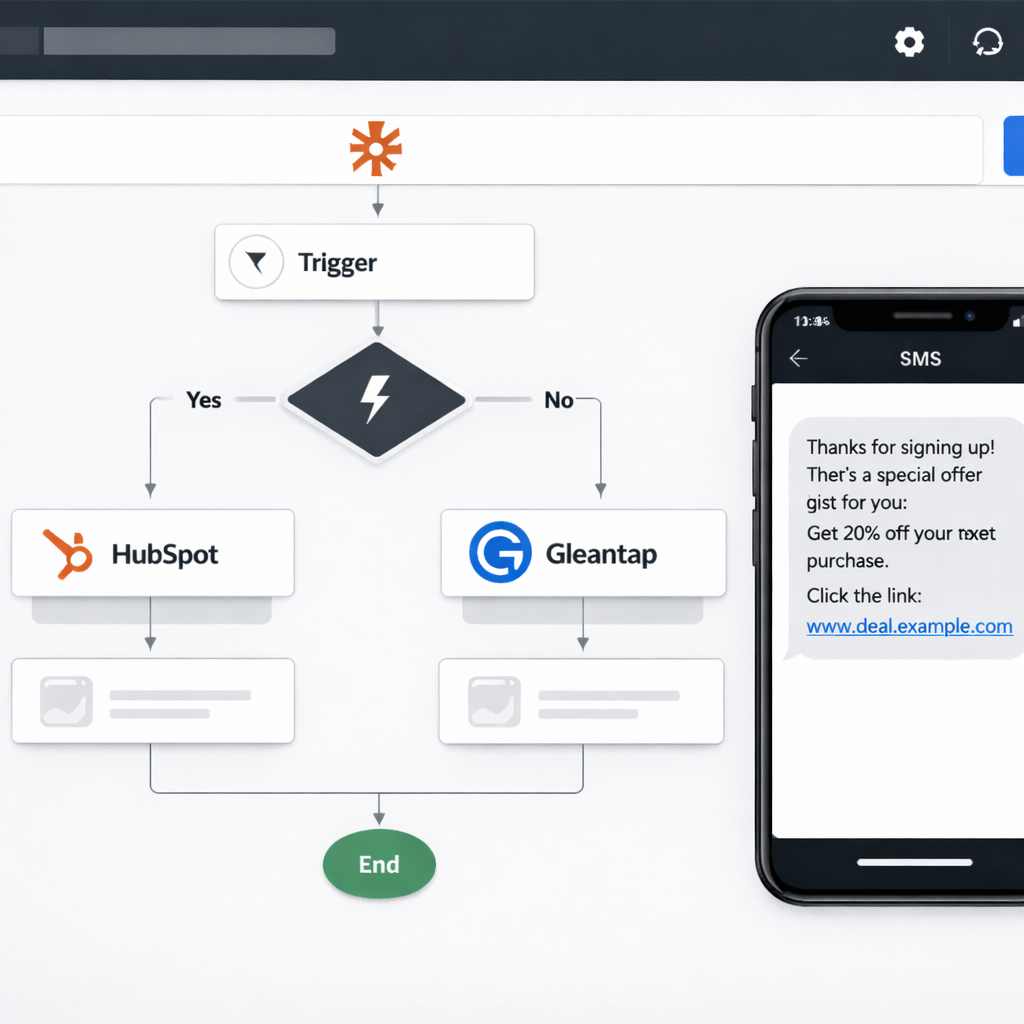
- Capture: form submission or chat creates a new record in CRM via Zapier/Make.
- Dedupe & enrich: check for existing email or phone, pull last activity and tags into the lead record.
- Immediate response: if phone present send an automated SMS within 5 minutes and an email instantly; if not, only send email and display booking link.
- Qualify by micro survey: SMS contains one quick question or a link to a 1 question booking/qualification form; route positive answers to a sales queue.
- Assign & escalate: auto assign to the correct owner or create a follow up task; if no reply in 24 hours escalate with a second SMS and a manual reminder task.
- Close loop: when lead books, update CRM stage and stop nurture sequences to avoid over messaging.
Practical tradeoff: SMS yields higher reply rates and faster conversions but increases compliance and cost burden. Prioritize a single short SMS plus an email rather than multi message blasts. Ensure opt in before using SMS and log consent in the CRM.
Concrete example: A boutique fitness studio uses Typeform on its site. New submissions create a HubSpot lead via Zapier. An immediate SMS from Gleantap asks Can you attend a trial on Saturday? with a one tap booking link; if no reply in 6 hours the system sends a follow up email with available times. Within two weeks the studio reduced lead response time from 18 hours to under 30 minutes and increased booked trials by a measurable margin.
| KPI | Typical pilot target (30 days) |
| Lead response time | Under 5 minutes for SMS replies; under 1 hour for email |
| Lead to booked appointment rate | Increase by 20% to 40% depending on channel mix |
| Cost per qualified lead | Track message cost + tool subscriptions; expect small increase offset by higher conversion |
Do not skip field mapping. Incorrect phone or timezone fields are the most common failure that makes automation look broken to customers.
30 day pilot plan: Turn on capture -> CRM -> SMS + email for one lead source. Track baseline for lead response time and lead to booked rate for 7 days, run automation for 21 days, then compare. Stop or iterate on the message cadence if reply rate falls or opt outs rise.
Next consideration: After the pilot, add attribution fields so you can compare channels by cost and conversion, then decide whether to expand the same workflow to organic search leads, paid ads, or walk-ins.
2. Automated SMS and mobile engagement with Gleantap
Mobile-first engagement drives action fast. For local businesses that depend on appointments, repeat visits, and quick purchase decisions, automated SMS produces the fastest measurable lift in confirmations, reactivations, and immediate responses compared with email or social ads.
Why use Gleantap for SMS and mobile automation
Gleantap is built for small businesses that need simple, two-way workflows tied to POS and CRM events. Use it when you want conditional branching based on clicks or replies, templates you can edit in minutes, and built in analytics for reply and conversion rates. It is not a replacement for your accounting system or full CRM, but it is the fastest path to operational wins on the mobile channel.
- Best fit: high touch customer journeys like appointment confirmations, renewals, and reactivation for memberships
- Complementary tools: use Gleantap with your POS or CRM for triggers; use Zapier for lightweight glue if native integrations are missing
- When to avoid: extremely large volume transactional messaging without a gateway plan or when you need complex multi system reconciliation
Minimal viable SMS workflow to deploy this week
- Identify a single, high value trigger. Example triggers: new booking, membership expiry in 14 days, or no purchase in 60 days.
- Map required data fields from your POS or CRM (customer name, phone, last purchase date, membership end date).
- Create a 3 message sequence in Gleantap: immediate acknowledgement, friendly reminder, last chance with offer. Use short links and track clicks.
- Set branching: if customer replies YES or clicks link move to sales queue; if no action, send final reminder and then flag for manual outreach.
- Run a 30 day pilot on a single segment and monitor delivered, replied, and conversion events.
KPIs to track. Delivered rate, reply rate, click through rate on short links, conversion to booked appointment or paid renewal, and cost per reactivation. Track baseline for 14 days prior to the pilot so you measure net impact.
Trade offs and limitations. SMS has a higher cost per message than email and stricter consent requirements. Expect small segments to perform very well; broad blasts to cold lists will underperform and risk opt outs. If you scale volume, budget for carrier fees and consider using a dedicated messaging gateway or Twilio for throughput. Also plan human routing for replies that need personal attention; unattended two way messages create poor experiences.
Concrete example: A 45 location gym chain used Gleantap to run a 3 message membership renewal pilot for members expiring in 14 days. The sequence was: initial renewal reminder with one click renewal link, a follow up with a discount for automatic renewal, and a last chance SMS 3 days before expiry that routed replies to local sales staff. The pilot targeted 2,000 members and converted sufficient auto renewals to cover the monthly subscription cost for the messaging platform. This example is illustrative; results will vary by audience and offer.
Start with one high value segment and a 3 message sequence. That is where business automation and quick revenue impact meet.
Compliance note: Ensure explicit opt in and a clear opt out in every message to stay within TCPA rules in the United States. Keep message frequency low for cold segments and document consent in your CRM.

3. Appointment scheduling, confirmations and reminders
Problem: No-shows and manual appointment handling eat owner time and unpredictably cut revenue. Solution: Automate confirmations, two-way reminders, and reschedule flows so the slot either fills or converts to revenue without a manager babysitting the calendar.
Recommended toolset and where each piece matters
Tools: Use a scheduling front end like Calendly, Acuity Scheduling, or Square Appointments + Google Calendar for canonical events. Glue with Zapier or Make for conditional logic. Use Gleantap or Twilio for SMS confirmations/reminders. Connect the scheduling system to your CRM or POS so attendance updates your customer record and revenue attribution.
- Scheduling: Calendly or Square Appointments for public booking and embedded widgets
- Messaging: Gleantap for mobile-first reminders and two-way replies; Twilio if you need custom logic
- Integration: Zapier/Make to sync bookings to CRM and trigger messaging sequences
- Payments: Square or Stripe for deposits and prepaid bookings to reduce no-shows
Step-by-step automation workflow (minimal viable)
- Client books online in scheduling tool → event created in Google Calendar
- Zapier detects new event → creates/updates contact in CRM and records booking source
- Zapier triggers immediate confirmation SMS + email via Gleantap with reschedule link
- Automated reminders scheduled at 48 hours and 2 hours before the appointment; messages include an easy reschedule button that updates the calendar and CRM
- If client reschedules or cancels, automation frees the slot and notifies front desk; if no-show, automation triggers a follow-up sequence and, if policy applies, a no-show fee invoice via your POS
Practical insight: The reschedule link is the single highest-impact element. Businesses that let customers reschedule without a phone call recover many slots that would otherwise be lost. Build the reschedule path so it updates the original booking record rather than creating a new lead.
Trade-off to consider: Prepaid deposits reduce no-shows but add friction to booking and increase cancellations if your price or refund policy is unclear. If you add deposits, automate clear receipts and refund rules to avoid service friction and chargeback risk.
Important: include an opt out and respect TCPA for US SMS. Keep reminder frequency tight, 1 confirmation + 1–2 reminders, to avoid customer annoyance.
Concrete example: A boutique fitness studio embedded Calendly for class bookings, used Zapier to push bookings into their POS and Gleantap for SMS. Automated confirmation plus a 48 hour and 2 hour reminder with a reschedule link reduced the time staff spent reconfirming classes and created immediate reschedule options that filled canceled slots faster. The owner reported reclaiming roughly 1–2 admin hours per week and a visible reduction in last-minute no-show work.
| Metric to track | Why it matters |
| No-show rate | Direct revenue loss and indicator of reminder effectiveness |
| Booking to attend rate | Shows whether confirmations + reminders convert bookings into visits |
| Admin hours spent on scheduling | Quantifies time saved and helps compute ROI |
| Reschedule completion rate | Measures whether self-service rescheduling keeps slots filled |
Pilot plan: Run a 30–60 day pilot for one service or location. Track baseline no-show rate and admin hours for two weeks, enable automated confirmations + 48/2 hour reminders, and compare results. If you use deposits, test a small sample first and monitor cancellation patterns.
Judgment: Start simple. Over-automating reminders or adding rigid deposit rules creates customer friction; minimal confirmations plus a clear reschedule path deliver most of the benefit for the least trouble. When the pilot works, expand to additional services and add conditional branching, for example, different reminder cadences for first-time clients versus regulars.

Next consideration: decide whether to tie no-show policies to deposits or automatic invoicing, and prepare clear messaging and refund rules before you scale the automation.
4. Re engagement and churn prevention campaigns
Direct point: Automated re engagement beats one off winback pushes because it preserves staff time and catches customers at the moment they are about to defect. Small business owners get the most leverage by treating re engagement as a short funnel with automated steps and a clear human escalation point.
Practical workflow to set up a re engagement sequence
- Define churn signals: pick a measurable window such as no purchase or no visit for 30, 60, or 90 days using an RFM style rule. Update segment membership daily or in real time where possible.
- Create the segment in your CRM: use HubSpot, Pipedrive, or your POS CRM. Add suppression rules for customers who have an open dispute, are on a current promotional plan, or have opted out.
- Design a three step sequence: start with value content, follow with an incentive if no response, then escalate to a personal touch. Use Gleantap for SMS first touch and Klaviyo for richer email content. Connect with Zapier or native integrations for the trigger.
- Tier incentives carefully: set limits by customer value and expiration dates so incentives do not permanently change buying behavior.
- Escalate to human follow up: flag non responders after the automated sequence for a manual call or personal email. Use a clear SLA so staff know when to act.
- Measure and iterate: run an A B test of incentive versus content led outreach and track reactivation revenue, opt outs, and long term retention.
Key operational note: Data freshness matters more than channel creativity. If your segment is stale by two days you will contact customers who are already re engaged or who recently paid, increasing opt outs and wasted incentives. Aim for daily sync or webhooks where your tools support them with Zapier or native connectors.
| KPI | Pilot target | How to measure |
| Reactivation rate | 5 to 12% | Number of reactivated customers divided by the targeted lapsed segment over 60 days |
| Incremental revenue per reactivated customer | $25 to $150 | Revenue from reactivated customers in 90 days minus expected baseline |
| Cost per reactivation | $3 to $25 | Ad spend plus incentive cost plus messaging cost divided by reactivations |
| Opt out rate | < 2% | Opt outs received during the campaign divided by messages sent |
| Manual handoff rate | 10 to 25% | Percent of segment flagged for personal follow up after automation |
Escalation rule: If a customer does not respond after the automated sequence, escalate to human outreach within 3 to 7 days to convert high value churn risks.
Pilot plan – 60 days: pick 300 to 1,000 lapsed customers 30 to 90 days inactive. Run a 3 message sequence across SMS and email. A B test incentive versus value content. Measure reactivation rate and incremental revenue; apply manual follow up to top 20 percent by lifetime value.
Concrete example: A neighborhood gym segments members with no visits for 45 days. They trigger a Gleantap SMS that links to a free class schedule and a single click rebook option. If there is no click in three days the system sends a 10 percent off one month offer, then a final SMS offering a free one on one session and a staff call. The gym reactivated 8 percent of the pilot segment and identified a handful of members worth a personal call.
Trade off and judgment: Discounts will move reactivation metrics quickly but they cost margin and train customers to wait for deals. Start with content led attempts, reserve incentives for customers above a value threshold, and always time incentives with a clear expiration. Use an A B test to avoid the common mistake of assuming discounts are the default solution.
Next consideration – choose your segment and set the daily sync before you design messaging. If your CRM is HubSpot use the segment to trigger Gleantap via a connector, or use Zapier for glue.

5. Order processing, fulfillment triggers and inventory alerts
Orders and inventory are the places where automation either saves real cash or silently breaks the business. Automate the handoffs that are purely mechanical, order creation, fulfillment assignment, inventory decrementing, and reorder triggers, but keep human checks where uncertainty exists: returns, partial refunds, and supplier lead-time exceptions. Treat your inventory system as the single source of truth and instrument audit trails for every automated change.
Recommended minimal workflow
- Order captured: storefront (for example Shopify or WooCommerce) records sale and payment.
- Create fulfillment: webhook or connector pushes order to ShipStation or Shippo to generate shipping label and packing list.
- Sync inventory: fulfillment system updates inventory back to storefront and other channels via Zapier or Make; record delta in accounting/ERP.
- Low stock trigger: when on-hand <= threshold, create a reorder record in QuickBooks Commerce or a Google Sheet and notify purchasing via SMS and Slack.
- Supplier notification: automated SMS or email to supplier with SKU, qty, and desired ship date; create follow-up tasks in your task manager (Asana/Trello).
- Customer updates: if backordered, auto-send an estimated delivery SMS/email and provide an easy cancel/refund option.
KPIs to track
| KPI | Why it matters / target to aim for |
| Order processing time (order -> shipped) | Measures speed of fulfillment; target: <24 hours for local retailers, <48 for small e-commerce |
| On-time fulfillment rate | Percent orders shipped by promised date; target: 95%+ |
| Stockout incidents per month | Direct lost-sales measure; aim to reduce month over month |
| Days of inventory cover by SKU | Visibility into safety stock; maintain supplier-dependent buffer |
| Inventory reconciliation errors | Count of phantom stock issues caused by returns or manual edits; target: near zero |
Practical trade-offs and checks: real-time sync sounds ideal but increases API calls and complexity, for multi-channel sellers a 15–60 minute batch sync is often the right balance. Safety stock prevents stockouts but ties up cash; pick thresholds by SKU velocity, not by gut. Always automate the creation of a vendor-facing purchase order, but require human approval for orders over a dollar or quantity threshold you set.
Concrete Example: A local sports retailer set reorder threshold 10 for its top 20 SKUs. When stock hit 10 the automation created a PO in Google Sheets, sent an SMS to the supplier via Gleantap, and created a 48-hour follow-up task in Asana. Lead time dropped from seven days to three on those SKUs and stockout incidents fell by two thirds within eight weeks (results illustrative, validate on your SKUs).
Start small: pilot with your top 5 SKUs that represent 60–80 percent of sales. Automate the full loop for those SKUs first, order -> fulfillment -> inventory update -> reorder trigger, then expand once reconciliation and supplier SLAs are stable.
Next consideration: run a 30-day pilot measuring order processing time and stockout incidents, then lock thresholds and add returns reconciliation automation so phantom stock stops being your recurring firefight.
6. Accounting, invoicing and payment reconciliation
Hard fact: late invoices and messy reconciliation kill cashflow much faster than an underperforming ad. Automation here is not optional once you exceed a handful of recurring customers, it is the difference between predictable cash and constant chasing.
Why automate AR and reconciliation
Direct impact: automating invoicing, reminders, and reconciliation reduces manual errors, cuts Days Sales Outstanding (DSO), and gives you a reliable audit trail for tax time. But automation only pays if invoices are correctly coded, payment descriptors are consistent, and exceptions are triaged to a human quickly.
- Core workflow: Create invoice in accounting system (QuickBooks Online or Xero) and send via scheduled email/SMS.
- Payments: Accept with Stripe or Square so payments post immediately and trigger webhooks or native sync.
- Reconciliation: Use native banking rules or Zapier to match payment events to invoices and mark them closed.
- Escalation: If a payment fails or a partial payment occurs, create a flagged task in your CRM or task manager for manual follow up.
- Recordkeeping: Attach receipts and payment confirmations to the invoice and to the customer record for audit and sales visibility.
Trade-off to accept: fully automated reconciliation depends on clean, consistent data. Expect 10 to 20 percent of transactions to require manual intervention at first, split payments, refunds, and third-party marketplace descriptors will trip rules until you tune them.
| KPI | What to measure | Practical target (initial) |
| Days Sales Outstanding (DSO) | Average days between invoice and cleared payment | Reduce by 25% in 60–90 days (estimate) |
| Percent invoices paid on time | Invoices paid before due date | 70%+ after automations and reminders |
| AR hours per month | Staff time spent chasing payments | Cut administrative AR time by 30–50% |
Concrete example: A small marketing studio starts sending invoices from QuickBooks, accepts payments via Stripe, and uses Zapier to post Stripe payment events to QuickBooks and to create a follow up task when a payment fails. Within the first month they reduce manual reconciliation steps and have a single list of overdue accounts; the studio reports fewer missed payments and one person now manages AR instead of two. These outcomes are illustrative, validate against your volumes.
Practical setup tip: use bank/payment descriptors and invoice numbers as your matching keys. If your payment processor puts variable prefixes on descriptions, create mapping rules or attach metadata to transactions so your reconciliation rule is deterministic.
Automation blindspot: automated reminders speed payment, but over-automating with impersonal or overly frequent messages damages client relationships. Use a tiered cadence that escalates from polite email to SMS to a personal call for high-value clients.
Start small: automate invoice delivery and the first two reminder steps, validate reconciliation accuracy for 30 days, then add auto-escalation rules and AP automation with Bill.com or similar.
Next consideration: pick one pilot invoice type (recurring subscriptions or standard client invoices), instrument current DSO and hours spent, then run the automation for 60 days and compare, if reconciliation error rate remains above 10 percent, pause and tighten matching rules before scaling.
7. Employee scheduling and HR automation
Straight answer: employee scheduling is low-hanging fruit for automation for small business because it is repeatable, rules-driven, and directly tied to labor cost. Automating shift creation, swap approvals, time tracking, and payroll sync converts hours of weekly manager work into predictable, auditable workflows.
Workflow to implement
- Map the rules first: document shift patterns, required skills, maximum hours, and notice windows for changes – this prevents automation from enforcing bad schedules.
- Pick a scheduling tool: choose Homebase, When I Work, or Deputy for rostering and time clocks; add Slack or SMS for instant team notices and Zapier or native connectors to sync with payroll.
- Publish and notify: manager publishes schedule -> automated Slack or SMS notifies affected employees -> confirmations are logged automatically.
- Handle swap and PTO requests: employee submits swap via app or a simple form -> workflow checks rule compliance (availability, overtime) -> auto-approve if within rules or route to manager if not.
- Time capture and payroll sync: clock-ins feed payroll system (QuickBooks, Gusto, or ADP) -> automated reconciliation flags mismatches for review before run.
- Monitor and iterate: run a 30 day pilot, measure exceptions, tighten rules, then expand to recurring patterns and cross-location schedules.
Concrete example: a neighborhood fitness studio used Deputy to automate recurring instructor shifts, required certifications, and availability. When an instructor requested a swap, the system matched qualified substitutes, notified candidates by SMS, and only escalated to a manager when no qualified volunteer accepted within two hours – cutting manager scheduling time by about half and reducing last-minute coverage gaps.
Practical tradeoffs and limits
- Fairness vs efficiency: automated rotation and rule engines reduce bias, but opaque rules erode trust. Publish the scheduling logic so staff understand why shifts rotate.
- Over-automation risk: auto-approving swaps without manual review can create overtime and misclassification problems. Build hard stops for overtime and classification checks.
- Data quality dependency: automation only works if availability, certifications, and roles are kept current. Expect a maintenance task to keep employee profiles accurate.
- Cost vs benefit: scheduling tools have per-employee fees; start with the busiest week to validate time saved before rolling out across all staff.
Key operational insight: combine schedule automation with historical sales or foot traffic data to right-size shifts – that is where labor cost savings show up, not just time saved for managers.
Pilot KPI suggestion: measure schedule creation time, unfilled shift rate, and payroll exceptions. Target: reduce weekly scheduling time by 40 percent and unfilled shifts by 30 percent in the first 60 days.
Compliance note: embed break, overtime, and local labor law rules into your workflow and keep an audit trail for payroll. For guidance on adopting technology across small operations see SBA technology guidance.
Next consideration: after the pilot, link scheduling data to performance and retention metrics so scheduling decisions become a lever for both operational efficiency and employee satisfaction.
Frequently Asked Questions
Most FAQs break down into three practical concerns: what to automate first, how to prove it moves the needle, and what risks to avoid. Below are direct answers you can act on today, not abstract theory.
Short answers to the questions we actually get
- Which automation should I start with to get quick wins: Pick the process that costs the team time and directly affects revenue or capacity – common winners are lead response, appointment reminders, or pickup confirmations.
- How do I measure ROI for a pilot: Capture a 30 to 90 day baseline, run the automation for the same length, and compare the process KPI (no shows, lead-to-booked, time spent). Translate time saved into payroll dollars and add any incremental revenue.
- Do I need a developer: Usually no. Use native integrations or a connector like Zapier or [Make] (https://www.make.com) to wire systems. Bring a developer in only for complex, two-way data syncs.
- What about legal risk for messaging: Follow consent rules in the recipient’s jurisdiction, keep opt-out simple, and log opt-in timestamps. Treat compliance as part of the workflow, not an afterthought.
- How much will it cost: Expect subscription fees for the core app, plus connector fees that scale with tasks. Budget for 1 to 3 hours of setup per automation and occasional maintenance.
Trade-off to accept up front: Automation reduces repetitive work but increases maintenance overhead and dependence on integrations. If you automate 20 manual steps, plan for 20 potential break points when tools update or APIs change. Start minimal and document flows so fixes are fast.
Concrete example: A neighborhood bakery automated order pickup messages by connecting Shopify orders to an SMS workflow. The automation sends a confirmation at purchase, a pickup reminder on the morning of pickup, and an hour-before message with a staff-facing fulfillment flag. That removed a daily manual task and cut missed pickups quickly; the owner used native Shopify triggers and Gleantap for messaging to keep setup under a day.
Quick decision checklist: 1) Map the current process and time spent; 2) Choose one measurable KPI to improve; 3) Build a minimal workflow with native integrations or Zapier; 4) Run a 30–90 day pilot; 5) Measure and iterate.
On measurement and reliable evidence: Don’t declare victory after two weeks. For conversion or behavior changes aim for a sample that produces stable results – typically at least 50 events per variant or a calendar window that captures natural cadence (30 days for appointment businesses, 60–90 days for low-frequency purchases). Use your CRM or a simple spreadsheet to log pre and post metrics so you can attribute changes to the automation.
Common mistakes people understate: automating noisy or low-value touchpoints (spammy messages), failing to map data fields correctly between systems, and not building a fail-safe for exceptions. In practice the biggest time sink is troubleshooting edge cases you did not plan for; budget a small recurring window to tidy automations.
Next concrete steps
- Pick one process that costs more than 2 hours per week or directly reduces revenue.
- Map and measure the baseline KPI for 30 days so you have a clean comparison.
- Build a minimal workflow using native integrations or Zapier, avoid adding branches on day one.
- Run a 30–90 day pilot, log results, and iterate; if messaging is involved use Gleantap or a compliant SMS vendor and include opt-out handling from the start.
- Document the flow and monitoring points so the next person can maintain it without guesswork.
Primary takeaway: Treat your first automation like a short experiment: isolate one KPI, keep the workflow small, plan for upkeep, and only expand after you have clean evidence it moves the needle.


Ready to Run Successful Marketing Campaigns and Grow Your Business?
Gleantap helps you unify customer data, track behavior patterns, and automate personalized campaigns, so you can increase repeat purchases and grow your business.
Ready to Run Successful Marketing Campaigns and Grow Your Business?
Gleantap helps you unify customer data, track behavior patterns, and automate personalized campaigns, so you can increase repeat purchases and grow your business.