
 Divya Ghughatyal
Most practices do not lose patients over clinical quality. They lose them to reminders that never arrive, forms that take too long, and follow-ups that quietly never happen. Improving healthcare patient engagement is mostly an operations problem: getting patient communication right, at the right moment, on the channel each patient actually checks.
Below are nine practical strategies for how to improve patient engagement in healthcare that you can pilot in 30 to 90 days, along with the actions to take and the key numbers to watch. None require a new headcount. Most focus on tightening and improving the processes your team already handles manually.
1. Centralize patient data into one unified profile
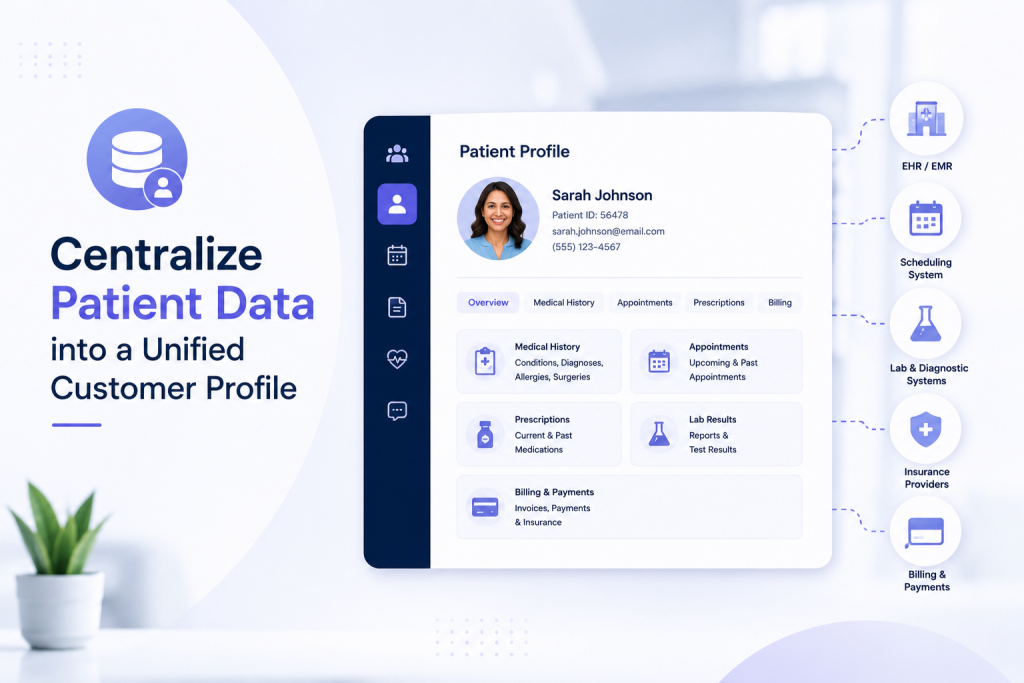
This is the highest-leverage change you can make. Without a single view combining contact details, appointment history, conversations, and consent flags, outreach stays fragmented: wrong numbers, duplicate messages, and staff checking three systems to answer one question.
One scope note. This is not a clinical mirror of your EHR. It is an engagement profile focused on contactability and behaviour.
What to pull in:
- Contact details across every channel, plus each patient’s preferred one
- Consent status and opt-out flags
- Appointment history: booked, completed, cancelled, no-showed
- Recent conversations across SMS, email, chat, and social
- Basic tags: service line, referral source, no-show risk
How to get there. Inventory every system holding contact or consent data, map the fields into one schema, then deduplicate using phone and email as match keys, flagging uncertain merges for review. Decide which system wins for which field, and give one named person ownership of data quality. Most patient engagement software handles the matching for you, which is cheaper than building a custom sync.
The trade-off: governance overhead. You need rules on what gets stored, who can see it, and how often records get audited. Expect an upfront cost in matching logic and training that pays back in messages actually reaching people.
Example. A four-location dental group merged contact records across sites and found roughly 15 percent were duplicates or dead numbers. After cleanup, reminder deliverability rose and the front desk stopped calling patients who had already confirmed.
Track: share of active records with a valid mobile number, duplicate rate, and message bounce rate.
2. Meet patients on the channels they already use
Multichannel patient communication works when each channel has a defined job. Sending the same message everywhere produces fatigue and opt-outs, not reach. Pick two to start.
- SMS. Time-sensitive reminders and confirmations. Fastest read rates, best for short prompts like “Reply C to confirm.”
- Email. Longer content: prep instructions, care plans, newsletters, anything a patient may want to re-read later.
- WhatsApp and web chat. Two-way questions and rescheduling. Strong for multilingual communities.
- Phone. Sensitive conversations and patients who have opted out of digital channels.
Sequencing matters more than channel count. Use one primary channel with fallbacks, and give each touch a different job: confirmation at booking by email, a reminder seven days out by SMS, a confirmation prompt at 48 hours, and a final nudge 24 hours before with a reschedule link.
The catch: more channels mean more consent tracking, per-channel opt-out handling, and one view of who was last contacted where. Without that you will double-message people or contact someone who asked you to stop. Routing everything into a shared inbox, rather than a separate app per channel, keeps this workable for a small front-desk team.
Example. A med spa with a large Spanish-speaking client base added WhatsApp for confirmations and pre-visit instructions. Confirmations from that group climbed within two months, and callbacks dropped because patients could reply with a photo of their form.
Track: response rate by channel, appointment confirmation rate, and opt-out rate by channel.
3. Segment patients and personalize outreach
Start with three to six segments, not thirty. The ones that consistently earn their keep: due for recall, upcoming appointment, recent no-show, lapsed with no visit in six to twelve months, and high-value repeat patients.
Signals worth building on:
- Behavioural: confirmations, cancellations, message opens and clicks
- Operational: days since last visit, service history, referral source
- Access: preferred language, valid mobile number, preferred channel
Simple rules beat elaborate scoring. Patients with a verified mobile and an appointment inside 48 hours get SMS. Anyone who has no-showed twice gets a call before their next booking. Lapsed patients get a reactivation sequence, not the general newsletter. Cap outreach at three messages per week per patient.
Where teams go wrong: they equate personalization with longer, hand-written copy. Real personalization is rule-driven: swap one sentence for a service-specific line and change cadence by segment. That is reproducible; bespoke messages are not.
Trade-off: finer segments mean more maintenance and more consent checking. If your data is still messy, use fewer signals you can actually trust.
Example. A physical therapy clinic built one segment: patients who completed an initial evaluation but never booked a second visit. A three-message sequence with a direct booking link lifted rebooking from that group inside the first month.
Track: response and rebooking rate per segment, week over week after launch.
4. Automate appointment reminders and two-way confirmations

Automated reminders cut no-shows faster than adding front-desk staff. The word doing the work is two-way: patients should be able to confirm, cancel, or reschedule without calling.
Set it up like this:
- Connect your scheduling system to your messaging platform so replies update the calendar automatically
- Send at booking, seven days out, 48 hours out, and 24 hours out
- Use automation to parse common replies (C to confirm, R to reschedule) and route anything ambiguous to a person
- Keep messages logistical: time, location, provider. No clinical detail over SMS
- Block outreach outside reasonable hours and honour opt-outs immediately
- If nobody confirms by 24 hours, queue a call or a staff task
The trade-off nobody plans for: automation removes outbound work but creates inbound replies. Automate confirmations without deciding who handles those replies and you have moved the workload rather than removed it. Assign the reply queue to an owner before launch.
Two details drive most of the outcome: copy with one clear action, and clean phone data. Generic reminders with no reply option underperform badly.
Example. A two-location pediatric practice ran a four-message reminder flow with a reschedule link and automated reply parsing. No-shows fell by about a third over two months, and the front desk cut roughly two hours a day of confirmation calls.
Track: confirmation rate via messaging (60 to 80 percent is a reasonable target), no-show rate, share of replies handled automatically, and staff hours saved.
5. Digitize intake and pre-visit forms
Every minute a patient spends on a clipboard is a delayed start time and a chance for a transcription error.
Digitize in order of payoff: registration and demographics, insurance capture, consent forms, medical history, and preferred communication channel.
How. Send a secure, expiring link by SMS ahead of the visit. Pre-fill whatever you already hold so the form stays short, and send one or two reminders for incomplete forms. Build mobile-first.
Guardrails that matter:
- Keep a fallback. Not everyone will complete an online form. Offer phone help and in-clinic tablet check-in so digitization does not become a barrier.
- Do not over-gate. Blocking appointments until forms are done reduces access. Gate only where a consent or authorization genuinely requires it.
- Verify at check-in. Self-reported and scanned data is imperfect; a quick staff check catches most of it.
- Minimize PHI in the message body. Put the detail behind the secure link, and make sure your vendor signs a BAA.
Example. A multi-location optometry practice moved intake to SMS links with insurance capture built in. Average check-in time fell sharply and front-desk data entry dropped, with the biggest gains at its busiest site.
Track: share completing intake before arrival, check-in time saved, and completion rate by age group so you can see who is being left behind.
6. Run recall and follow-up campaigns that bring patients back
Most practices spend heavily on acquiring new patients while existing ones lapse quietly. Recall is the cheapest growth available.
Build three sequences:
- Post-visit follow-up. A check-in a few days out, plus a prompt to book the next appointment while intent is still high.
- Recall. Triggered by time since last visit and service type: annual exam, six-month cleaning, quarterly review.
- Reactivation. For patients with no visit in six to twelve months, with a concrete reason to return and a one-tap booking link.
Make each message do one job. Confirm a next step, ask a question, or offer a booking link. Not all three. Make booking a single tap, because every extra step costs completion.
The fix for “this feels robotic” is structured personalization: templates with dynamic fields plus one conditional line referencing the actual service. That scales without sounding like a mail merge.
Trade-off: recall only works if appointment data is accurate. If completed-visit statuses are not updated reliably, you will message people who have already rebooked, which erodes trust quickly.
Example. A dental group automated six-month recall by service type with two reminders and a booking link. Recall bookings rose steadily across a quarter with no extra front-desk effort.
Track: rebooking rate within 30 days, reactivation rate, and revenue from recall campaigns against new-patient acquisition cost.
7. Collect feedback and turn it into reviews
Short surveys plus public reviews do two jobs: they surface operational problems and bring in new patients.
Keep it to two questions. A single rating sent by SMS within 24 hours of the visit, plus an optional comment box. Long satisfaction surveys get low response and produce noise.
Then route by score:
- High scores: prompt for a Google or Facebook review with a direct link
- Low scores: create a ticket, assign an owner, and follow up inside 24 to 48 hours
- All scores: roll up weekly to spot patterns rather than fixing one complaint at a time
The limitation: surveys skew toward people willing to answer, and automation without staffing makes things worse. An unanswered complaint ticket damages trust more than never asking. Set a realistic response SLA before you launch.
Treat results as a trigger to investigate, not a verdict. A low score usually points at a process, such as wait times or a billing surprise, rather than at an individual.
Example. A dermatology practice sent a one-question SMS after each visit and auto-prompted positive responders for a Google review. Review volume more than doubled over three months, and a recurring complaint about wait times surfaced early enough to fix.
Track: survey response rate (10 percent is a reasonable starting bar), average rating, review volume and trend, and time to resolve flagged issues.
8. Use loyalty and small incentives to reinforce the right behaviour
Incentives work when they are immediate, small, and paired with an easy next step. They do not work as a patch over a broken booking process.
Levers that actually move behaviour:
- Defaults. Book the next appointment before the patient leaves rather than asking them to call later.
- Immediate, small rewards. A modest credit delivered right after a completed action beats a larger, delayed one.
- Commitment prompts. Asking a patient to pick a specific day and time drives more follow-through than “call us to schedule.”
- Habit-timed reminders. Send prompts when the action is actually possible, not at 9am on a workday.
- Points and tiers, sparingly. Useful for long-running treatment plans, mostly overhead elsewhere.
Trade-off: incentives cost money and often produce a spike that decays once the promotion ends. Pair them with structural fixes such as easier scheduling or automatic recall, or you are renting behaviour rather than changing it. Check local rules before offering anything of significant value.
Example. A wellness clinic tested a small credit for completing a follow-up visit against a reminder alone. The incentive group booked more within the same week, though the gap narrowed by month three, which is the more useful finding.
Track: completion rate for the target behaviour, repeat visit rate, and cost per additional completed action after 60 days.
9. Track the KPIs that show impact
Pick a narrow dashboard. Too many metrics dilute action.
Core metrics:
- Response rate: the first filter on whether your messages work at all
- Appointment confirmation rate: tied directly to no-shows
- No-show rate: the primary operational number for scheduling teams
- Rebooking and recall rate: share of patients returning inside the expected window
- Staff hours saved: converts engagement work into an ROI argument
- Cost per engaged patient: for budget decisions
Use control groups. Before-and-after comparisons overstate impact because they ignore seasonality and scheduling changes. Hold a location or two as controls where you can.
Clean data before reporting. Duplicates and stale consent flags skew everything. Reconcile weekly.
Avoid vanity metrics. Open rates and impressions look good and mean little. Measure behaviour tied to operations or revenue.
Example. A community practice ran a recall campaign in two locations and held two as controls. After 90 days the pilot sites showed a clear lift in completed visits while controls stayed flat, and the scheduling team logged several hours a week saved. The test design is what made the case to finance, not the raw number.
Start here: set a baseline over the prior 30 to 90 days, choose one outcome KPI and one operational KPI, and report both weekly.
Where to start
Nine strategies is a menu, not a checklist. Starting from scratch, the order that works is: clean up contact data, automate appointment reminders, then layer on recall campaigns. Those three cover most of the measurable gain, and each funds the next.
The common failure is chasing sophisticated personalization before basic deliverability and consent are working. Get contact hygiene and channel preferences right first; it produces more reliable results than any amount of copy tweaking.
Frequently Asked Questions
What reduces no-shows fastest?
A two-way reminder sequence with a clear confirmation option and a one-tap reschedule link. Most practices see movement within 30 days. Track confirmation rate alongside no-show rate so you can tell whether appointments are being kept or simply shifted.
Where should a small practice start?
Automate one workflow end to end, usually appointment reminders, and redirect the saved front-desk time to calling lapsed patients personally.
How should we use AI without creating risk?
Keep it to administrative work. AI patient engagement tools are genuinely useful for answering routine questions, booking appointments, and drafting campaign copy, all of which free staff for the conversations that need a person. Anything clinical needs a human, a clear escalation path, and a log of what the system did.
How do we choose between SMS, email, and chat?
Match the channel to urgency and stated preference. SMS for anything time-sensitive, email for detail patients will want to re-read, chat for back-and-forth. Let deliverability data decide the final mix.
What should we look for in a platform?
Integration with your scheduling system, two-way messaging on the channels your patients actually use, HIPAA compliance with a signed BAA and documented security controls, and reporting you can act on without exporting to a spreadsheet. Platforms like Gleantap bring these capabilities together for healthcare organizations, helping teams engage patients through personalized, automated communication while keeping data security and compliance in focus.


Ready to Run Successful Marketing Campaigns and Grow Your Business?
Gleantap helps you unify customer data, track behavior patterns, and automate personalized campaigns, so you can increase repeat purchases and grow your business.
Ready to Run Successful Marketing Campaigns and Grow Your Business?
Gleantap helps you unify customer data, track behavior patterns, and automate personalized campaigns, so you can increase repeat purchases and grow your business.