
 Divya Ghughatyal
Customer reviews and online mentions are a revenue lever, not just a reputation headache. This practical guide to reputation review monitoring, case use walks through the tools, repeatable response playbooks, integrations, and KPIs you need to turn reviews into measurable revenue and retention gains. You will get platform recommendations, ready-to-use templates, and three step-by-step case scenarios for gyms, restaurants, and medical practices that you can operationalize this quarter.
1. Why reputation and reviews directly affect revenue and retention
Direct statement: Reputation and reviews are not soft branding KPIs — they move search visibility, click-through, conversion rates, and repeat business in measurable ways, often at lower marginal cost than equivalent paid acquisition.
How it works in practice: Reviews change three levers that drive revenue: discoverability (local SEO and rich snippets), conversion (star ratings and review content change click behavior), and retention (public responses and follow-up repair churn and increase lifetime value).
- Discoverability: Better average rating and fresh reviews improve local pack rankings and organic CTR on Google Business Profile; more clicks mean more low-cost traffic.
- Conversion: Consumers use star rating and sentiment as a trust filter; a small star improvement can disproportionately raise booking or purchase probability on listing pages.
- Retention and referrals: Handling negative feedback publicly and privately reduces churn and increases word-of-mouth; unresolved negative reviews compound retention loss.
Practical limitation: Attribution is noisy. You cannot reliably prove causation from star changes alone without controlled tests — combine UTM-tagged links, review-request A/B tests, and cohort analysis before declaring ROI. Platforms can also penalize aggressive solicitation; scale review volume with contextual personalization, not bulk prompts.
Evidence and realistic expectations
Key evidence: Consumers consult reviews before visiting — see the BrightLocal data — and academic analysis shows ratings correlate with revenue and demand (BrightLocal and HBR). Use those correlations as directional benchmarks, not guarantees.
| Observed change | Practical business effect (typical range) |
| +0.1 average star | 2–10% lift in listing CTR or trial-booking conversion when combined with active responses and new reviews |
| +0.2 to +0.4 average star | 10–25% reduction in churn risk over 6 months for service businesses that act on feedback |
| Increase review volume (30–50%) | Stronger SEO, more keyword-rich review content, and steady conversion improvement |
Concrete example: A mid-size gym chain tied automated, post-visit review requests to completed bookings and tracked UTM-tagged clicks from Google listings. Over three months they prioritized responding within 24 hours and saw higher trial-to-paid conversion in cohorts that received both the solicitation and a follow-up manager outreach. The lesson: rating improvements matter most when you pair solicitation with timely, personalized responses and CRM linkage.
Judgment call: If you must prioritize effort, focus first on review quality and response SLAs for platforms that drive the most direct bookings (usually Google Business Profile, Facebook, and industry sites). Volume without authenticity wastes resources and risks platform penalties; response speed and CRM linkage deliver the most predictable retention gains.
Key stat: Over 90 percent of consumers consult reviews for local businesses — use that as the baseline for investment decisions.

Next consideration: After accepting that reputation impacts revenue, your next step is to measure it correctly — set up UTMs on listing links, capture review-sourced leads in CRM, and run short A/B tests to isolate the effect of review-driven changes.
2. Key platforms and what to monitor on each
Prioritize by impact. For most local service businesses the single biggest source of discoverable traffic and conversions is Google Business Profile, followed by the industry-specific site that customers trust (Yelp for restaurants in many markets, TripAdvisor for travel, Healthgrades or Zocdoc for some medical practices). Build your reputation review monitoring, case use list around where customers actually choose you — not every site that exists.
Local listing platforms — what to track
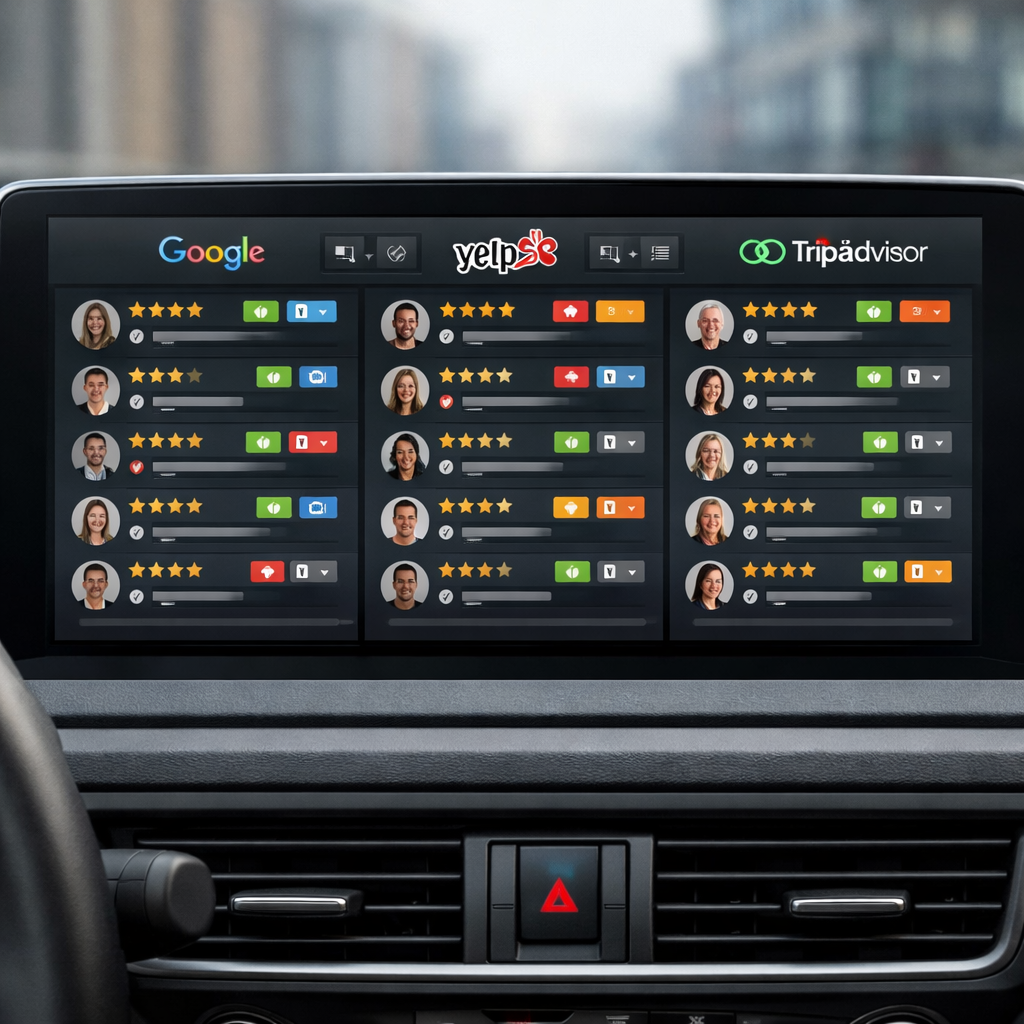
Google Business Profile. Monitor average star rating, review velocity (new reviews/week), reviewer photos, owner responses, Q&A items, and clicks-to-call or booking link conversions. Watch for flagged reviews and follow Google review policies when escalating removal requests.
Yelp and Facebook Pages. Track sentiment trends, complaint categories, response time, and the conversion actions (reservations, messages). Yelp noise is higher and their removal process is stricter — assume some disputes will be rejected and plan public responses instead.
TripAdvisor and industry sites. Prioritize these for tourist-facing or professional-service verticals. Monitor rank and category-specific badges (e.g., traveler favorite), as those drive visibility differently than simple star averages.
Aggregators and reputation platforms
Birdeye, ReviewTrackers, Reputation.com, Trustpilot. These tools aggregate, deduplicate, run sentiment analysis, and automate review solicitation and routing. Use them to centralize alerts, attach reviews to customer records, and apply consistent SLAs across locations.
Trade-off. Aggregators save time but obscure platform-specific features — you might miss a Yelp owner-only option or TripAdvisor private message flow. Also check API rate limits and whether the aggregator preserves original meta (review id, permalink, timestamps) for dispute evidence.
Social listening and mentions
Mention, Sprout Social, native platform monitoring. Track @mentions, shares, stories, and influencer posts that don’t appear as reviews but shape public perception. Prioritize monitoring spikes and sentiment shifts — social issues often become review problems if left unaddressed.
Practical example: A three-location restaurant group routes reviews from Google and Yelp into ReviewTrackers which pushes them into Gleantap customer profiles. Negative reviews tagged as service issues automatically create a task for the location manager; within four weeks the group reduced unresolved complaints and increased review volume by asking customers to re-evaluate after remediation.
Competitor and score tracking. Monitor competitor average ratings and review velocity monthly to spot market shifts. Use reputation score tracking only as a directional metric — different platforms weight reviews and recency differently, so compare like with like.
Risk signals to watch. Rapid bursts of five-star or one-star reviews, identical language across reviewers, or reviews from new accounts clustered by IP are red flags for fake reviews. Log evidence and follow platform removal steps before escalating legally.
Key takeaway: Start with Google Business Profile + one industry site + Facebook. Add an aggregator when you need routing, sentiment analysis, and CRM linkage. Tie everything into your customer profile system so reviews become actionable signals, not noise.
3. Build an end-to-end monitoring stack and integration map
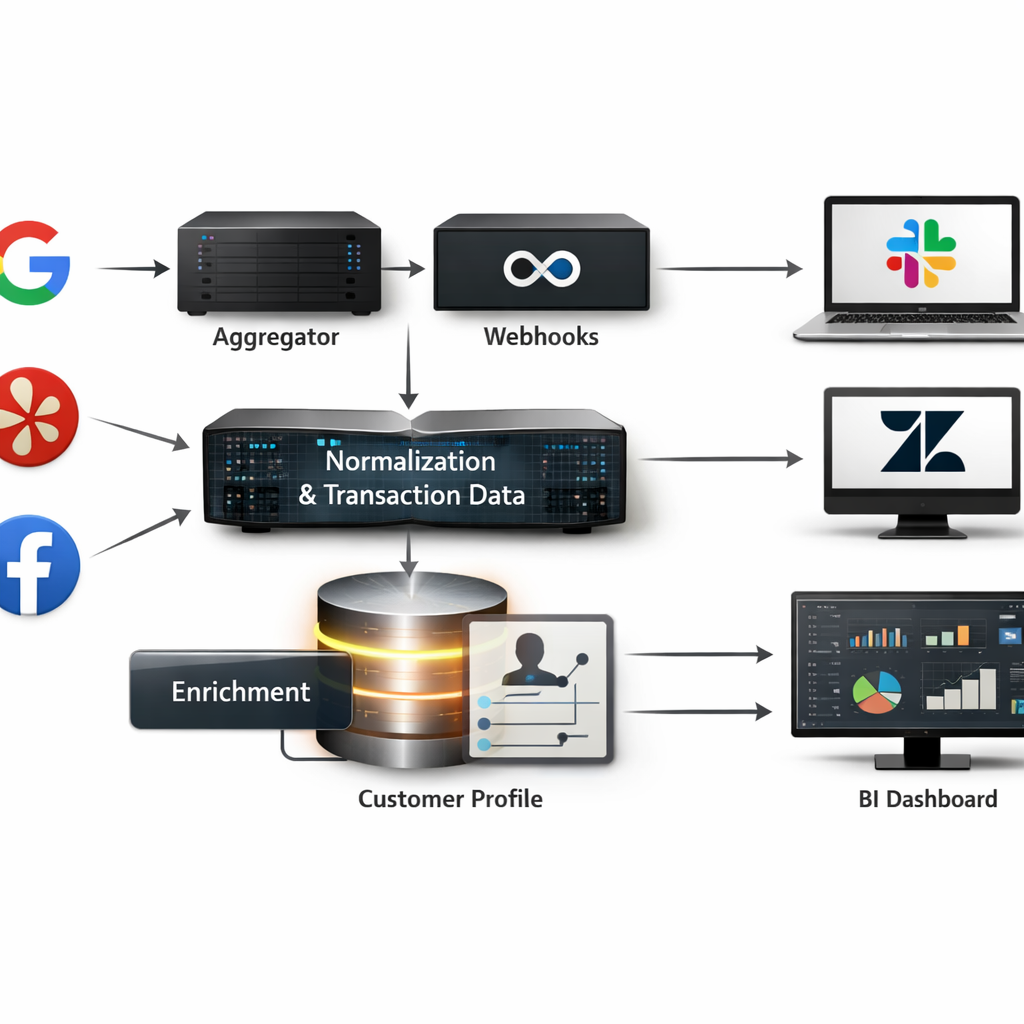
Start with the data pipeline mindset: treat reputation review monitoring as an event stream — ingestion, normalization, enrichment, routing, action, and measurement. If you skip any stage you will either drown in noise or miss the events that actually move revenue.
Core components and recommended sequence
- Ingestion: capture reviews and mentions via platform webhooks, official APIs, or a managed aggregator (Birdeye, ReviewTrackers) to avoid rate-limit headaches.
- Normalization & dedupe: canonicalize fields (platform, location id, rating, text, timestamp), deduplicate cross-posts, and attach transaction_id or visit metadata when available.
- Enrichment: add location, service line, staff id, and customer profile link; run a lightweight sentiment pass and tag severity for negative intent.
- Routing & SLAs: map events to channels — Slack for manager alerts, Zendesk/Gleantap tasks for customer follow-up, legal queue for harassment or defamation flags.
- Response automation: use templates for acknowledgements but require human review for escalations and high-severity negatives.
- Measurement & storage: persist raw events and derived metrics in a BI-ready store for dashboards and attribution.
Practical trade-off: choose webhooks over polling when you can — lower latency and fewer API calls — but expect sporadic delivery. Polling is simpler to implement for small pilots and more predictable for platforms without reliable webhooks.
Limitation to plan for: automated sentiment and severity tags are noisy. Do not trust sentiment alone to trigger refunds or legal escalations; use it to prioritize human review. Invest 2–4 weeks of manual review labeling to tune thresholds before automating high-impact actions.
| Event Type | Primary Integration & Action | Routing / SLA |
| New 1- or 2-star review | Webhook -> Gleantap customer profile + Slack alert | Route to location manager within 1 hour; public reply within 24 hours |
| Negative social mention with influencer reach | Social listener (Sprout Social) -> PR/Comms queue | Escalate to Head of Marketing within 2 hours |
| Positive 5-star review | Aggregator -> automated thank-you + ask-for-referral | Auto-acknowledge; add to testimonial queue |
Concrete example: a mid-market gym chains the post-visit review request to a Gleantap workflow that appends ___CODE0 and trainer id to the outgoing link. When a negative review arrives on Google, the ingestion webhook attaches the CODE1___, creates a ticket in Gleantap, and sends a Slack alert to the location manager with a 4-hour SLA. This reduced time-to-first-contact from 48 hours to under 6 hours in the pilot and made it possible to recover memberships before churn decisions were final.
Integration sequencing for small teams: start with Google Business Profile + Gleantap + Slack + a simple BI view. For growing programs add an aggregator and Zendesk for ticketing. For enterprise-level volume, insert a durable event bus and a data warehouse for historical analysis.
Key point: attaching transaction or visit metadata to every review event is more valuable than an extra sentiment model. Metadata enables attribution, targeted recovery, and staff-level coaching.
Operational rule: implement a light governance layer: one owner for platform credentials, defined SLAs per severity, and a 30-day review of false positives from automated routing.
Final judgment: most teams underbuild the enrichment and routing layers. If you can only fund one thing, invest in reliable customer linkage and clear SLAs — automation without context wastes time and risks mishandling sensitive reviews. Next consideration: design your pilot around measurable SLAs and a 60-day labeling window to establish reliable automation thresholds.
4. Operational playbooks: response templates, escalation, and workflows
Most reputation programs collapse from inconsistent execution, not lack of strategy. A compact playbook fixes three things: who owns every new review, the SLA for public and private outreach, and the exact language teams should use. Without those, response times slip, tone varies, and saved customers are lost to process confusion.
Playbook components you must formalize
- Ownership and routing: map review types to roles (front-desk, manager, ops, legal) and to channels (___CODE0, CODE1___, or CRM task).
- SLA matrix: public acknowledgement target, private outreach window, resolution target, and escalation timers.
- Tone & policy: approved voice (empathetic, concise), compensation policy limits, and platform-specific constraints (Google, Yelp rules).
- Templates and scripts: short public replies, private outreach, phone scripts for recovery calls, and win-back offers.
- CRM recording: required fields (review id, transaction id, action taken, resolution notes) and tagging for reporting.
- Audit & governance: periodic template review, legal sign-off where needed, and tamper-proof audit trail.
Practical trade-off: automation speeds acknowledgement but erodes authenticity if overused. Use automated replies for initial acknowledgement and review requests; switch to human responses for any negative review that meets your escalation threshold. That mix preserves scale while keeping the responses real.
Concrete templates you can copy and adapt
Positive public reply: Thanks for the kind words! We loved having you at [location] — tell us what stood out so we can share with the team. Positive private invite: Hi Name, thanks for your visit — would you mind sharing your experience on Google? Here is a short link: Google Business Profile help.
Neutral public reply: Thanks for taking the time to leave feedback. We want to improve — can you DM us the visit date and staff name so we can follow up? Negative public & private flow: Public: We’re sorry to hear this and appreciate the flag. Please DM your visit date so we can investigate. Private: Hi Name, I’m [Manager Name], I’m sorry we missed the mark. Can I call or schedule a time to fix this? If applicable, offer a specific remedy within the policy.
Example in action: A 12-location gym chain automated post-class review asks via Gleantap, set public acknowledgement within 24 hours and private outreach by the location manager within 48 hours. If the issue is unresolved after 72 hours, the case escalates to regional ops with a mandatory recovery call recorded in the member profile. That sequence raised response rate and reduced member churn in pilot locations.
Escalation rules and workflow mechanics
- Classify severity: low (feedback), medium (service failure), high (safety, legal, PHI).
- Automated routing: low goes to location inbox; medium to manager task queue; high triggers immediate alert to regional ops and legal with evidence bundle.
- Evidence collection: capture screenshots, transaction id, staff shifts, and any consented customer communications before escalating.
- Resolution and closure: manager logs remedy, customer confirms resolution, case closed and tagged in CRM for 30/60/90-day follow-up.
SLA targets: public acknowledgement within 24 hours, private outreach within 48–72 hours, escalate to regional ops after 72 hours for unresolved medium/high issues.
Treat healthcare and privacy-sensitive reviews differently: avoid discussing clinical details on public replies and route these immediately to compliance. Review platform removal and legal processes before public statements.
Next consideration: connect this playbook to measurement—instrument the CRM fields and dashboards to track response-rate, time-to-resolution, and recovery conversions so you can iterate playbook thresholds based on real business impact.
5. Measuring impact: KPIs, attribution, and dashboards
Measurement is the control lever you use to convert review activity into predictable revenue and retention gains. If you can’t link review signals to outcomes, you will optimize the wrong things – more reviews that don’t move conversion, faster replies that don’t change retention, or sentiment scores that miss critical service issues.
Core KPIs to track
- Average star rating – track store-level and aggregated brand rating; target improvements of 0.2 to 0.4 points within six months for active programs
- Review volume – new reviews per week per location; aim for 30 to 50 percent growth year one for programs that automate asks
- Response rate and response time – percent of reviews replied to and median time to first public reply; target >70 percent response rate and median <24 hours for critical locations
- Sentiment score / review sentiment analysis – normalized positive/negative ratio and trend of top topics
- Review-sourced leads and conversion – number of inbound leads or bookings that originated from review pages or review request flows
- Retention delta and cohort lift – repeat visit or churn change among cohorts exposed to improved ratings or proactive responses
Practical insight: automated sentiment scores are useful for triage but not for decisions that require precision. Use sentiment for routing and tagging, not as the sole justification for refunds, terminations, or legal escalation.
Attribution that works in the real world
Start with lightweight experiments rather than full attribution models. Practical methods that scale: UTM-tagged review-request links, A/B tests of solicitation timing or message variation, and cohort analysis that compares conversion and retention before and after a program roll-out.
Concrete Example: run an A/B test at two gym locations where group A receives a post-visit review request immediately with a UTM-tagged link and group B receives the same message 48 hours later. Measure review conversion, sign-up rate from listing clicks, and 90-day retention for both cohorts. In practice, immediate asks increase review conversion but the 48-hour ask produced slightly higher conversion to class bookings at our clients because it allowed follow-up personalization.
Limitations and tradeoffs: attribution will rarely be clean. Reviews correlate with business performance, but star rating changes interact with seasonality, promotions, and SEO. Expect noise – use rolling windows, control groups, and multiple signals before declaring causation.
Dashboard design – what to put where
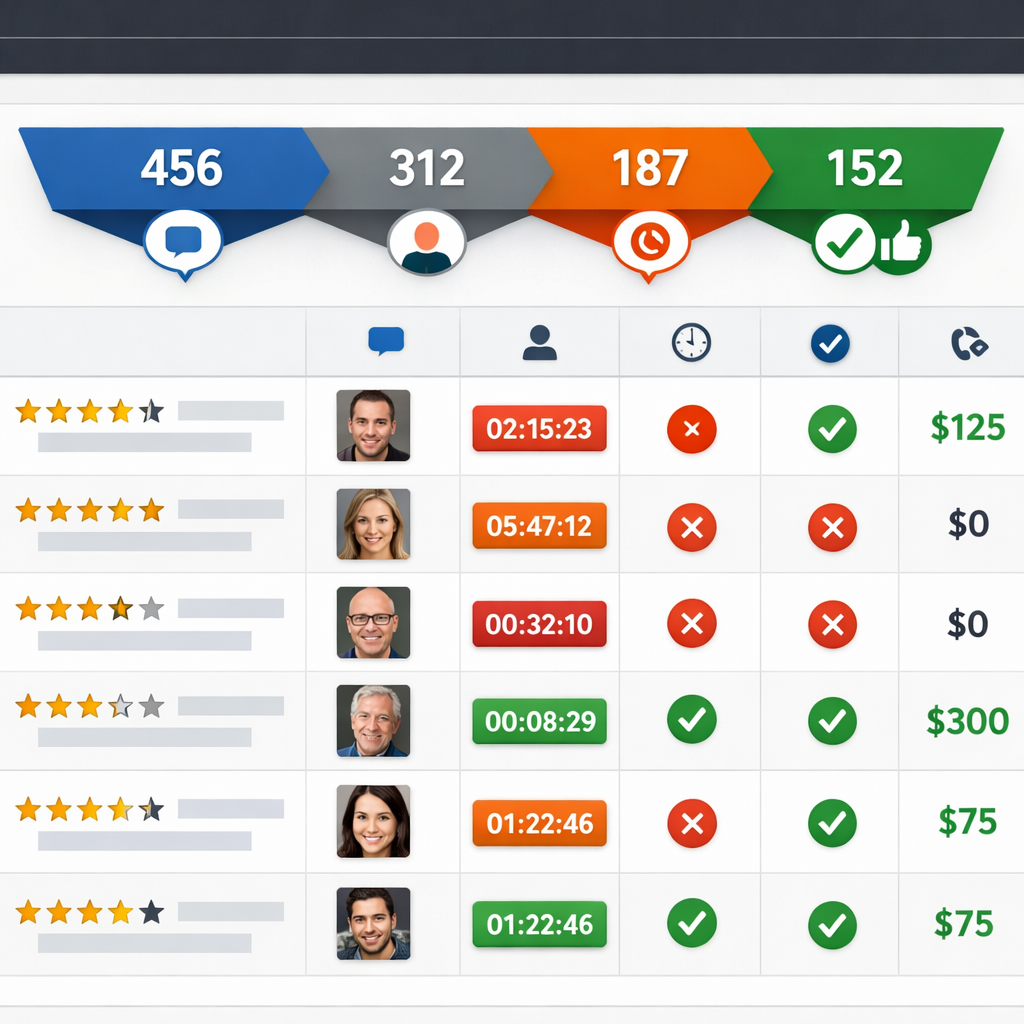
| Widget | Purpose |
| Overview KPI strip | Snapshot of star rating, new review count, response rate, sentiment trend |
| Trend charts | 30/90/365 day trends for rating, volume, and sentiment with annotations for campaigns |
| Location drilldown | Top and bottom locations by rating and response SLA, with owner and recent reviewer list |
| Review impact funnel | Listing click -> booking/call -> conversion attributable to review traffic (UTM) |
| Issue heatmap | Top complaint categories from review text and their change over time |
Judgment call on cadence and ownership: operational teams need near-real-time alerts for negative spikes and SLA misses; executives want weekly rollups showing trend and revenue impact. Assign a single owner for dashboard accuracy – someone who can reconcile CRM leads to review events and defend the numbers.
Important: sentiment models typically misclassify 10 to 25 percent of short reviews. Audit automated tags weekly and surface a sample of false positives to improve rules or retrain models.
Benchmarks to use: target >70% response rate, median public reply <24 hours, review volume growth 30-50% first year, and a rating lift of 0.2-0.4 points in six months for an active, automated program.
Final consideration: avoid dashboards that only show smoothed trends. If you smooth away spikes you lose signal for urgent escalation and local operator coaching.
6. Practical case use scenarios you can replicate this quarter
Start small, measure quickly. Run timeboxed pilots that prove the mechanics of reputation review monitoring, case use — not an idealized program. Each pilot below is designed to deliver measurable lifts in review volume, faster responses, and at least one conversion signal you can track back into CRM within eight weeks.
Multi-location gym chain — automated post-visit asks and trainer-level routing
Scope and tools: Pick 3 representative locations, use Gleantap for post-visit SMS automation, and aggregate listings into ReviewTrackers or native Google Business Profile API.**
- Week 0–1: Configure Gleantap webhook from POS or check-in system to fire review-request SMS 24 hours after visit.
- Week 2–4: A/B test two request templates (short ask vs. short ask + staff mention). Use UTM-tagged links to track clicks from listings.
- Week 5–8: Route negative or neutral feedback into a private queue for manager outreach; escalate recurring complaints to operations.
- KPIs to track: review conversion rate, review volume by trainer, click-through from listing, and member retention delta for cohorts who left a review.
Concrete Example: A 12-location chain ran this pilot for two busy clubs. Automated SMS increased review conversion from 0.6% to 3.1% in eight weeks and identified two trainers responsible for most positive mentions; management used that insight to replicate training and staff incentives.
Restaurant group — real-time mentions and converting negatives into bookings
Tactics: Prioritize TripAdvisor and Yelp plus Google. Use ReviewTrackers or Birdeye for mentions; push alerts to a Slack channel for on-shift managers with a short response script and voucher redemption flow.
- Quick win: Create a one-click manager response template for night managers and a private follow-up flow offering a table reservation or voucher.
- Trade-off to accept: Faster public acknowledgements are shallow; invest manager time only for near-real escalations to recover revenue.
- Metric: negative-to-recovered rate (guest rebookings or voucher redemptions) and same-location revisit rate within 60 days.
Concrete Example: A regional group used real-time alerts to convert 18% of negative reviews into rebookings over six weeks — revenue recovered exceeded the cost of vouchers, and negative reviews decreased by 22% at pilot sites.
Medical or dental practice — privacy-safe review collection and escalation
Constraints: You must avoid disclosing PHI when responding and be careful where you solicit reviews. Use appointment reminders to include a neutral review request link and store consent records in CRM.**
- Pilot steps: pick two clinics, add review requests to post-visit SMS with wording cleared by compliance, monitor Healthgrades/Zocdoc and Google.
- Escalation rule: any review mentioning an adverse event or clinical harm triggers private outreach from the clinical manager within 24 hours and documentation in the patient record when appropriate.
- KPIs: review volume, average rating, time-to-private-touch on negative mentions, and appointment retention rate for patients who received outreach.
Concrete Example: One dental group reduced negative public mentions by offering a private clinical callback within 24 hours; they saw a 15% improvement in 3-month retention for patients who received outreach, with no PHI shared publicly.
Practical limitation and judgment: Pilots expose operational bottlenecks more than tool deficiencies. Expect the first eight weeks to reveal staffing and process gaps — not platform failures. If you do not assign clear owners and SLAs at launch, the pilot will fail even with the right tools.
Key takeaway: Run an 8-week pilot, assign one owner per location, instrument UTM-tagged review links, and measure review conversion + one revenue or retention metric.
Next consideration: Pick the pilot that maps to your weakest operational link — if response speed is poor, start with restaurants; if review volume is low, start with gyms. Assign the owner and instrument tracking this week.
7. Implementation roadmap and operational checklist
Start small, instrument tightly. A focused pilot protects budget and surfaces the real operational gaps most programs miss: access, data mapping, and human response capacity. Treat the pilot as a measurement exercise first and a rollout exercise second.
Phase 1 – Pilot (6 to 8 weeks)
Pilot scope: pick 2 locations or one service line, one review channel set (Google Business Profile plus one industry site), and a single review-solicitation workflow. Keep variables low so you can learn fast.
- Setup and access: obtain API/manager access for Google Business Profile and chosen aggregator, create service accounts, and store keys in a vault.
- Data mapping: map ___CODE0, CODE1, CODE2, and CODE3___ to your customer profile store; confirm sample size and data quality.
- Baseline KPIs: capture average star rating, weekly review volume, response rate, and NPS or CSAT for the pilot cohort.
- Workflows: configure a timed review request (48 hours post-visit), routing rules for negative reviews to manager Slack channel, and tagging conventions.
- Legal and templates: get legal to sign off on response templates if you handle protected health information; finalize 3 public and 2 private templates.
Phase 2 – Scale (3 to 6 months)
Automate selectively. Automate ingestion, enrichment, and routing, but keep public responses human for any negative or mid-score review. Prioritize automation that reduces manual triage work, not that replaces judgment.
- Integrations: push review events into CRM and Gleantap profiles so each review becomes a follow-up task or retention trigger.
- SLAs and training: set public acknowledgement SLA at 24 hours, private outreach SLA at 48 hours, and train managers on escalation thresholds.
- Quality QA: run weekly spot checks on responses for tone and compliance; add a feedback loop to update templates every 30 days.
- Reporting cadence: publish a consolidated weekly dashboard and a monthly executive summary tying review trends to conversion and retention cohorts.
Operational checklist (deploy this on day one of scaling)
- Confirm ownership: assign an accountable owner and deputies for each region – name, contact, and backup.
- Platform credentials: centralize logins and API keys in a secure store.
- Field map: a documented table mapping review fields to CRM attributes and tags.
- Templates approved: public and private response templates with legal sign-off where required.
- Routing rules: automated rules for severity, location, staff, and sentiment.
- Escalation roster: contact list for operations, legal, and executive escalation.
- Training session: 60 to 90 minute practical training and one live QA session per month.
- Audit log: enable logging of all review responses and edits for compliance and coaching.
- Dashboard: live dashboard with star rating trend, response rate, time to first response, and review-linked leads.
Practical tradeoff: faster responses reduce visibility damage but increase risk of canned-sounding replies. The rule that works in practice is to automate detection and routing but reserve public negative responses for a human who follows a short, approved template.
Concrete Example: A multi-location gym ran the pilot described above: two clubs, Google Business Profile and SMS review requests via Gleantap. After eight weeks they increased weekly review volume 35 percent and dropped average response time from 72 to 14 hours; managers used the routing rules to convert two at-risk members through personalized outreach tied to trainer follow-ups.
Key consideration: prioritize data hygiene and role-based access in the first 2 weeks; poor customer ID matching is the single biggest reason review responses become meaningless or misattributed.
Pilot success targets: +30% review volume, response rate >70%, average rating lift of 0.2 within 3 months for active locations. Use these as stop/go criteria before full rollout.
Next consideration: once scale is stable, focus on attribution experiments – UTM-tagged review-request links and cohort comparisons – to prove ROI before expanding channels or increasing budget.
Frequently Asked Questions
Key point: Treat this FAQ as an operational checklist for decisions you actually need to make when running a reputation review monitoring program, not as high-level theory.
reputation review monitoring, case use — concise answers with action
- Which platforms should I prioritize if time and budget are limited? Start with Google Business Profile and whichever review site drives bookings in your sector — Yelp for restaurants, Healthgrades or Zocdoc for medical. Add Facebook Pages for social validation. Once you have consistent volume, add an aggregator like ReviewTrackers or Birdeye to reduce manual checks. See BrightLocal for consumer behavior context: BrightLocal Local Consumer Review Survey.
- How quickly should we respond to negative reviews? Public acknowledgement within 24 hours, private outreach within 48 to 72 hours, and immediate escalation for legal, safety, or regulatory issues. The trade-off is speed versus quality: a fast templated reply protects public perception, but a late, thoughtful private resolution improves retention. Set SLAs and measure both response time and follow-up outcome.
- How do I measure revenue impact from reputation work? Use A/B tests on review-solicitation flows, UTM-tagged links in listing profiles, and track review-sourced leads in CRM. Correlate cohort retention before and after rating shifts rather than assuming causality from star changes alone.
- Are automated responses acceptable? Use automation for confirmations and simple thank-yous, but personalize negative-review replies with specific visit details and an agent name. Over-automation damages credibility; under-automation wastes time. Deliver a hybrid: templates plus tokenized personalization.
- How should I handle fake or defamatory reviews? Follow platform removal processes first — Google has a removal path: Google Business Profile review guidelines. Collect timestamps, order IDs, and communications before escalating to legal. If removal fails, respond publicly with facts and an invitation to resolve privately.
- What are realistic benchmarks for response rate and rating improvement? Aim for a response rate above 70 percent on new reviews and plan for a 0.2 to 0.4 star lift over six months after an active program. Smaller businesses should prioritize review volume growth first; rating gains follow when operations fix recurring issues exposed by feedback.
Practical trade-off: Speed of response and depth of investigation compete for the same resources. In practice, map reviews into triage buckets — auto-acknowledge, assign to local manager, escalate — and staff accordingly rather than trying to do everything at once.
Concrete Example: A 12-location fitness studio ran a pilot that A/B tested two post-visit review request templates and used UTM-tagged links. The variants showed which phrasing lifted response rate and which audiences required a different channel (SMS vs email). The pilot also made attribution possible because review replies were tied back to customer records in the CRM.
Important: If you operate in healthcare or regulated industries, build privacy-safe workflows and legal sign-off into your review response playbook before scaling. Mishandling patient details in public replies is a faster way to create problems than ignoring reviews.
- Three concrete next actions: 1) Add Google Business Profile, your industry site, and Facebook to a single monitoring inbox this week. 2) Run an 8-week pilot with two locations, using UTM-tagged review requests and one templated response plus one personalized flow. 3) Create triage rules in your CRM to route negative reviews to a human within 24 hours and log outcomes for attribution.


Ready to Run Successful Marketing Campaigns and Grow Your Business?
Gleantap helps you unify customer data, track behavior patterns, and automate personalized campaigns, so you can increase repeat purchases and grow your business.
Ready to Run Successful Marketing Campaigns and Grow Your Business?
Gleantap helps you unify customer data, track behavior patterns, and automate personalized campaigns, so you can increase repeat purchases and grow your business.