
 Divya Ghughatyal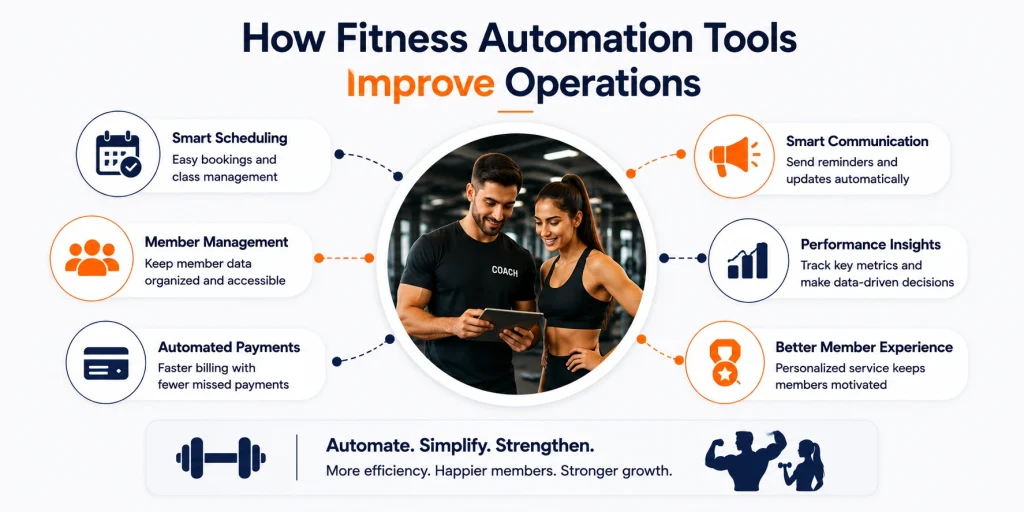
If you run a multi-location business, inconsistent lead follow-up, manual operations checklists, and patchwork local marketing are quietly draining revenue and staff time. Franchise automation tools reduce that drag by cutting manual work, enforcing brand consistency across locations, and speeding lead response to lift conversions. This guide gives concrete tool examples, vendor criteria, a phased pilot plan, and the KPIs you need to measure payback.
1. Why franchises need automation now: core operational pain points
Immediate problem: too many franchises lose customers before anyone follows up. Manual handoffs, slow lead response, and inconsistent local execution create leakage at the top of the funnel and invisible workload at the back end. Automation fixes both the speed problem and the scale problem, but only when applied to the right processes.
Top operational pain points that demand automation
- Inconsistent lead follow up: corporate captures leads but follow up varies by location, producing lost revenue and unpredictable conversion.
- Manual local marketing: franchisees rework brand materials and run ad hoc campaigns that dilute spend and reduce measurable ROI.
- Scheduling and labor friction: shift swaps, last minute fills, and incorrect forecasts drive overtime and missed service standards.
- Inventory and POS mismatches: stock variances and disconnected sales data create reconciliation work and shrink margin.
- Reporting lag and visibility gaps: corporate waits days for accurate KPIs, so corrective actions come too late.
Before and after expectations: automating lead capture to an immediate conversational channel typically shortens response time from many hours to minutes and materially increases booking and show rates. Centralized workflow templates cut local setup time and reduce repetitive reporting by multiple hours per week. These are not marginal benefits; they change the economics of follow up and frontline staffing.
Practical tradeoff to acknowledge: automation produces consistency and speed but can feel rigid to franchisees if you push one size fits all templates. The real win is template plus localization rules – standard messaging and local variables – and clear guardrails for when a human should take over. Also, successful automation depends on reliable integrations; a great SMS workflow will fail if your scheduling or POS data are stale.
Judgment: prioritize fixes that close revenue leakage first. Lead response and conversational follow up deliver the fastest, most measurable ROI for most service and retail franchises. After that, automate scheduling and POS reconciliation to protect margin. Integration maturity matters more than feature lists when you scale beyond a pilot.
Concrete example: a multiunit fitness chain routes website chat and lead forms into an automated SMS sequence that asks for availability, sends a booking link, and schedules a trial appointment in the local studio. The workflow reduces manual call backs, increases show rates through reminder messages, and gives corporate a single report on lead sources and outcomes.
Where to focus first: short response automation for incoming leads and a templated local marketing playbook. These address revenue and consistency together.
Key takeaway: automation that shortens first response time and centralizes templated workflows delivers the fastest operational ROI.
2. Key categories of franchise automation tools and their primary impact
Direct rule: buy automation by the problem you need to fix, not by feature lists.** Different tool categories move different needles — some shrink response time and convert more leads, others cut labor or eliminate reconciliation work. Pick categories that map to the KPI you must change this quarter.
Category map: what each class does and when to prioritize it
| Category | Primary impact | Typical KPIs influenced | When to prioritize | Example tools |
| Lead capture & CRM | Centralizes lead data and enforces follow-up | Lead response time, lead-to-customer conversion, average leads per location | If follow-up is inconsistent or leads leak between corporate and franchise | HubSpot, Salesforce |
| SMS and conversational automation | Drives immediate local engagement and booking | Response rate, booking rate, no-show rate | When speed of contact matters and local staff struggle to follow up fast | Gleantap, Twilio, Klaviyo |
| POS and order automation | Automates transactions and menu/item updates | Average ticket, transaction volume, payment reconciliation time | High-volume stores or brands with frequent menu promotions | Toast, Square |
| Workforce scheduling & payroll | Reduces overstaffing and payroll errors | Labor % of sales, open-shift fill time, schedule adherence | When labor is a top cost and managers spend too much time scheduling | 7shifts, Deputy, Gusto |
| Franchise operations platforms | Standardizes checklists, compliance, onboarding | Audit pass rate, new-unit ramp time, SOP adherence | You need centralized governance across many units | FranConnect, FranchiseSoft |
| Reporting & analytics | Unifies data for location-level decisions | Marketing ROI, revenue by campaign, daily scorecard metrics | When corporate lacks single source of truth for performance | Looker, Tableau, Google Data Studio |
| Inventory management | Prevents stockouts and shrink | Stock turns, waste %, COGS accuracy | If inventory variance is causing margin erosion | MarketMan, Toast Inventory |
| Training & onboarding | Automates consistent training delivery and tracking | Time-to-proficiency, training completion rate, attrition | When new hires require standardized onboarding at scale | LearnUpon, TalentLMS |
Practical trade-off: consolidating vendors reduces integration work but risks settling for weaker features in one area. Specialized tools (best-in-class SMS or scheduling) will outperform suites on specific KPIs, but expect higher integration effort and per-location cost. Choose consolidation when your priority is speed of rollout; choose specialization when a metric (for example, conversion or labor %) must move materially.
- Integration priority: connect CRM and SMS first so every captured lead gets tracked and a fast, automated outreach attempt.
- Compliance priority: ensure SMS/CRM vendors log opt-ins and opt-outs to meet TCPA requirements.
- Measurement priority: tie at least one revenue metric to each automation category before scaling to every franchise.
Concrete example: a regional fitness franchise deployed website chat-to-SMS with Gleantap to convert walk-in website conversations into booked trial sessions. The automation sent an immediate text with a booking link and two reminders; local staff only handled confirmations. The result was a visible uptick in trial bookings and fewer manual follow-ups — enough to justify a small monthly per-location fee and a two-location pilot expansion.
What many operators misunderstand: automation is not a universal cost saver — it reallocates work and reveals messy processes. If your SOPs are inconsistent, automation will enforce bad behavior at scale. Automate only after you have a documented, agreed process or be prepared to iterate quickly when issues appear.
Key takeaway: start with Lead capture + SMS conversational automation to move conversion metrics quickly; follow with POS and reporting once you can prove conversion lift at a few locations. Pilot one category to measure impact before consolidating vendors.
Next consideration: pick the KPI you want to move first, then choose the category that directly targets it and design a two-location pilot to measure before scaling.
3. How SMS and conversational automation drive local conversions
Speed wins locally: for multiunit businesses the fastest respondent almost always converts. Using SMS and conversational automation from capture to booking cuts lead response time from hours to minutes and forces a different customer path than email.
Key conversational workflows that move metrics
Below are the workflows that produce predictable, measurable lifts when implemented correctly. Each one needs a CRM sync and tracking so corporate and location teams can measure impact.
- Website chat to text: capture a visitor, push a short SMS within 30 seconds with a one click booking link. This replaces the slow inbound email play and reduces abandonment at the top of funnel.
- Automated nurture for new leads: 2 to 4 staged messages that qualify interest, offer a short incentive, and surface available appointment times. Use conditional branches so hot leads go to immediate booking and cold leads enter a longer drip.
- Appointment reminders with two way confirmation: automated reminder plus a reply required for confirmation or reschedule. Two way flows cut no shows materially because customers commit in conversation.
- Abandoned booking recovery: detect incomplete signups and trigger a one off conversational recovery SMS within an hour. Short, actionable copy wins here.
Practical insight: automation that only sends outbound messages is cheap but limited. The conversion wins come from conversational paths that allow replies, automated qualification, and escalation to staff. That requires routing rules, a human in the loop for edge cases, and real time CRM updates to avoid duplicate outreach.
Operational tradeoffs and compliance you must accept
Tradeoff: higher conversion through two way SMS creates inbound workload spikes at busy times. If you do not define escalation SLAs and automated triage you will overwhelm local teams and erode the benefit. Plan staffing or use AI-assisted response templates for peak hours.
Compliance constraint: SMS requires documented opt in, consent logs, and immediate opt out handling. Do not treat opt in as optional. Vendors that log consent automatically reduce risk, and you should validate vendor logs against legal guidance.
Gleantap fitness use case
Concrete example: a fitness franchise routes website leads into Gleantap where a three message sequence is triggered: immediate greeting with class times, follow up with a booking link, and a reminder 24 hours before the trial. The sequence includes conditional branching for replies and agent handoff. Operators should measure response time, booked trial rate, and trial to paid conversion before and after the pilot.
Judgment: many operators assume SMS is a blunt instrument and will annoy customers. In practice the opposite is true when messages are localized, limited in frequency, and tied to clear transactional value. The failure mode is overmessaging and poor CRM hygiene that creates duplicate touches across corporate and local campaigns.
- Quick rollout checklist: capture opt in at point of contact and store consent with every lead.
- Journey templates: build 2 to 3 test flows per use case and include conditional replies and escalation.
- Integrations: sync with CRM and scheduling so bookings write back and marketing avoids duplicate outreach.
- Reporting: track response time, booked appointments, no show rate, and revenue per lead at location level.
- Operational rules: define agent SLAs, hours for broadcast messages, and peak hour staffing plans.
Key takeaway: prioritize conversational SMS that combines immediate outbound messages with two way reply handling and clear escalation rules. This is the highest impact automation for turning local leads into bookings, provided you plan for the operational load and TCPA compliance.
Next step: choose 2 to 3 pilot locations, instrument response time and booked appointment metrics, and test a single conversational flow before scaling to the whole system.
4. Standardizing operations and brand consistency with franchising platforms
Centralize the things that must never vary. Franchising platforms turn brand rules, compliance checklists, and local marketing approvals into enforceable workflows instead of hoping franchisees read an email. That single move reduces variability where it matters most: customer experience, legal risk, and audit outcomes.
What standardized workflows actually look like in practice
Template-driven checklists. Create a small library of immutable templates for pre-open, daily quality checks, incident reporting, and monthly audits. Templates should include required fields, photo evidence, and conditional steps that only appear when an exception is reported.
- Pre-open checklist: health and safety items, equipment checks, POS connectivity
- Daily checklist: merchandising standards, signage, service script reminders
- Audit checklist: scored items, photo evidence, auto-calculated pass/fail
Role-based controls and versioning matter. Platforms that track who updated a template, who completed each task, and which version was active during an audit are the only ones that stand up under franchisor legal review. If your vendor lacks audit trails you will pay later in disputes and fines.
Operational trade-offs and constraints to plan for
Trade-off: consistency versus local agility. Over-centralizing every minute decision kills owner initiative and local marketing that actually drives traffic. Pick which items are non-negotiable and which are configurable by location, then enforce only the former through automation.
Integration cost and data duplication. A checklist system that lives in a silo forces duplicate entry versus one that syncs with your POS, scheduling, and CRM. During vendor selection prioritize mature connectors to avoid manual reconciliation work that negates automation gains.
Change management friction. Expect pushback. The quickest path to adoption is mandatory templates for compliance tasks paired with opt-in templates for local marketing. Use pilot locations and real-time dashboards to show improvements before a full roll out.
Concrete example
Concrete Example: A multi-unit fitness brand used a franchise operations platform to push daily pre-open checklists with required photos and automatic escalation when a critical item failed. Regional managers received an aggregated audit feed each morning, enabling targeted coaching instead of chasing issues by phone.
Why it worked in practice: The platform removed subjective judgment from audits, made corrective actions visible, and reduced back-and-forth emails. That visibility is what turns brand standards into predictable operations rather than aspirational policies.
| Checklist | Trigger | KPI improved |
| Pre-open checklist | Daily at scheduled open time | First-hour service uptime and safety pass rate |
| Monthly audit | Automated on first business day | Audit compliance rate and corrective action closure time |
| Local marketing approval | When a franchise submits an ad | Brand guideline violations and time-to-approval |
Practical insight: Start with three templates only pre-open, daily, and monthly audit. That scope answers immediate compliance needs and demonstrates measurable behavior change without overwhelming franchisees.
Key requirement before buying: confirm the vendor provides role-based permissions, immutable audit logs, conditional logic in checklists, and at least native or low-code integrations for POS and CRM.
Final consideration: Automation enforces standards, but it does not replace clear SOPs and accountability. Use franchising platforms to codify what good looks like, measure compliance with dashboards, and escalate exceptions automatically. If you skip versioning or role controls you will create more risk than you remove.
Next consideration: Once checklists are stable, connect approvals and scheduled content to local marketing automation so brand-consistent campaigns can be deployed with minimal manual review.
5. Reducing labor and scheduling friction through workforce automation
Hard truth: scheduling is where franchises leak both service quality and margin. Workforce automation tools stop that leak by turning manual shift-making, open-shift chasing, and payroll reconciliation into repeatable workflows that tie directly to sales and demand signals.
Workforce automation for franchises covers three practical pieces: automated schedule creation and forecasting, mobile shift filling and confirmations, and timekeeping-to-payroll integrations. When those pieces are connected to POS and booking systems, operators stop guessing staffing needs and stop spending manager hours on schedule tweaks.
Key metrics to watch
- Labor cost as % of sales: the single best lever to judge schedule efficiency
- Schedule adherence: percent of shifts worked as originally scheduled
- Open shift fill time: time between when a shift opens and when it is accepted
- Overtime hours: avoid optimization that pushes regular hours into overtime
- Timecard exceptions: mismatches between clocked hours and scheduled hours
Practical insight: labor automation only helps if demand forecasting is reliable. Bad sales forecasts produce optimized-but-wrong schedules. Connect POS or booking data first, and run schedules against a rolling 4-week forecast before trusting automation to cut labor.
There are trade-offs. Heavily constrained rules (skill requirements, minimum rest, local labor laws) make automation brittle—systems will flag too many exceptions and force manager overrides. Treat automation as an assistant that enforces standard guards, not a replacement for local judgment. Also expect a short-term productivity hit while employees migrate to mobile apps and automated clocking.
Concrete example: a regional quick-service franchise piloted 7shifts for schedule generation and Deputy for open-shift pickup, and used Gleantap to send automated SMS confirmations to staff for last-minute fills. Managers stopped manually calling a list of employees, open-shifts were filled on the same day, and payroll reconciliation required fewer corrections because timecards matched scheduled shifts.
Fast pilot playbook (2–3 locations)
- Select target shifts: start with the two busiest shift windows where mis-staffing costs you most
- Integrate POS for demand signals: feed last 12 weeks of sales into the scheduler so forecasts are grounded in reality
- Enforce core rules: skills, max hours, and minimum staffing thresholds before enabling auto-scheduling
- Require mobile adoption: make the app mandatory for shift swaps and confirmations, and provide a 1-hour onboarding session
- Measure weekly: track the metrics above and require managers to sign off on exceptions for the first 6 weeks
Important: pair scheduling automation with mobile confirmations and automated reminders (SMS works best).
Judgment call: prioritize workforce automation where labor is a material line item and turnover is high. If managers are already spending more than 3 hours per week building schedules or you see frequent overtime, the ROI is immediate. If your locations are tightly unionized or have complex local rules, expect longer pilots and embed legal review early.
Next consideration: after you stabilize scheduling, connect schedule and payroll data to location performance dashboards so labor decisions are judged against conversion and ticket metrics — that turns scheduling from a cost center into a tactical lever for revenue optimization.
6. Connecting POS, CRM, and analytics for unified reporting
Key point: Integrating POS, CRM, and analytics turns scattered data into actionable, comparable metrics across locations — and reveals which local actions actually move revenue. Without that linkage corporate teams are guessing which campaigns, staffing changes, or promos worked.
What to join: At minimum you need transactions (POS), customer and lead records (CRM), and campaign or touchpoint data (marketing automation or SMS). Match on a canonical customer or transaction ID so you can follow a lead from first touch through booking and purchase.
Integration choices and their tradeoffs
Connector options: Use native connectors where available for speed, an iPaaS (Workato, Zapier) for medium complexity, or an ELT pipeline (Fivetran + a data warehouse) for scale. Tradeoff: native connectors are easiest but fragile at scale; ELT costs more upfront but cleans and centralizes data for reporting.
Sync cadence judgment: Near-real-time feeds sound appealing but are costly and often unnecessary. In practice a nightly sync covers revenue reconciliation, campaign attribution, and labor KPIs for weekly reviews. Reserve real-time for fraud detection, live inventory, or high-volume ecommerce.
Data quality traps: Mismatched SKUs, inconsistent discount codes, and separate guest records between POS and CRM are the usual culprits that break attribution. Plan a data-mapping sprint to standardize fields before you build dashboards — it is faster than reworking metrics later.
- Priority 1: Map identifiers (location ID, transaction ID, customer ID) across systems and lock that mapping.
- Priority 2: Define canonical metrics and calculation rules centrally (what counts as a converted lead, how refunds are treated).
- Priority 3: Decide sync frequency per dataset (transactions daily, leads near-real-time, staffing nightly).
- Priority 4: Implement role-based access so franchisees see location-level detail while corporate can view roll-ups.
| Dashboard metric | Required source fields | Why it matters |
| Daily revenue by location | POS: date, transactionid, netamount, location_id | Shows location health and flags outliers early |
| Lead-to-sale conversion | CRM: leadid, leadsource, createdat; POS: transactionid linked to lead_id | Measures marketing effectiveness and local follow-up quality |
| Average ticket and transactions | POS: items, tickettotal, itemscount | Informs pricing, promotion success, and labor planning |
| Labor % of sales | Payroll/scheduling: laborhours, laborcost; POS: sales | Controls staffing decisions and margin impact |
Concrete example: A regional quick service chain connected Toast POS to HubSpot CRM and Looker. They matched online ordering and walk-in transactions to lead records, which let marketing attribute weekend discounts to incremental revenue and adjust spend by location. The result: corporate stopped funding low-return promos and reallocated budget to high-converting locations.
Practical limitation: Expect 10 to 20 percent of initial records to require manual reconciliation during the first 30 days after go-live. That is normal. Budget a reconciliation cadence and a small routing table for common mismatches rather than trying to perfect mappings before launch.
Access and governance: Franchisees often resist corporate-level access to granular sales and customer data. The practical compromise is tiered dashboards: aggregated, anonymized roll-ups for corporate and detailed, permissioned views for franchise operators. Make data ownership and visibility explicit in your franchise agreement or ops manual.
Integration priority checklist: 1) Lock identifier mappings. 2) Choose connector approach (native, iPaaS, ELT). 3) Standardize metric definitions. 4) Set sync cadence. 5) Pilot with 2 locations, reconcile for 30 days, then scale.
Next consideration: After dashboards are stable, move from descriptive to prescriptive: automate alerts for underperforming locations, trigger local SMS offers via your marketing automation when conversion drops, and tie incentives to the three-metric scorecard below.
| Three-metric weekly scorecard | What to watch |
| Revenue vs target | Identify locations >10% below target and drill into tickets and transactions |
| Lead-to-sale conversion | Low conversion with steady leads indicates follow-up or staffing problems |
| Labor % of sales | Rising labor % with flat sales signals overstaffing or scheduling inefficiency |
7. Implementation roadmap: pilot, integrate, train, scale
Start with a measurable pilot, not a corporate-wide roll out. The single biggest failure I see is skipping a disciplined pilot phase and treating automation as a checkbox. A short, instrumented pilot protects franchisee trust, reveals integration gaps, and gives you the numbers you need to make a scaled business case.
Phase timing and deliverables
Discovery & KPI alignment (Weeks 1-2): Define 3–5 primary metrics you will measure during the pilot — for example lead response time, lead-to-booking conversion, and labor hours saved. Pull baseline reports for each location and document current workflows and pain points.
Pilot (Weeks 3-8): Run the automation in 2–3 representative locations. Keep the scope narrow: one customer-facing automation (SMS nurture + booking confirmation) plus one operations automation (daily pre-shift checklist). Require daily logs and weekly checkpoints with franchisees and the vendor.
Measure & iterate (Weeks 9-12): Compare pilot metrics to baseline. Fix workflow gaps, tweak message cadence, and validate integrations between CRM, scheduling, and POS. If key integrations are unstable, stop and resolve before scaling.
Rollout & enablement (Months 4-12): Stagger location onboarding in waves, embed training into routine meetings, and hand each location a playbook and a short video. Tie success to location-level dashboards and a vendor SLA for incident response.
Practical tasks for each phase
- Discovery: Export baseline reports, map data flows, list required integrations (POS, CRM, scheduling), and assign a single project owner.
- Pilot: Install automation scripts, configure consent capture and opt-out flows, train staff on runbook steps, and set weekly KPI review cadence.
- Iterate: Log integration errors, refine templates, tighten consent records, and set a go/no-go threshold for rollout.
- Scale: Schedule waves of 5–20 locations, run mandatory 30-minute onboarding sessions, and publish a location-level scoreboard.
Decision checklist — buy vs build. Buy when you need fast time-to-value, mature integrations (POS, CRM, scheduling), and vendor compliance features. Build only if you have unique workflows that no vendor supports, sufficient engineering resources, and a long-term plan for maintenance. Remember: custom builds accumulate long-term debt.
Simple ROI formula to estimate payback: Payback months = Total implementation cost / Monthly net benefit. Monthly net benefit = (Incremental booked customers × average ticket × gross margin) + monthly labor savings − incremental recurring fees. Include one-time integration and training costs in Total implementation cost.
Trade-offs and limitations to plan for. Expect slow adoption at some franchise locations — poor connectivity, staff churn, or resistance to new scripts will reduce early returns. Integration maturity is the real gating factor; a polished UI matters less than reliable, fault-tolerant data syncs. Also watch for data ownership disputes between corporate and franchisees and specify this in contracts.
Concrete example: A regional fitness franchise piloted an SMS-based lead nurture using Gleantap integrated with its scheduling system at three clubs. The pilot focused only on capturing web leads, sending two automated reminder messages, and logging bookings back to the CRM. The team measured baseline lead response time, tracked all bookings, and used those results to justify the vendor contract for a phased roll out.
Measure before you change: baseline reports + consistent KPI definitions are the single best predictor of a successful scale.
Vendor SLA checklist: 99.9% uptime, <4-hour critical incident response, documented integration maps, consent logging, and quarterly review meetings.
8. Compliance and data governance for franchise communications
Start here: compliance is not an add-on — it is the architecture that determines what messages get sent, who can send them, and which locations can act. Franchise automation tools must enforce consent, suppression, and access rules automatically; if they do not, you are creating legal and reputation risk at scale.
What to lock down before you send a single SMS
- Documented opt-in: Capture point-of-capture language and timestamped consent for every contact and store it centrally.
- Clear opt-out handling: Automated keyword-based opt-outs (STOP, STOPALL) plus centralized suppression lists shared across franchisees.
- Consent provenance: Record where consent came from (web form, chat, phone), the exact copy presented, and any sale or promotional context.
- Pre-approved templates: Only allow franchisees to send from a library of pre-authorized templates that include required disclosures.
- Audit trail: Message logs, delivery receipts, and consent records must be searchable and exportable for legal review.
Legal anchors to reference: Follow the FTC/TCPA guidance for telephone and SMS outreach and use vendor documentation like Twilio for implementation details.
Data governance decisions operators must make
Centralize consent, decentralize execution: Keep the single source of truth for consent and suppression at corporate (CRM or franchise operations platform) and push read-only views to franchisees. Let locations act only when the centralized record permits it — this prevents accidental TCPA violations when franchisees try to message leads directly.
Access and segmentation: Implement role-based access so a regional manager can see records for their markets but cannot export raw PII unless authorized. Franchisees often ask for full lists; resist it. Give them controlled lists or campaign tools, not raw databases.
Retention and deletion: Define retention windows for PII, automated deletion workflows for opt-out or subject-access requests, and mapping between retention policy and vendor data stores. This is especially important for multi-state brands subject to differing privacy laws.
| Compliance element | Where it should live |
| Consent record (copy + timestamp) | Corporate CRM and SMS vendor logs (linked by ID) |
| Suppression list | Centralized suppression service pushed to all messaging vendors |
| Message templates | Franchise operations platform with template approval workflow |
| Audit logs | Immutable logging store accessible to legal and compliance teams |
Trade-off to accept: Stricter governance shrinks the immediately reachable audience and slows local improvisation. That is the point — you trade some local agility for legal safety and consistent brand protection. Deploy templated local personalization that preserves compliance while keeping messages relevant.
Concrete example: A multi-location fitness franchise used Gleantap for appointment reminders and lead nurturing. They capture consent on the web sign-up form, store the record in the corporate CRM, and sync consent flags to Gleantap and their scheduling system. If a lead lacks consent, the automation blocks SMS sends and routes follow-up to email only — that single control removed inadvertent non-compliant sends when franchise staff attempted manual outreach.
- Pre-launch compliance checklist: Verify opt-in capture, test suppression propagation, confirm template approvals, run sample audit exports, and get legal sign-off for multi-state requirements.
- Vendor due diligence: Ask vendors for their data retention policy, encryption details, breach notification SLA, and whether they provide automated consent logging.
- Operational guardrails: Enforce campaign approval SLAs, limit outbound cadence per contact, and require a human review for promotions with regulatory risk (financial, health, or regulated offers).
Important: automated tools reduce manual errors, but automation can also scale mistakes. If the consent pipeline or suppression sync breaks, non-compliant messages will multiply quickly.
Key action: Before wide rollout, run a compliance dry run: send non-promotional transactional messages to test consent handling, export and inspect the audit trail, and confirm suppression blocks manual sends at the franchise level.
Next consideration: Validate your consent pipeline end-to-end every quarter, and build an incident playbook that ties vendor support to legal escalation — that single process reduces risk faster than any one technical control.
9. Short real-world examples and quick wins
You can capture measurable operational gains from franchise automation in 30 days, not 12 months. Focus on a single customer-facing workflow, measure baseline response and conversion, then automate the smallest repeatable steps.
Concrete examples — what success looks like in practice
Starbucks mobile ordering: Starbucks tied mobile ordering and loyalty to store workflows so orders arrive with predictable timing and staffing. The automation moves demand off the counter during peak minutes, enforces menu and pricing consistency, and provides location-level queue data that managers use to shift labor in real time. This is a lesson in automating the entire order-to-fulfillment loop, not just marketing.
Fitness franchise using Gleantap: A multi-unit gym installs website chat-to-text and an automated SMS nurture. The sequence sends an immediate welcome SMS on lead capture, a second message with a booking link, and a two-way confirmation reminder before the trial. The practical result: response time drops from hours to minutes and trial bookings become trackable at the location level — leading to clearer follow-up responsibility and fewer missed opportunities.
Three quick wins you can implement in 30 days
- Automated welcome and booking SMS: Trigger an immediate SMS on every lead capture with a booking link and 2-step confirmation. Metric to watch: lead response time and click-to-book rate. Consideration: confirm opt-in capture at the point of lead collection and log consent automatically to avoid TCPA risk.
- Templated operations checklists pushed to staff: Deliver daily pre-open and closing checklists via email or a lightweight task app. Metric to watch: checklist completion rate and audit exceptions. Trade-off: overly rigid checklists frustrate experienced managers; keep templates editable per location while tracking variance centrally.
- Weekly location performance email: Automate a one-page scorecard to franchisees showing three KPIs (leads, bookings, conversion). Metric to watch: week-over-week delta per location. Limitation: this is a monitoring tool, not a fix — pair it with a short coaching cadence for low-performers.
Practical insight: Quick wins deliver visibility, not magic. Fast automation exposes upstream data problems — duplicate leads, missing phone numbers, inconsistent opt-ins. Expect to spend the first two weeks cleaning capture points; that investment multiplies the value of automation.
If franchisees resist change, run a two-week, money-on-the-line micro-pilot at a high-traffic location and pay for incremental bookings through the pilot; results speak louder than policy memos.
30-day pilot checklist: 1) Baseline metrics (response time, bookings) 2) One automated workflow (SMS welcome + booking) 3) Consent logging enabled 4) Location-level dashboard 5) Two-week review with franchisee — decide go/no-go.
What people underestimate: Attribution and long-term behavior change. Quick automations often spike bookings, but sustaining improvement requires embedding the workflow into daily ops and retraining staff to act on the signals automation generates. Plan for a handoff from pilot to operations within 30 days or gains will evaporate.
Next consideration: pick one quick win from above, instrument two simple KPIs, and run a two-week micro-pilot with a willing location. If the pilot moves the needle on response or bookings, fold the workflow into your rollout plan and enforce consent and data hygiene from day one.
10. Checklist for selecting the right automation vendor
Start with the problems you need solved, not the vendor pitch. Pick a vendor that removes your current bottleneck — whether that is slow lead follow-up, fractured reporting, or inconsistent local marketing — and does it without a year of custom development.
- Integration footprint: Does the vendor have native connectors to your POS, CRM, scheduling, and payroll systems? Native integrations cut rollout time; APIs that require custom builds do not. Priority: high for multi-unit rollouts.
- Reporting and analytics: Can you get location-level KPIs and scheduled scorecards out of the box? Look for automated, exportable reports and an open data feed for your BI tool.
- Franchise ease-of-use: Will store managers use it daily? Prefer UIs that require under 30 minutes of training per role and have mobile-first workflows for on-the-floor staff.
- Compliance and consent handling: Does the vendor log opt-ins, timestamps, and message content securely?
- Support SLAs and onboarding: What are guaranteed response times, escalation paths, and implementation resources? Ask for an onboarding timeline with milestones tied to measurable outcomes.
- Pricing model and scale economics: Is pricing per location, per contact, or per message? Map expected volumes for year 1 and 2 to avoid surprise bills as you scale.
- Customization vs configuration: Will you pay for one-off features? Avoid vendors that insist on custom builds for core capabilities — that creates technical debt and captive costs.
- Security and data ownership: Confirm data export rights, tenant separation for franchisees, and encryption standards.
- Roadmap and third-party ecosystem: Does the vendor play well with partners you may add later — marketing automation, loyalty, or BI tools?
Vendor scoring template
| Criteria | Weight | Vendor A | Vendor B | Vendor C |
| Integration maturity (POS, CRM, scheduling) | 25 | 18 | 22 | 15 |
| Reporting & analytics | 20 | 16 | 18 | 14 |
| Ease of use for franchisees | 15 | 12 | 13 | 8 |
| Compliance features (opt-in logging) | 15 | 15 | 12 | 10 |
| Support SLAs & onboarding | 10 | 8 | 9 | 7 |
| Pricing scalability | 10 | 7 | 6 | 9 |
Practical trade-off: Best-of-breed tools often beat all-in-one platforms on depth, but they increase integration overhead and change management. In practice I prefer a hybrid approach: a single vendor for customer-facing automation (SMS, local marketing) that provides first-class native connectors to your CRM and POS, then bolt-on specialized modules for payroll or BI as needed.
- Red flag: Opaque pricing that hides message or contact volume tiers — this will blow your budget during peak season.
- Red flag: No automated consent logs or limited opt-out handling — regulatory risk is non-negotiable.
- Red flag: Long required customizations for features you expect to be standard (reporting, templates, opt-in capture).
Concrete example: A regional fitness franchise evaluated three vendors and chose the one with a native connector to their POS and built-in opt-in logging. The chosen vendor required less than a week of configuration per pilot site and delivered two-way SMS workflows that cut lead response time from several hours to under 10 minutes during the pilot, enabling a quick go/no-go decision for rollout. That speed-to-value mattered more than a long wishlist of rarely used features.
Key takeaway: Prioritize integration maturity, franchisee usability, and compliance features. Use a weighted scoring table to compare three vendors and pick the one that gives measurable pilot wins within 60 days.
Next consideration: After you pick a pilot candidate, insist on a written implementation SLA with milestone-based payments and a rollback plan. If a vendor resists that level of accountability, walk away.
Frequently Asked Questions
Direct answers operators need. Below are the concise, practical replies to the questions that determine whether a franchise automation pilot succeeds or stalls.
- How much does franchise automation typically cost per location? Costs vary by tool and integration depth. Expect single-purpose subscriptions in the low tens to low hundreds per month per location; integrated franchise platforms and full-service deployments run higher and often include implementation fees. Always model total cost including integrations, training hours, and a realistic vendor support SLA.
- What KPIs should I track to prove automation ROI to franchisees? Focus on lead response time, lead-to-customer conversion, average ticket, labor cost as a percent of sales, and audit/compliance pass rate. Track these at location level and normalize by store maturity so early adopters don’t get penalized in rollouts.
- How do I ensure SMS campaigns comply with TCPA and other regulations? Capture documented opt-ins at the first point of contact, store consent metadata with each lead, expose opt-out handling in every message, and use vendors that log consent automatically.
- Can I integrate automation tools with my existing POS and booking systems? Yes, but integration maturity matters. Prefer vendors with native connectors to your POS and scheduling systems; if you need custom work, budget for an integration sprint and acceptance tests. Verify webhook reliability, data mappings (coupons, refunds, customer IDs), and reconciliation reports before rollout.
- What is the best way to get franchisee buy-in for automation? Start with a short, measurable pilot at willing locations, share weekly location-level scorecards, and reduce friction with ready-made templates and one-click marketing assets. Tie vendor fees or incentives to measurable wins so franchisees see benefit quickly.
- Which automation should franchises prioritize first? Prioritize what moves customers to purchase: lead capture plus conversational SMS for immediate follow-up, then scheduling/booking and POS integrations to close and record transactions. Avoid investing in broad BI platforms before you have clean, consistent data flows.
- Who owns the data and how do I handle multi-franchise access? Data ownership should be contractually explicit. Use role-based access so corporate sees roll-up KPIs while franchisees retain customer-level control for their locations. Implement clear retention policies and an audit trail for who exported or changed records.
- What happens if the internet or vendor service goes down? Have offline fallbacks: printable checklists, phone-based lead capture, and manual reconciliation procedures. Test failover in pilot so franchisees can operate without automation for short outages.
- How quickly should I expect measurable results? Expect operational stabilization before dramatic ROI. Real, repeatable wins usually appear within 60 to 120 days once integrations, templates, and training are in place; faster only if you already have clean data and motivated franchisees.
Practical limitation to plan for. Centralizing workflows enforces brand consistency but creates resentment when local managers need flexibility; avoid binary choices. Provide templated local variables and an approval fast-path so locations can adapt promotions without breaking brand rules.
Concrete Example: A regional director rolled out a standardized weekend-promo workflow across 30 locations using automation tied to the POS. The automation pushed localized SMS messages, applied a coupon code at checkout, and produced a daily reconciliation report that cut manual dispute tickets and sped up settlement—no custom code, just native connectors and a clear data mapping plan.
Judgment you won’t get from sales decks. Most vendors sell feature breadth; operators should buy integration depth and predictable support. A cheap tool that lacks a connector to your POS or scheduling system will cost more in manual work than a pricier platform with mature integrations.
Key action: Run a 60-day, 2–3 location pilot focused on lead capture and SMS follow-up. Define baseline KPIs, require consent logging, verify POS integration for redemption tracking, and commit to weekly scoreboard reviews.
- Pick 2–3 geographically representative pilot locations and assign a single operator accountable for results.
- Document baseline metrics for leads, response times, bookings, and labor hours before any change.
- Verify native connectors to POS and booking systems and run end-to-end tests for coupons and refunds.
- Ensure opt-in collection and consent metadata are captured at lead source; export one consent record to validate storage.
- Run the pilot for 60 days with weekly dashboards, then decide: iterate, scale, or pause.
Next consideration: If you lack a reliable internal owner for data hygiene, hire short-term external help to set mappings and clean customer records before the pilot. Poor data hygiene is the single biggest cause of automation failure in multi-location rollouts.


Ready to Run Successful Marketing Campaigns and Grow Your Business?
Gleantap helps you unify customer data, track behavior patterns, and automate personalized campaigns, so you can increase repeat purchases and grow your business.
Ready to Run Successful Marketing Campaigns and Grow Your Business?
Gleantap helps you unify customer data, track behavior patterns, and automate personalized campaigns, so you can increase repeat purchases and grow your business.